

Norton 360 Review: Complete Digital Security
See if Norton's all-in-one digital security suite is worth your time and money.
 &
&
 Last Updated on Aug 13, 2026
What We Like
- Protects up to 10 devices: One subscription can protect up to 10 devices, computers and smartphones included.
- Robust digital security: Norton 360 combines malware protection with tools for device and personal data protection. You'll get a password manager, VPN, AI scam protection, and optional identity monitoring.
- Backed by artificial intelligence: Norton 360 uses artificial intelligence to improve its malware and threat detection.
What We Don't Like
- Higher renewal prices: Introductory prices are promotional; renewal prices are typically higher.
- History of lawsuits: Gen Digital has faced lawsuits and controversies due to the alleged overcharging of customers and questionable sales tactics.
- Confusing lineup: Between Standard, Deluxe, Premium, and three LifeLock bundle tiers, figuring out which plan you actually need takes real research.
Bottom Line
the security.brief
Norton 360 protects up to 10 devices with AI-driven threat detection across three layers of malware protection. Higher renewal costs and past lawsuits are downsides.
The Norton brand has become synonymous with antivirus protection and internet security. Being one of the longest-standing antivirus brands — it started making antivirus software in 1991 — Norton has a diverse offering of software focused on security and data protection. That diverse product line is headlined by Norton 360, and just by its name, you can tell it’s aiming to provide full, all-around protection. The question is, does it work?
For this review, we purchased a Norton 360 Premium subscription ourselves and ran it across a Windows PC, a Mac, and both an iPhone and Android phone for several weeks, testing everything from malware detection to customer support. Ready to get started? Let’s begin with an overview.
A Brief Overview of Norton 360
Norton 360 isn’t just an antivirus. While one of its main jobs is to detect malware, it aims to provide all-around digital security. But here’s the thing: device protection habits shift and cyberthreats evolve — see our latest antivirus usage trends and statistics for the bigger picture — so the definition of “all-aroudn protection” also changes. What Norton 360 plans offer right now are cloud backup as ransomware protection, password management tools, virtual private networks (VPNs), and the more recently added AI-powered scam protection tools. In this review, we’ll cover what each of those protections include and how well they work, plus which Norton 360 plans are best for which households.
FYI: A lot of brands — including Norton — are fighting for the spot to be the best all-around antivirus. See our 2026 list of the best antivirus software to see which ones made the cut.
Norton 360 Plans Comparison
Let’s start by comparing Norton 360’s plan tiers. There are three: Standard, Deluxe, and Premium, and while they all include the protections mentioned earlier, each tier offers slightly better protection than the previous tier. Take a quick look below before we dissect each plan, tier by tier.
| Features | Norton 360 Standard | Norton 360 Deluxe | Norton 360 Premium |
|---|---|---|---|
| Number of devices covered | 3 | 5 | 10 |
| Operating systems | Windows, Mac, iOS, and Android | Windows, Mac, iOS, and Android | Windows, Mac, iOS, and Android |
| Complete malware protection | Yes | Yes | Yes |
| Other types of protections | Antivirus, anti-spyware, ransomware protection | Antivirus, anti-spyware, ransomware protection | Antivirus, anti-spyware, ransomware protection |
| AI-driven online threat protection | Yes | Yes | Yes |
| Cloud backup storage | 2 GB | 50 GB | 100 GB |
| Smart firewall | Yes | Yes | Yes |
| Password manager | Yes | Yes | Yes |
| 100% Virus Protection Promise | Yes | Yes | Yes |
| Parental controls | No | Yes | Yes |
| School Time | No | Yes | Yes |
| Secure VPN | For up to 3 devices | For up to 5 devices | For up to 10 devices |
| Privacy Monitor | No | Yes | Yes |
| PC SafeCam | No | Yes | Yes |
| Dark web personal information monitoring | Yes | Yes | Yes |
Norton 360 Standard
When you only need basic protection for yourself, Norton 360 Standard covers your bases. It’s still a full-feature digital security solution, but it lacks some of the more advanced features offered by the Deluxe and Premium plans like Privacy Monitor and PC SafeCam. You can still use it on just about any device since it works on all major operating systems, well aside from Linux. If you need protection for a Linux device, check out our roundup of the best Linux antivirus protection services that we’ve tried.
As the least expensive option, most people go with Standard when they only need protection for their own devices, but if you have more than three devices, it might not be enough for you. The 2 GB cloud backup is also an indicator that it’s best for average solo users. That’s enough space to store important documents and files, but it’s not enough to back up even an entire phone’s storage. For reference, Google gives you 15 GB of cloud storage completely free by just making a Google Account. So if you’re looking for complete ransomware protection, the higher tiers are definitely better.
With that said, you still get Norton 360’s 100% virus protection promise and its complete malware protection suite. So, you’ll get the same quality of antivirus as the Deluxe and Premium plans — it’s the peripheral features that differ. It’s also worth noting that Standard lacks any parental control features, unlike the other two plans.
Bottom Line: Norton Standard gives solo users reasonable protection at an affordable price, but the three-device limit is the biggest limitation. It also doesn’t include any parental controls and the 2 GB cloud backup is only a fraction of the storage you get from Deluxe and Premium.
Norton 360 Deluxe
Norton 360 Deluxe steps things up. It still includes malware protection, cloud backup, a password manager, a VPN, and basic dark web monitoring, but it improves on the three key limitations of the Standard plan.
First is the device limit. With each subscription covering up to five devices, it’s a good fit for multi-device users or couples that need all-around cybersecurity protection. Even if you and your partner each own a personal computer and work laptop, there’s still room to protect one more device.
The expanded 50 GB cloud backup is also noteworthy. It provides enough space for important files, which is how Norton 360 offers ransomware protection. The cloud backup is meant for important files — digitized copies of important documents like house deeds, financial records, personal photos and videos — so you retain copies of them in case your files are held for ransom by malware. But of course, that’s just a countermeasure. Norton 360 can also detect and quarantine ransomware (among other types of malware) before it encrypts your files.
Lastly, if you’re a parent, Deluxe is the minimum tier we recommend. Unlike Standard, it includes parental control features that can help you protect your kids and their devices from online threats and malware. School Time, for instance, lets you limit their device use during school hours. There’s also a Search Supervision feature that lets parents monitor what kids search on their devices.
Bottom Line: Norton Deluxe solves the three things Standard leaves out — more devices, more cloud storage, and real parental controls — making it the tier we’d point most people toward, especially multi-device solo users, couples, and parents protecting their kids online.
Norton 360 Premium
Norton 360 Premium is, in a lot of ways, similar to Norton 360 Deluxe. It includes the exact same digital security features and malware detection technology, including School Time and parental controls. What actually changes between the two plans comes down to two things: device count and cloud storage.
First is the device limit. Premium covers up to 10 devices, double what Deluxe offers. That matters more than it might seem — according to Statista, the average person in North America owned 13 connected devices in 2023,1 so device counts add up fast even within a single household. Ten devices gives a family real breathing room where five would mean rationing coverage.
The other upgrade is cloud backup. Premium doubles Deluxe’s allotment to 100 GB, which matters more as a household grows — more family members means more photos, videos, and documents worth backing up in case a ransomware attack holds your files hostage.
Bottom Line: Norton 360 Premium is Deluxe with more room to grow — double the devices and double the cloud storage — making it the better pick for larger households rather than couples or solo users.
Bundling Norton 360 with LifeLock
If device security is only half of what you’re worried about, Norton also sells Norton 360 bundled with LifeLock, an identity theft protection service. These bundles come in three tiers — Norton 360 with LifeLock Select, Advantage, and Ultimate Plus — each adding more identity monitoring and identity theft insurance than the last. Where Norton 360 with Ultimate Plus really stands out is device coverage. Unlike the Norton 360-only plans with a hard device cap, Ultimate Plus protects an unlimited number of devices. That’s a real advantage for large households that outgrow Premium’s 10-device limit — think families with several kids, each carrying their own phone, laptop, and tablet.
We cover LifeLock’s specific plans, insurance coverage, and identity monitoring features in much more depth in our full LifeLock review, and you can compare bundle pricing on our LifeLock pricing page — those are the better reads if identity theft protection, rather than device security, is your main concern.
Bottom Line: If your household has outgrown Premium’s 10-device cap, Norton 360 with LifeLock Ultimate Plus removes that ceiling entirely — though you’re paying for identity theft protection along the way, so it’s worth checking our LifeLock review to see if that part of the bundle is actually a fit for your needs.
A Closer Look at Norton 360 Features
If we’re talking about coverage alone, Norton 360 offers some of the deepest all-around protections we’ve seen in the antivirus space. But coverage is just half of the full picture. We also wanted to see how well its features work, so we purchased a Norton 360 Deluxe subscription and tested it on a Windows 11 laptop, a Macbook, and both an iPhone and Android phone. Below is a breakdown of Norton 360’s most important features and how they fared during testing.
Scanning Options
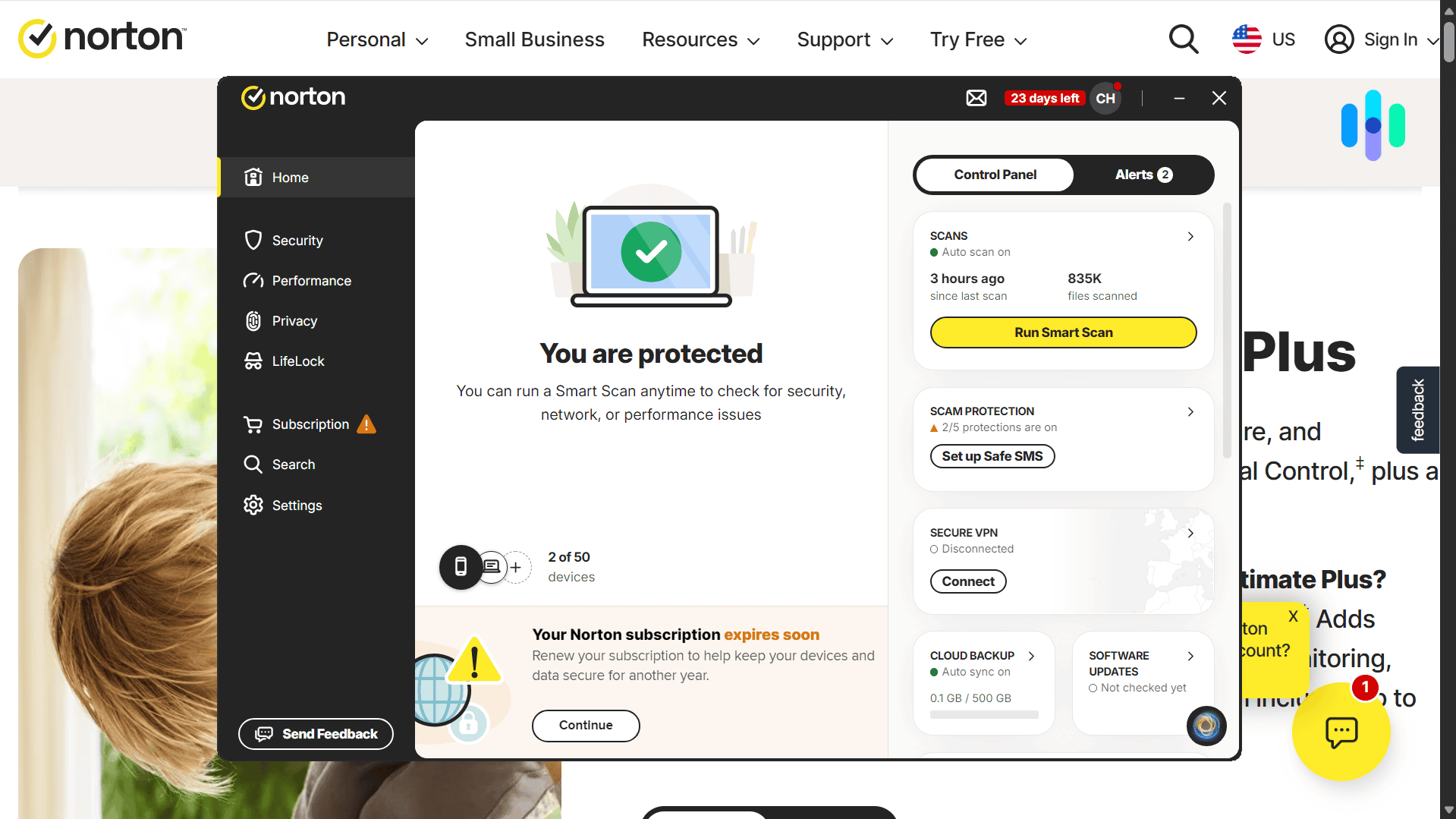
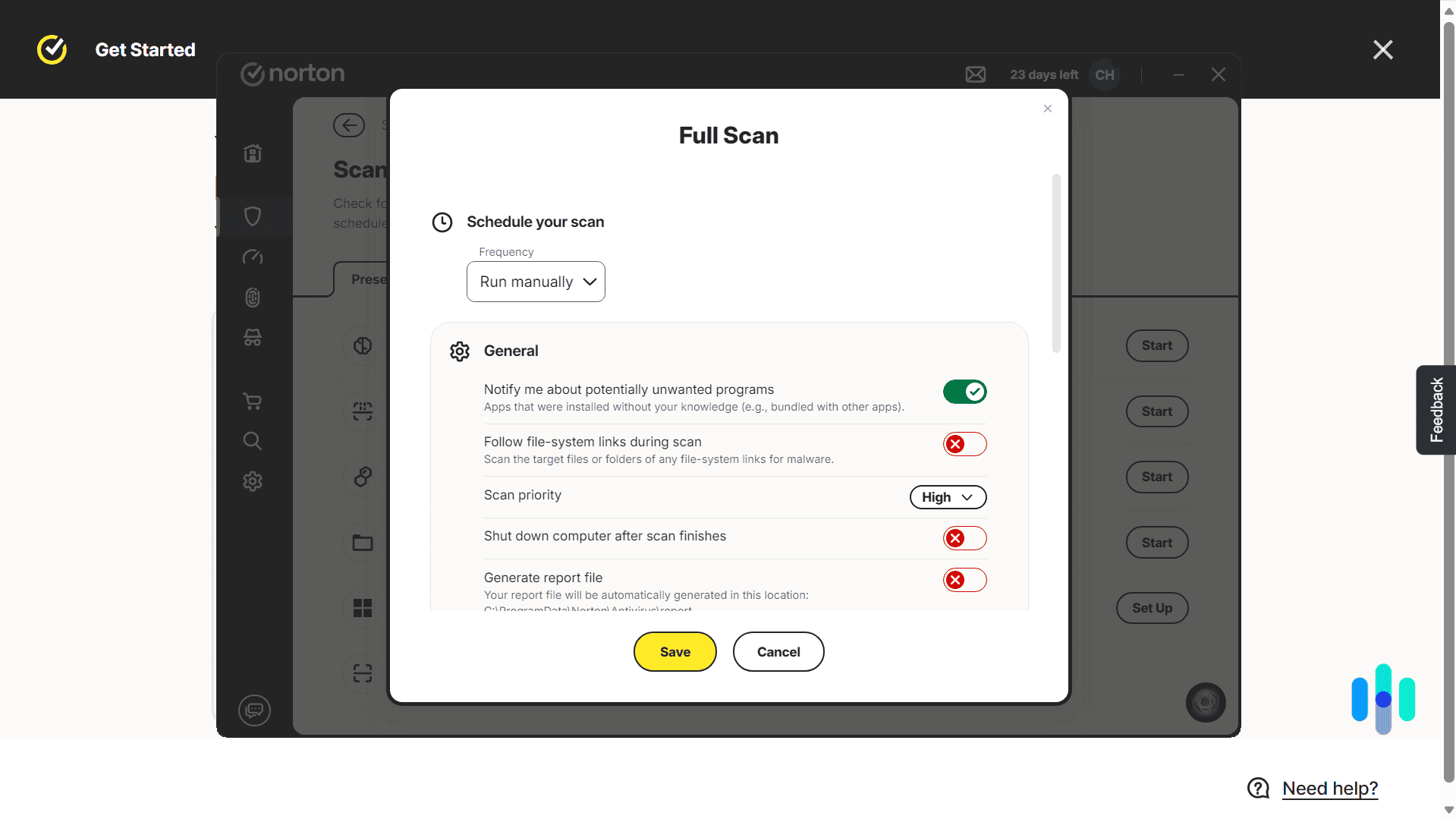
The very first thing we did after downloading Norton 360 onto our Windows computer was run a scan. It provided us with several scanning options.
- Smart scan: Norton’s default recommendation — a single pass that checks for malware, flags performance issues, and reviews privacy risks all at once. We recommend it if you want to see your device’s overall digital security and privacy posture.
- Quick scan: A quick scan scans the key areas of a computer where malware and viruses commonly hide, such as program files. Our first quick scan took only a couple of minutes to complete. We recommend running a quick scan if you think malware may have infiltrated your device.
- Full scan: A full scan analyzes every nook and cranny of a computer’s disk drives. Depending on how much data is stored in your computer, a full scan can take 30 minutes or longer. On a new computer with a low file count (Macbook), ours finished in about 10 minutes; on a machine with a high file count (Windows laptop), it took closer to 30 minutes.
- Targeted scan: Handles one-off checks — point it at a specific file, folder, or drive and it scans just that. This came in handy anytime we downloaded something from a source we didn’t fully trust.
- Startup scan: Reviews everything set to launch automatically when the computer boots up, one of the more common hiding spots for malware. We recommend running this periodically, especially after installing new software.
- Explorer scan: Skips the Norton app entirely — select a file or folder from its right-click menu in File Explorer to scan it on the spot. Run it whenever you see a folder or file that seems out of place.
Once your scan is complete, Norton 360 provides you with a summary that contains useful information, such as the total number of files it scanned, whether there were files that were skipped, and if there are threats. Right there, you can choose which action to take.
Real-Time Protection
Antivirus software relying on scans alone to detect threats has become a thing of the past. Now, Norton 360 offers real-time protection to prevent malware from entering your devices in the first place — for more on how that actually works under the hood, see our guide on how antivirus software works.
Norton 360 did this several times when we tried to download malware test files — basically, harmless files that emulate traits of malware. Although we were able to download them, Norton 360 scanned them immediately, flagged them as threats, and removed them.

Norton 360 didn’t just scan downloads; it also scanned files we were copying from external drives, peer-to-peer file transfers, and new files we created. One time, we created a .txt file containing a string of code we copied from a malware test file, and upon hitting Save, Norton 360 immediately blocked it.
Real-time protection is one of those features you hope you never notice — and in our testing, Norton 360 delivered exactly that. Whether we were downloading a file, copying one from an external drive, or creating one from scratch, it caught the threat before we could act on it, without asking us to run a manual scan first. That said, real-time protection is a process running continuously in the background, so if you’re on an older or lower-powered device, it’s worth keeping an eye on performance. For most modern devices, though, we’d still recommend leaning on real-time protection over relying on manual scans alone.
Artificial Intelligence
One of the things that sets Norton 360 apart from the competition is its use of AI to help detect and mitigate threats. That AI splits into two jobs: catching threats and catching scams.
AI Threat Detection:

Norton 360 doesn’t rely on a single method to catch threats — it stacks three AI-driven layers on top of each other, each designed to catch what the others might miss.
- Intrusion Prevention System (IPS): Analyzes incoming network traffic to block threats before they reach your device.
- Behavioral protection: Classifies each app by what it’s supposed to do, then flags it if it starts behaving suspiciously — like a VPN app secretly accessing your email contacts.
- Advanced Machine Learning: Emulates what a file does before letting it onto your computer, catching threats like backdoor Trojans disguised as harmless files.
We’ve tested antivirus suites that lean on one detection method and call it a day. Norton 360’s layered approach is a big part of why it caught every malware sample we threw at it in testing — network traffic, app behavior, and file emulation each get their own dedicated line of defense, so a threat has to slip past three separate checks instead of one. It’s the kind of depth we’d recommend prioritizing in any antivirus, not just Norton’s.
AI Scam Protection:
Malware isn’t the only thing trying to get to you anymore — scams increasingly arrive as a text, a fake website, or even a deepfaked voice call. Norton 360 now treats scam protection as its own AI-driven category, with several sub-features such as:
- Safe Web: Blocks malicious or fake websites before you visit them.
- Safe SMS: Flags scam texts before you tap a risky link.
- Genie AI Assistant: A built-in AI you can paste a suspicious message, link, or website into for a quick scam read.
- Deepfake Protection: Scans streaming audio/video for signs of AI-generated scams.
On Norton 360 with LifeLock plans, this upgrades to Scam Protection Pro, which adds Safe Email and Safe Call.
This is genuinely one of the more forward-looking additions we’ve seen from Norton — most antivirus suites still treat scams as a phishing-link problem, when in reality the threats have moved to text messages, voice calls, and now AI-generated video. Having a dedicated tool like Genie AI Assistant to sanity-check a suspicious message in real time is the kind of feature we’d want in any security suite, and it’s a big part of why we’d recommend Norton 360 to anyone who’s ever second-guessed a text or call that felt slightly off.
FYI: These AI features don’t show up as a single dashboard in the Norton 360 app, but they’re continuously running in the background. Norton 360’s effectiveness in providing real-time protection tells us that its AI features work.
Smart Firewall
Another layer of protection that Norton 360 provides is the Smart Firewall. The firewall operates on the network level. It analyzes incoming and outgoing traffic and decides what to let through. If it sounds similar to the IPS feature, that’s because the firewall and IPS work side by side, although they have different purposes.

Think of it like airport security. The firewall acts as the gatekeeper, checking everyone for tickets and identifications and allowing only those with permission to pass through. In the same manner, the firewall allows only permitted traffic as defined by you to pass through. IPS, on the other hand, is the equivalent of baggage checkers that use X-ray machines to check baggage contents. Sneakier malware that manages to evade the firewall will have to go through IPS’s scrutiny, which will most likely stop it in its tracks.
In our own testing, the firewall quietly blocked several port-scan attempts on our home network without a single false-positive alert — exactly the kind of protection you want running in the background.
>> Continue Reading: Best Norton Antivirus Alternatives
Testing Norton 360’s Performance
After thoroughly testing its features, we then tested Norton 360’s performance. Our own results aren’t the only data point worth trusting here — independent testing lab AV-TEST awarded Norton 360 its “Top Product” certification in 2026 evaluations, scoring it among the highest-rated products for protection, performance, and usability.2 As mentioned, we used malware test files. But before we share the results with you, let’s learn a little more about the test files we used and what they tell us.

EICAR, which stands for the European Institute for Computer Antivirus Research, is an organization that developed a standardized file used for testing antivirus software. The file itself is harmless and a legitimate program; in fact, if you do run it, it simply prints the message “EICAR-STANDARD-ANTIVIRUS-TEST-FILE!” Even so, because it’s a standardized test file for antiviruses, most antivirus products react to it the way they do with real malware.
Now, the purpose of this test isn’t to determine how many malware antivirus programs it can detect; digital threats are always evolving, and a single file can’t tell us how well antivirus software adapts. Rather, it tests how deep an antivirus program looks to detect malware.
There are four downloadable files in total:
- .com file: The first one is a .com file, which is an executable program containing the test malware. It’s surface-level, so it should be easy to detect.
- .txt file: The second one is a .txt file, which, if you open it with a text editor, contains the fake malicious code. This tells us if the Norton 360 is able to scan the content of files for threats.
- .zip file: The third file is an archived (.zip) file that contains the test malware. This tells us if Norton 360 scans archived folders and their contents.
- .zip(2) file: The fourth file is another .zip file, this time containing the previous archived folder. We used this file to determine if Norton 360 scans archives more than one layer deep.
Norton 360 flagged all four files automatically — a perfect score. This tells us that Norton’s malware detection works. It’s looking at the right places and is capable of stopping them before they do any real harm. Our tests didn’t tell us what types of malware Norton 360 effectively catches, but that’s where independent third-party testing labs like AV-TEST come in. They use hundreds of thousands of malware samples, and as of last check, their latest Norton testing caught all of them. Their results and ours show that Norton works — at least when it comes to stopping malware.
Customer Service
Aside from testing Norton 360 as a product, we also reviewed the customer support. We were pleased with what we found.
First, Norton has an online help center that covers a wide range of topics, from billing and subscriptions to features and troubleshooting. There, we found answers to most of the questions we had when we started testing Norton 360. Second, Norton has an active community forum where customers can interact and help each other resolve issues. The forum is particularly helpful if you’re facing issues specific to your device or operating system, as there’s a good chance that similar issues have already been posted there before. And third, Norton’s customer support is easy to reach whenever and wherever you are. It has phone and live chat support, both available 24/7, as well as support through Facebook and X.

Cost
Even though features, performance, and customer service always come first, in our opinion, we know that price is always a huge deciding factor. So let’s review Norton 360’s pricing.
| Pricing | Norton 360 Standard | Norton 360 Deluxe | Norton 360 Premium |
|---|---|---|---|
| First year price | $39.99 | $49.99 | $59.99 |
| Yearly renewal price | $94.99 | $124.99 | $149.99 |
Norton 360’s pricing is simple. The first year price is how much you’ll pay when you buy a subscription for the first time. Unless you cancel before your subscription expires, Norton 360 will automatically renew for another year. However, the renewal prices are higher than the first-year prices, as they no longer include introductory pricing discounts.

We think Norton 360’s pricing is competitive — it’s one of the names on our list of the best cheap antivirus software. Remember, a subscription includes not just malware protection, but a VPN, a password manager, and basic identity monitoring as well. These extra services could easily cost you more than $10 a month. Even with the more expensive Norton 360 Premium, the monthly cost of the renewal is about $12.50, so it’s definitely affordable. Furthermore, with the heavily discounted first-year prices, you can get all-around digital security for as low as $4.16 a month. There are VPN-only subscriptions that cost more than that, so definitely consider Norton 360 if you want an affordable but comprehensive device protection.
Is Norton 360 Worth the Money?
Overall, Norton 360 is a great malware protection and digital security service. It’s from a tested and trusted brand that offers high-quality digital products, it’s top-of-the-line software considering that it uses AI to detect and prevent threats, and it’s affordable. We would recommend Norton 360 to most people. However, if you want to find out if it’s the right malware protection service for you, here are our final thoughts.
Norton 360 does great in
- Device protection: Norton 360 Deluxe protects up to five devices, while Premium covers up to 10. Additionally, it works on Windows, Mac, iOS, and Android.
- AI-based threat monitoring: Norton 360 pairs AI-driven malware detection with a full scam protection suite — Safe Web, Safe SMS, Genie AI Assistant, and Deepfake Protection.
- Offering useful extras: Browser protection, a VPN, password management tools, and a PC optimizer are just some of the useful extras that come with either Deluxe or Premium.
- Pricing: Norton 360’s pricing doesn’t break the bank. In fact, it’s one of the more affordable services we’ve tested.
However, watch out for these downsides
- Higher renewal rates: Once you’ve taken advantage of the first-year discount, expect that your yearly subscription renewal will double in cost.
- Windows-only feature: If you’re a Mac user, some features available on Windows might not work. For instance, cloud backup can be set up using Windows devices only.
- History of lawsuits: Gen Digital has faced lawsuits and controversies due to alleged overcharging of customers and questionable sales tactics.3
In the end, what matters most is that you get a malware protection service that works and that is continuously improving. Based on our experience, that’s exactly what Norton 360 is. But it’s not the only antivirus software that has those traits.
Norton 360 FAQs
Before we end this review, let's answer some FAQs.
-
Is there a Norton 360 free trial?
Yes, there is a seven-day Norton 360 free trial. You’ll need to provide your payment information to access it, but you won’t be charged until after the trial is over. If you’d rather not pay at all, check out our roundup of the best free antivirus software.
-
What is Norton 360's cancellation policy?
Norton 360 has a 60-day refund period. Within the first 60 days of your purchase, you can cancel your subscription and request a refund.
-
Which types of malware does Norton 360 detect?
Norton 360 detects all types of malware, including viruses, Trojans, worms, and spyware. It also uses AI to detect potential threats, even if they’re new and not yet in Norton’s threat database.
-
Does Norton automatically delete harmful files?
If a file is flagged as high risk, Norton 360 quarantines it and sends you a prompt to review the file — from there, you can mark it for deletion. It doesn’t delete high-risk files automatically without your input.

-
Statista. (2023). Average number of devices and connections per capita in North America.
statista.com/chart/32691/average-number-of-devices-and-connections-per-capita -
AV-TEST. (2026). Test Norton Norton 360 for Windows 11.
av-test.org/en/antivirus/home-windows/windows-11/february-2026/norton-norton-360-25.12-261116 -
Class Action.org. (2026). $9.95M Gen Digital Settlement Ends Class Action Lawsuit Over Alleged Prerecorded Marketing Messages.
classaction.org/news/9.95m-gen-digital-settlement-ends-class-action-lawsuit-over-alleged-prerecorded-marketing-messages