
NordVPN includes multi-hop encryption and other advanced privacy features missing from Hidester’s lineup.
Hidester VPN Review and Pricing 2026: Is This VPN Any Good?
Our firsthand experience with Hidester will tell you everything you should know before buying this VPN service.
All of our content is written by humans, not robots.
Learn More
By
 &
&
 Last Updated on Sep 10, 2026
&
Last Updated on Sep 10, 2026

What We Like
- OpenVPN and OpenVPN-based protocols: Hidester offers three different VPN protocols designed for different uses and applications, whether you want to prioritize speed, privacy, or unblocking.
- Over 20 P2P servers: Of Hidester’s 43 server locations, 20 support torrenting and P2P access. This is vital for users who want to hide their torrenting activity from their ISP.
- No IP address leaks: We tested Hidester for DNS and WebRTC leaks, which are quite common for weaker VPNs. Hidester passed both our tests.
What We Don't Like
- Short risk-free trial: You can request a refund if Hidester isn’t working to your expectations, but depending on your plan, you can do so only within three to seven days of buying a subscription. Others offer 30- to 60-day money-back guarantees.
- Slow speed: Hidester’s speed was disappointing, as it decreased our internet speed by more than 40-percent in all but one of the tests we conducted.
- Weak unblocking ability: Hidester isn’t the best choice for unblocking geo-restricted content. It failed to clear Netflix’s VPN blocks several times.
Bottom Line
There are things we loved about Hidester, and things we thought could be improved. Overall, it’s an affordable VPN for everyday use. It’s not very fast, but it has a good network of servers and the connections are secure. Just make sure you like it before springing for an annual subscription.
the security.brief
Hidester VPN is cheap and secure but slow, with weak unblocking and limited servers. Good for torrenting but lacks features like split tunneling.
Protecting your IP address is one of the most effective ways to protect yourself online. Virtual private networks (VPNs) are the easiest way to do this. One such service is Hidester, and at first glance, it has all the makings of a solid VPN: It doesn’t log data, it can bypass government censorship such as the Great Firewall of China, and it uses bank-level encryption and proprietary VPN protocols. But does Hidester still look as good when we put it under a microscope? We’ll find out in this review, so let’s get to it.
Hidester VPN Subscriptions
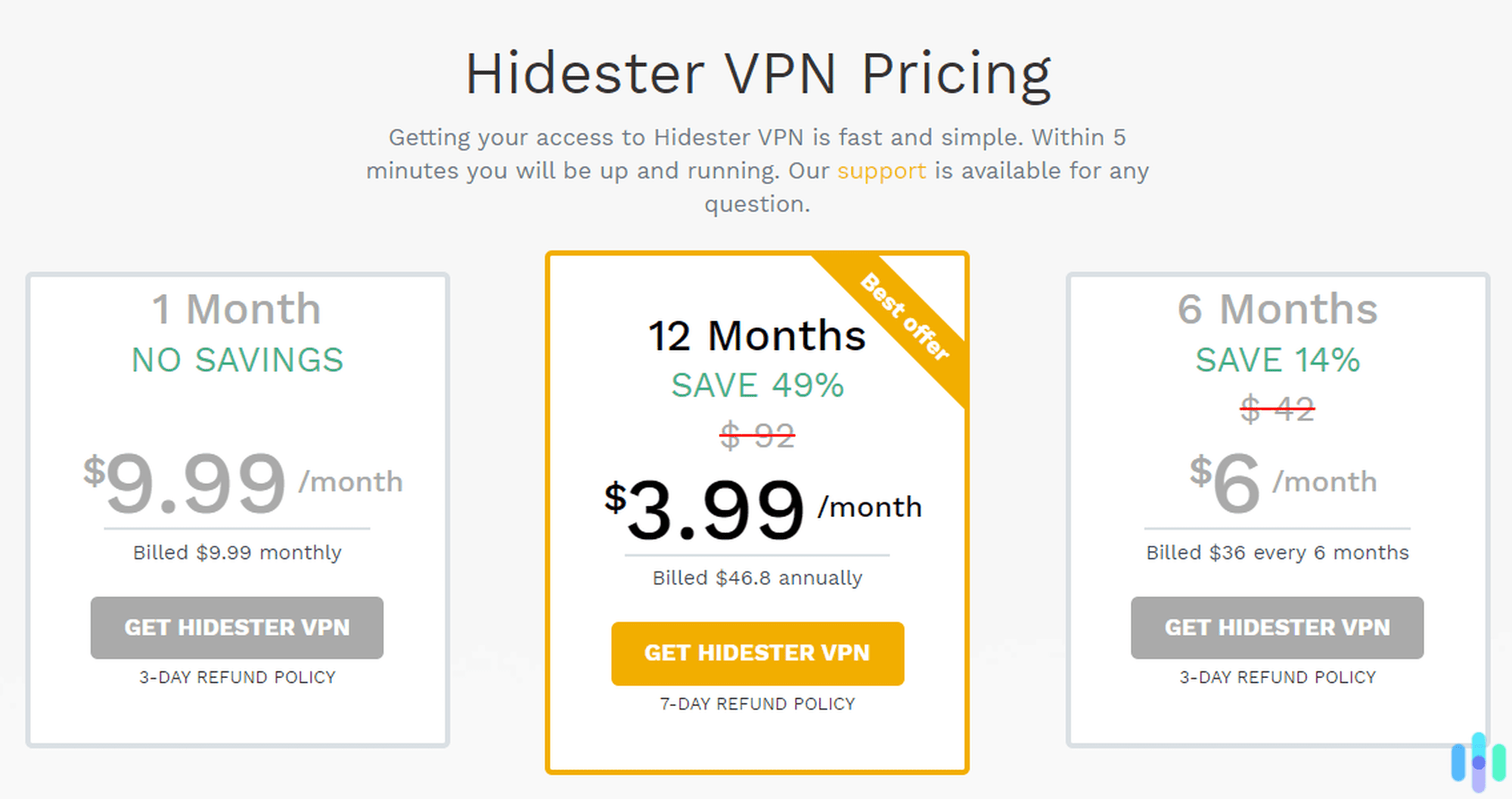
A good VPN need not be expensive; in fact, we like affordable VPNs because they make better online privacy accessible to people from all walks of life. We even wrote a review of the best cheap VPNs you can buy right now. Unfortunately for Hidester, it didn’t make our list, but still, we think it’s affordable. Check out the chart below that details its subscription options.
| Hidester VPN plans | Monthly | Six-month | Yearly |
|---|---|---|---|
| Average monthly cost | $9.99 | $6.00 | $3.90 |
| Total amount to be billed | $9.99 | $36.00 | $46.80 |
Like most VPN services, Hidester’s annual subscription delivers the best value. At $3.99 per month, it’s competitively priced for anyone looking for basic VPN protection.
It’s not the only budget-friendly option around. Surfshark comes to mind. Surfshark’s monthly cost on an annual plan runs $3.19, which beats Hidester’s pricing. Their two-year plan brings the monthly cost down to just $1.99.
Does Hidester VPN Have a Free Trial?
Before committing to any long-term VPN subscription, we always recommend testing the service to ensure it meets your needs. Unfortunately, Hidester doesn’t have a traditional free trial. In its place is a refund policy that guarantees that you’ll get your money back if you cancel within a certain number of days after buying a subscription. The number of days varies depending on your plan. If you choose the monthly or six-month plan, you’ll get three days to request a refund. If you choose the yearlong plan, you’ll get a full week.
While this refund window is better than nothing, it pales in comparison to what other providers offer. We prefer VPNs with free trials or longer refund periods. For example, Surfshark offers a seven-day free trial and a 30-day money-back guarantee. That gives you over a month to thoroughly test the service, compared to Hidester’s seven-day window.
Hidester VPN Features: Good or Bad?
Pricing and free trials aside, a good VPN has to have good features. In this section, we’ll discuss in detail Hidester’s features and how the VPN performed during testing.
Kill Switch
The kill switch is one of the first features we look for when testing VPNs. Hidester has this feature, and it works exactly as it’s supposed to. It stops all internet traffic in the event of an unexpected VPN disconnection to prevent your browsing data from leaking. This feature has become even more critical as cyber threats have evolved. From reports we’ve seen, VPN connection drops can expose users to tracking within milliseconds. No VPN is perfect, and when one fails, the kill switch prevents third parties from seeing your data.
Pro Tip: Hidester’s kill switch is not turned on by default. To turn it on, go to the app’s settings, click on Security, and toggle Network Protection on.
Server Selection
Being able to select a server to connect to is another necessary VPN feature. With Hidester, you can do that with just a couple of clicks. In the app, look for the box that displays the default server location. If it’s your first time connecting, it’s the box that says Best Location. Clicking on it will take you to a complete list of Hidester’s VPN servers.
Some of the best VPNs offer thousands of servers worldwide, but Hidester only has 43 servers across 30 countries. For comparison, NordVPN has over 8,000 servers in 118 countries.
The problem with having so few servers is that they’re more likely to get overcrowded, which can lead to slower connections. If there are more servers, users will have more options, so the likelihood of overcrowding decreases. In all fairness, though, Hidester has eight servers in the U.S., which is more than it has in any country. So if you live in the U.S., you have more server options close to you than users living in other parts of the world.
Hidester VPN Protocols
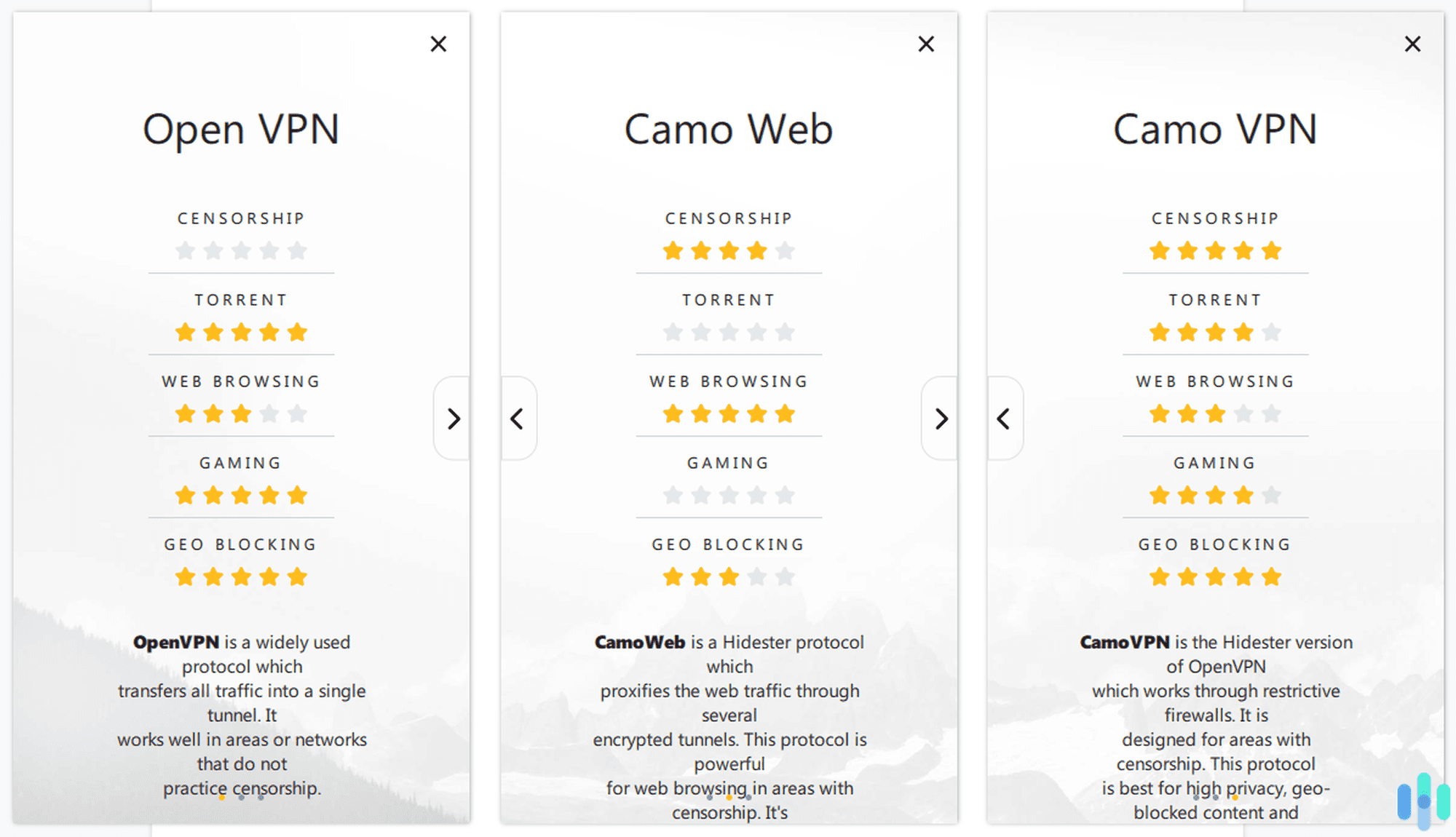
Another important feature to review when choosing a VPN to use is the VPN protocol. Now, before we detail which protocols Hidester uses, we think it’s best to explain what a VPN protocol is and why it’s so important. But of course, if you’re already familiar with what it is, you can skip the next paragraph.
The VPN protocol chooses the route, security measures, and speed of your internet traffic as it moves between your device and the VPN server. Some protocols prioritize lightning-fast connections for streaming. Others focus on maximum encryption for sensitive activities like online banking. That’s why the VPN protocol is crucial; it has a direct effect on how secure and fast your connections will be.
Hidester uses three protocols: OpenVPN, CamoWeb, and CamoVPN.
- OpenVPN: This open-source protocol remains the gold standard, with regular security audits validating its reliability.
- CamoWeb: CamoWeb is technically not a VPN, but rather a proxy. (Read about the difference between a proxy and VPN.) It’s able to bypass censorship, and it’s great for browsing because it’s fast. However, it doesn’t provide much privacy, and Netflix’s proxy detector can detect it.
- CamoVPN: CamoVPN is a modified version of OpenVPN. Hidester claims that it’s the most secure and private of the three protocols it offers and that the addition of obfuscation techniques enables it to bypass network and government restrictions.
FYI: Server compatibility varies by protocol. Most Hidester servers support OpenVPN and CamoVPN, CamoWeb availability is restricted to select locations.
Unblocking Netflix
We may use VPNs mostly to increase our privacy, but we’d be lying if we said we didn’t use them for entertainment as well. Mostly, we use VPNs to watch georestricted content that is not available in the U.S. Netflix is getting better at detecting VPNs, making it challenging for VPNs to bypass these restrictions.
When we tested Hidester, we got mixed results. Some servers worked with Netflix. We were able to stream Netflix Japan shows, for example, both using OpenVPN and CamoVPN. However, when we switched to an Australian server, Netflix didn’t let us in. This hit-or-miss performance is frustrating given that more people are using VPNs for streaming. With Hidester’s limited server network, your entertainment options remain quite restricted.
Torrenting and Peer-to-Peer Downloads
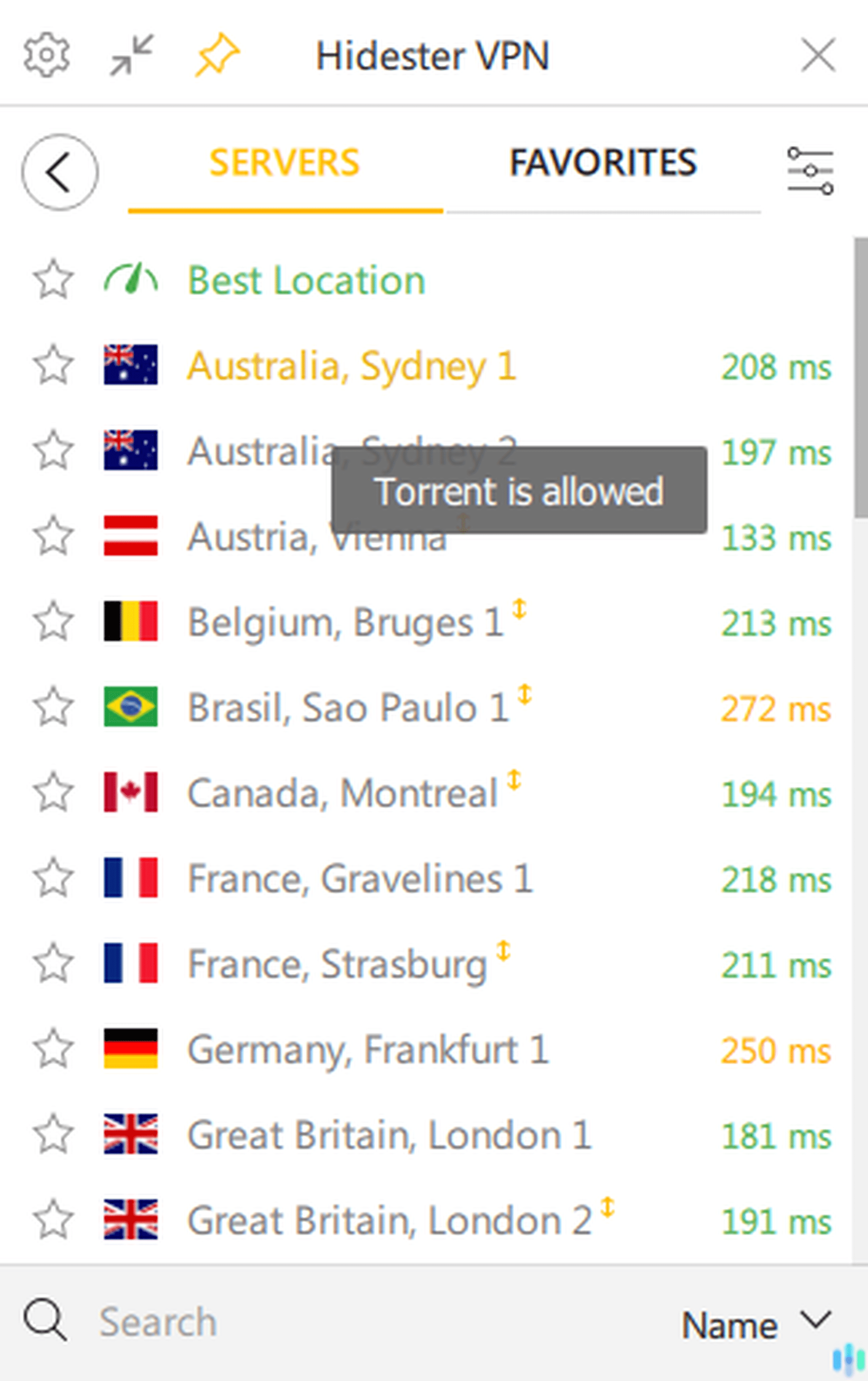
While we weren’t thrilled with Hidester’s Netflix unblocking capabilities, we commend it for having more than a handful of servers that support peer-to-peer downloads and torrenting. Of its 43 servers, 20 allow torrenting. They are the ones marked with a small two-way arrow.
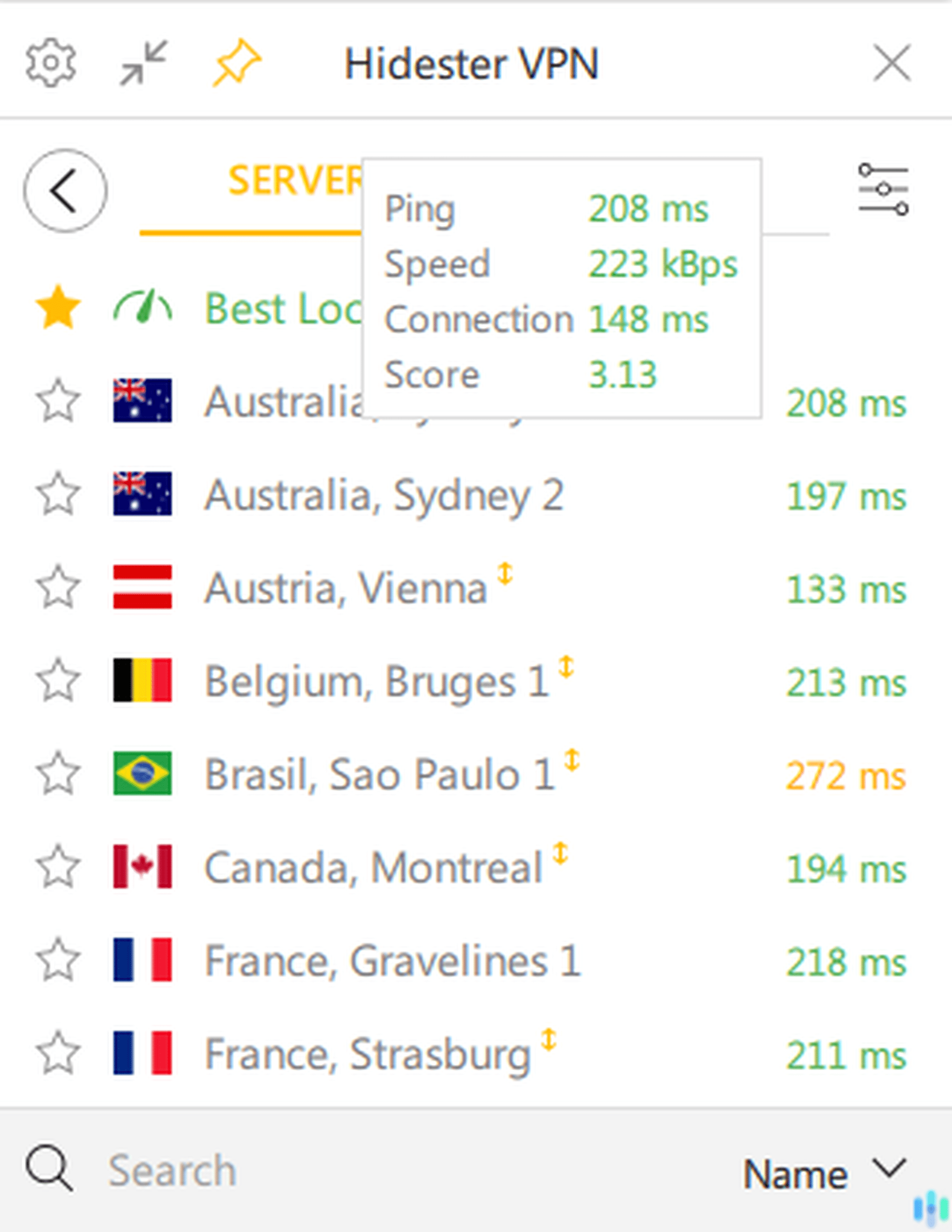
Unfortunately for U.S.-based torrenters, none of the American servers support P2P traffic. We recommend using the Montreal server, which offers reasonable proximity. However, the more people torrenting on this single Canadian server, the slower the network speeds during peak hours.
Features Hidester Doesn't Have

Get NordVPN
Links to NordVPN
Hidester VPN Privacy Policy
We’ve reviewed Hidester’s pricing and features, so let’s move on to another important aspect to consider when choosing a VPN: its privacy policy. Hidester claims to be a no-logs VPN, meaning it doesn’t log its users’ browsing data. If testing VPNs has taught us anything, it’s that “no-logs” claims require careful scrutiny.
In Hidester’s case, it doesn’t log users’ browsing data or internet traffic. What you do online is between you and your computer alone. However, Hidester does log browsing metadata, which is data about your VPN usage. Hidester’s current privacy policy also states they may collect certain information, including your connection country, selected server locations, and daily data usage totals. It doesn’t say how the company uses those pieces of data and whether or not they share them with third parties, which are red flags in our book.
Additionally, although not connected to Hidester’s no-logs claim, we found that the company reserves the right to store your account information, including your email address, even after you’ve canceled your subscription.
While we applaud Hidester’s commitment to not logging actual browsing activity, the metadata collection is not what we want to see from a premium privacy-focused VPN service. We’d also like to see some independent audits to verify their no-logs claims.
Testing Hidester’s Speed and Security
As it stands in our review, Hidester is shaping up to be a so-so VPN. It’s affordable, but it doesn’t have a free trial; it has some features that work great and some that don’t; and it has a no-logs policy but a few shady practices. Can its performance in our tests improve our opinion of Hidester?
Speed Performance
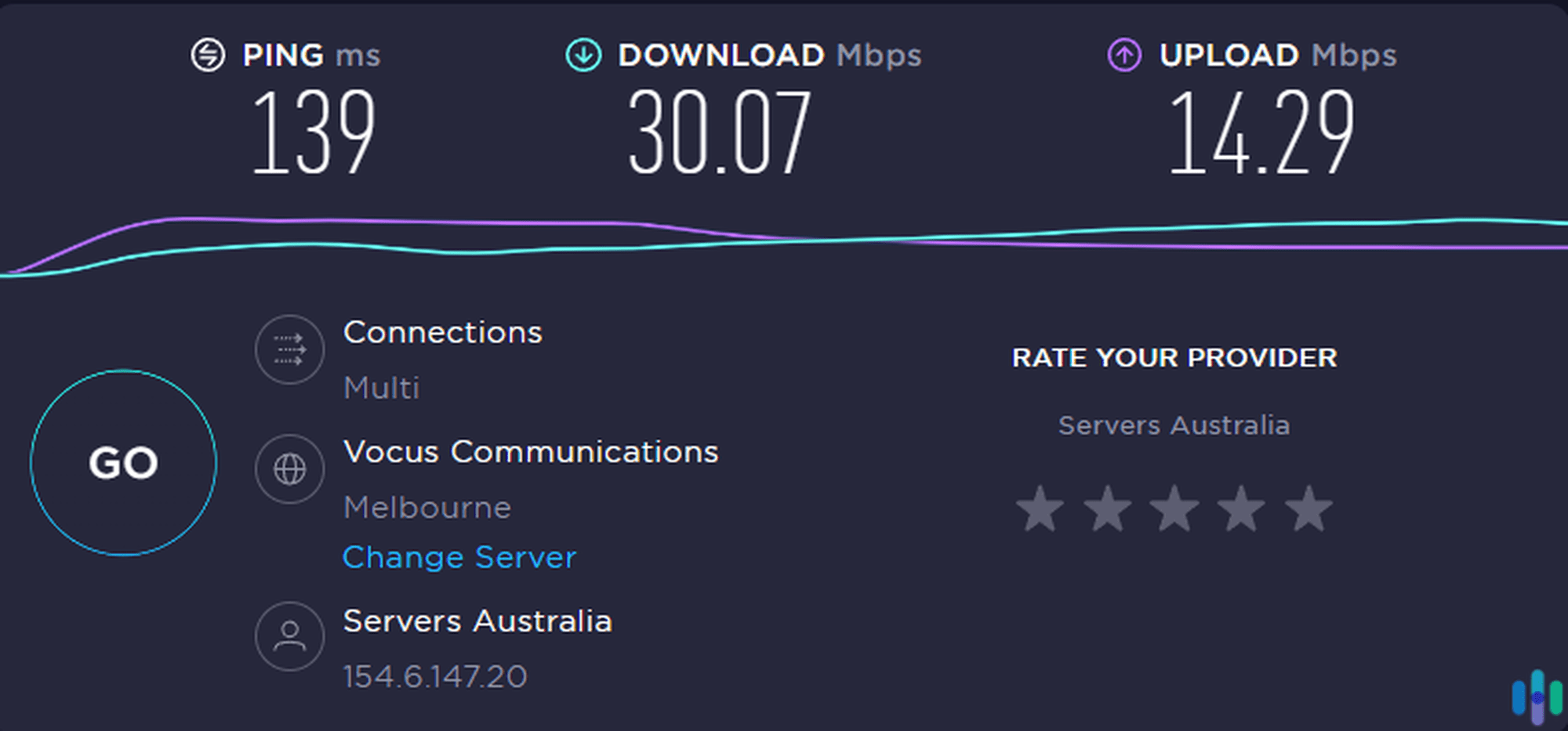
We tested Hidester’s connection speed using what it claims to be the fastest VPN protocol it offers: CamoVPN. To keep the tests fair, we connected to the Australia, Sydney 1 server every time, and we established a baseline speed by testing our own internet speed before each test. Here are the results.
| Speed test | Latency | Download speed | Upload speed |
|---|---|---|---|
| Baseline test 1 | 6 ms | 43.98 Mbps | 37.12 Mbps |
| Hidester test 1 | 329 ms | 12.88 Mbps | 8.61 Mbps |
| Baseline test 2 | 2 ms | 47.25 Mbps | 32.54 Mbps |
| Hidester test 2 | 139 ms | 30.07 Mbps | 14.29 Mbps |
| Baseline test 3 | 2 ms | 51.39 Mbps | 39.65 Mbps |
| Hidester test 3 | 216 ms | 21.97 Mbps | 6.32 Mbps |
In the three times we tested Hidester, we got good results only once, which was during our second test. The rest of the time, Hidester slowed down our internet speed by more than 40 percent, which is our maximum threshold when judging a VPN’s speed.
Security Performance
Next, we tested Hidester for two common security loopholes in VPNs: WebRTC leaks and DNS leaks. These two types of leaks can be used to detect a VPN user’s IP address, so it’s necessary for a VPN to be able to block them. We used online tools to detect if the two types of leaks are possible with Hidester, and these are the results.
For the DNS leak test, we connected to a server in New Jersey and noted the IP address that Hidester gave us. We opened the online tool and started the test. The tool tried to detect our real IP address through methods used by attackers who exploit DNS leaks, but to no avail. Instead of our real IP address, the IP address that the tool detected matched the one Hidester gave us. That’s an indication that there was no DNS leakage.
The process for detecting WebRTC leaks is the same. Still connected to the New Jersey server, we opened the WebRTC leak test and waited for the result. Once again, the tool detected the New Jersey IP address, not our real IP address, so there was no WebRTC leak.
Tip: Read our post on how to check if VPNs are working to learn more about our testing process.
Testing The App
Aside from the VPN’s performance, we tested Hidester’s app extensively and noted its advantages and shortcomings. Since the app is your gateway to the VPN service itself, it’s important to find out if you can rely on it, live with it, and use it with ease.
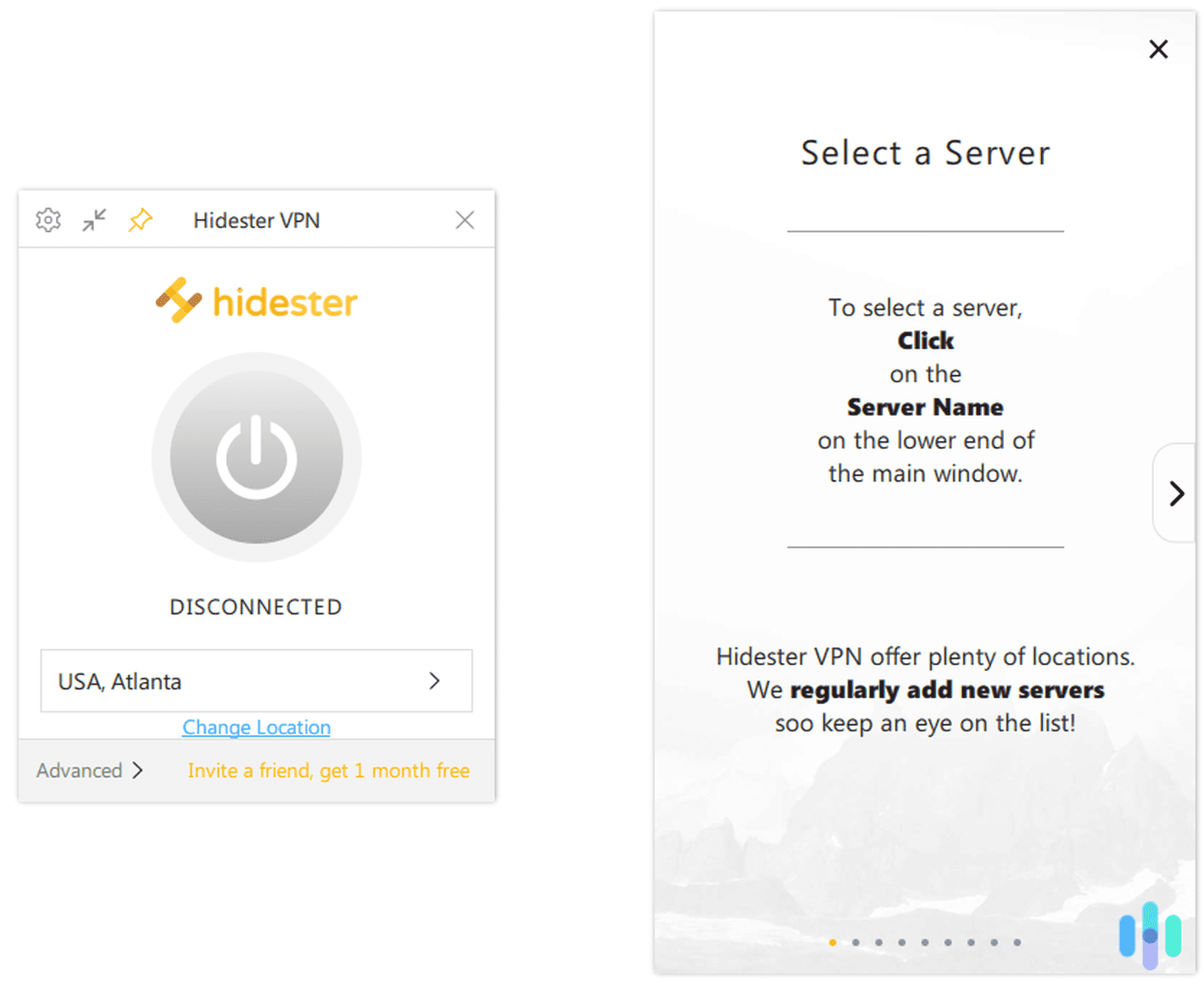
The first thing we noted was how user-friendly the app is. Upon launching it the first time, a handy user guide popped up that guided us through the app’s features. The instructions were clear, and they covered even the most advanced features, such as VPN protocols. If you’re new to VPNs, you should take the time to study the tutorial.
We also liked how much information the app gave us about its servers. Hovering our mouse over each server gave us key details, such as the server’s speed, latency, and connection time. Those details allowed us to choose the best server depending on what we were hoping to achieve. If we wanted to stream, for example, we would go with the server with the highest speed. And when we played online games, we went with the server with the lowest latency.
We also appreciate the fact that Hidester gave us two interfaces to choose from. The Quick interface featured a simple connection method: Just choose a server and click the power icon. The Advanced interface gave us more options, such as choosing a VPN protocol, as well as more information. Once connected, it showed us a graph of our connection speed and latency.
Our only qualm with the app, albeit a very small one, is that it stays on top of other windows all the time. It can be quite distracting, even when placed in the corner. Overall, though, we’d say that the app is one of the best things about Hidester.
Recap: Is Hidester Any Good?
This has been a pretty long review, so let’s do a quick recap of Hidester’s pros and cons.
The things we liked best about Hidester were its:
- App: It’s customizable, simple to use, and informative — exactly what we want from a VPN app.
- Low pricing: Hidester is affordable, starting at just $3.90 for the yearly plan.
- Decent speeds: It wasn’t blazing fast, but Hidester was able to sustain speeds suitable for browsing and even streaming.
- Torrenting capabilities: Twenty of Hidester’s 43 servers allow torrenting.
But we’d like to see Hidester improve its:
- Privacy practices: It logs more browsing metadata than other VPNs with the same no-logs claim.
- Servers: Its limited number of servers limit the freedom of users to choose the server location best suited for their internet activity.
- Features: Hidester lacked features like split tunneling and multi-hop, which have become common VPN features in this day and age.
- Content unblocking: We were able to access Netflix while using Hidester through trial and error. Some countries don’t have servers that work with Netflix, which severely limits the amount of georestricted content that Hidester can unblock.
Throughout our tests, we’ve witnessed Hidester’s mediocrity. Don’t get us wrong; it’s a good VPN, but it just isn’t the best. And when we’re talking about privacy and security, we want nothing but the cream of the crop. On that note, we suggest taking a look at our list of the best VPNs. Like Hidester, we tested each and every VPN on that list, but unlike Hidester, they stood out.
Hidester FAQs
Before we conclude, let's answer some frequently asked questions about Hidester, just so we don't leave any stones unturned.
-
Where is Hidester located?
Hidester is located in Hong Kong, which is not a member of the Five Eyes, Nine Eyes, and Fourteen Eyes alliance. That means that the government can’t legally force Hidester to hand over data about its customers.
-
What does Hidester's web proxy do?
Hidester’s web proxy enables you to unblock websites that are blocked by your network administrators or government. However, it’s not a VPN. It simply redirects your traffic so that it looks like it’s coming from a different location, but it doesn’t hide your IP address n]or encrypt your browsing data.
-
Which devices does Hidester work on?
Hidester works on Windows, Mac, and Linux devices, as well as iOS and Android smartphones.
-
Does Hidester work in China?
Although we haven’t tested Hidester in China, Hidester claims that it does work there. According to the company itself, its proprietary CamoVPN protocol can bypass the Great Firewall of China. However, Hidester’s website is blocked in China, so you’ll need to purchase and install the app elsewhere.
Citations
-
OpenVPN. (2022). Secure access and network connectivity reimagined. openvpn.net
-
Standford. (2022). Free speech vs MaintainingSocial Cohesion A Closer Look at Different Policies. cs.stanford.edu/people/eroberts/cs181/projects/2010-11/FreeExpressionVsSocialCohesion/china_policy.html
-
Hidestar. (2022). Legal Terms. hidester.com/legal/