
NordVPN Next-Generation Antivirus Review 2026
Next-generation antivirus can protect your desktop or laptop from malware and phishing, but don't cancel your antivirus subscription yet.
 &
&
 Last Updated on Aug 06, 2026
What We Like
- Excellent detection rates: Next-generation antivirus blocked malware downloads and phishing sites with great efficiency (92 percent phishing detection rate).
- Built-in ad blocker and tracker protection: NordVPN’s ad blocker stopped most ads from showing and kept third-party trackers off our devices.
- Works independently from the VPN: Next-generation antivirus works even when NordVPN isn't connected or running.
What We Don't Like
- Requires a NordVPN premium plan: Next-generation antivirus is only available on the Complete and Prime NordVPN plans.
- No device scanning: If your device is already infected, next-generation antivirus can't help. The app focuses on downloads and web traffic.
- Currently only available for Windows and macOS: Next-generation antivirus isn't available for mobile devices.
Bottom Line
the security.brief
Our cybersecurity experts tested how well NordVPN's next-generation antivirus protects devices from the latest malware and phishing threats.
NordVPN sits atop our list of the best VPNs for many reasons. One is that even the basic plan includes protection from malicious websites and ads that collect your data. If you’re after more comprehensive protection, similar to antivirus software, NordVPN includes next-generation antivirus with its premium subscriptions.
Next-generation antivirus might not be the best antivirus on the market, but that doesn’t mean it’s not reliable. After spending a month testing the latest version of the app, we were impressed with how well it detected our malware test files and blocked phishing scenarios. We just wish it were available for more devices. Let’s go through our full results to see if next-generation antivirus is worth upgrading your NordVPN plan for.
>> Learn More: The Best Antivirus with VPN Bundles in 2026
Scam and Phishing Protection vs. Next-Generation Antivirus
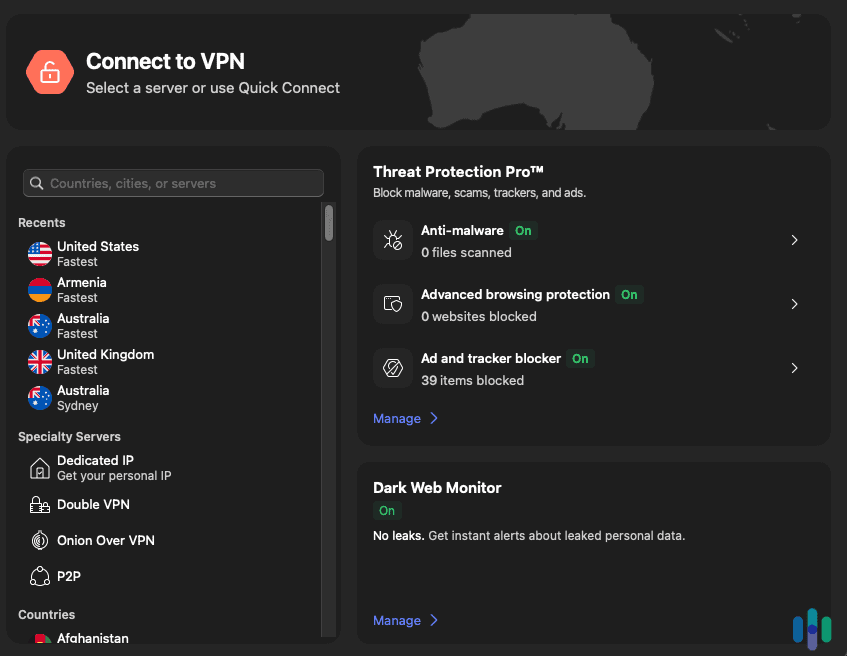
Before we begin, we should distinguish between NordVPN’s scam and phishing protection and next-generation antivirus. Scam and phishing protection is available with all NordVPN subscriptions, but next-generation antivirus is only available with Complete and Prime plans. That’s not the only difference. Here’s a breakdown of the two features.
| Scam and Phishing Protection | Next-Generation Antivirus | |
|---|---|---|
| Available on | Android, iOS, Linux, Windows, macOS, browsers | Windows, macOS |
| Ad blocker | Basic | Comprehensive |
| Domain blocker | Yes | Yes |
| Tracker blocker | Yes | Yes |
| Malware download scanner | No | Yes |
| Scam and fraud alert | No | Yes |
| Anti-phishing protection | No | Yes |
Our Review Methodology - How We Tested NordVPN’s Next-Generation Antivirus
We spent a month testing NordVPN’s next-generation antivirus to see how well it works and how it compares to other antivirus apps. After subscribing to the Prime plan, we installed NordVPN and enabled next-generation antivirus on our MacBook Pro and Windows desktop. We then assessed it against these criteria:
- Reliability: We ran multiple tests to see how well next-generation antivirus blocks malware test files, suspicious websites, and ads that mine our data.
- Usability: We assessed how easy next-generation antivirus is to use and if it interferes with our daily activities.
- Affordability: There are a lot of good antivirus deals out there, and we wanted to see if next-generation antivirus gave us good value for our money.
We also reviewed independent lab results from AV-Test and AV-Comparatives. NordVPN made it easy for us to find by displaying the results on its website.
Nord Antivirus Price and Plans
One downside immediately jumps out — next-generation antivirus isn’t a standalone product but a feature that comes included with NordVPN’s subscriptions. If you’re happy with your existing VPN, we suggest looking into standalone antivirus solutions to save money. If you don’t have a VPN yet or if you’re willing to switch to NordVPN, these are your options so you can use next-generation antivirus:
| NordVPN Pricing | Complete | Prime |
|---|---|---|
| 1 Month | $19.99 | $29.99 |
| 1 Year | $6.49 per month | $9.49 per month |
| 2 Years + 3 Months Free | $4.49 per month | $7.49 per month |
FYI: The NordVPN plans with next-generation antivirus also include NordPass, which is available as a standalone product for $1.39 per month on a two-year subscription. We tested NordPass and found it to be one of the best password managers around, but it’s more cost-effective to bundle it with NordVPN.
The Complete plan costs only a dollar more per month than the Basic plan on a two-year term, with the addition of next-generation antivirus, NordPass, and cloud storage. We think that’s reasonable. Even though next-generation antivirus isn’t a full-featured antivirus, a dollar per month is really cheap considering everything you’re getting. Norton Antivirus Plus is $2.49 per month on an annual subscription. TotalAV Premium starts at $2.42 per month. The value of next-generation antivirus becomes clearer, especially if you need a VPN.
We also calculated the total cost of buying separate VPN and antivirus subscriptions versus Nord’s bundled approach. Purchasing ExpressVPN Basic ($74.85/year) plus Bitdefender Antivirus Plus ($24.99/year) totals $99.84 for the first year. Nord’s Complete plan is $77.88 for the first year. That’s a savings of around $22.
FYI: Surfshark is another excellent VPN that includes an antivirus app with its premium subscription. In our Surfshark Antivirus review, we highlighted that we liked its lightweight design, but it only protects five devices compared to ten with NordVPN’s next-generation antivirus.
Installation and Setup Process
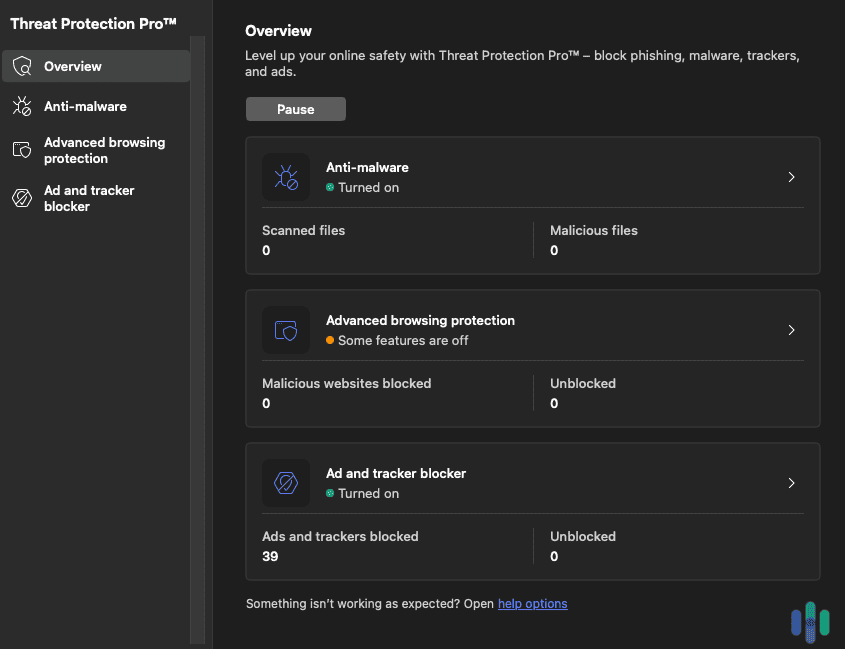
Getting next-generation antivirus running took us less than five minutes. After logging into our NordVPN account, we downloaded the desktop apps for macOS and Windows. We opened NordVPN and next-generation antivirus was on the front page. A few configuration steps later, and our devices were protected.
We appreciated that there’s no separate installer or additional account creation. Everything runs through the NordVPN app. It was easy to switch between the VPN, next-generation antivirus, and other security tools. We even like the overview on the app’s home page keeping us updated on how many files have been scanned and how many ads have been blocked.
>> Learn More: How to Remove Adware From Your Computer
User Interface and Experience
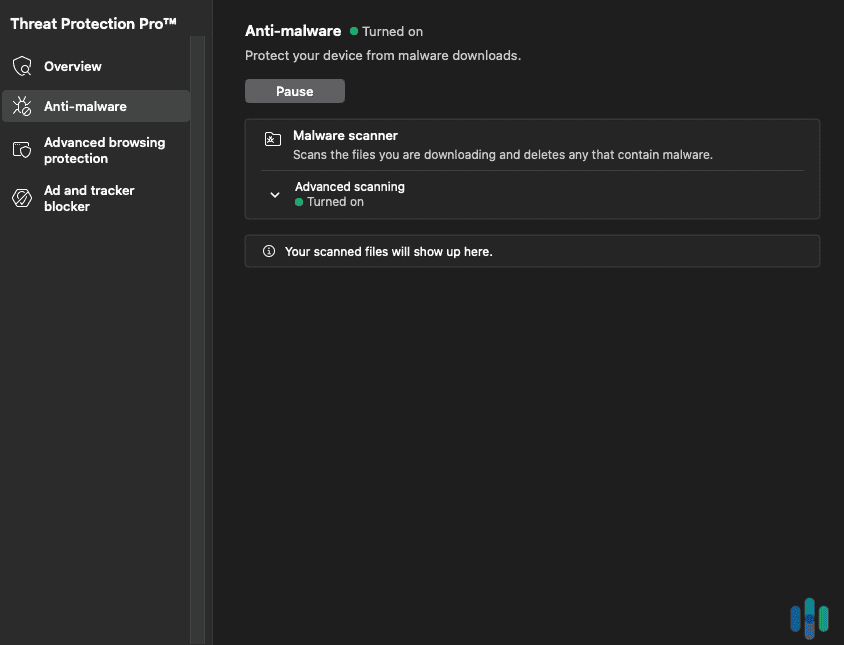
NordVPN’s next-generation antivirus dashboard displays:
- Scanned files
- Malicious files
- Malicious websites
- Unblocked websites
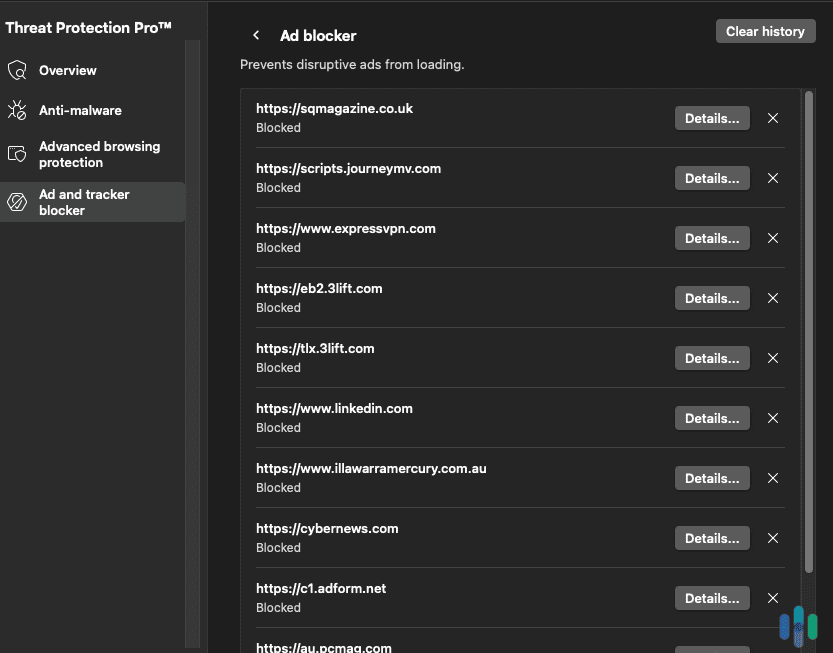
- Ads and trackers blocked
- Ads and trackers unblocked
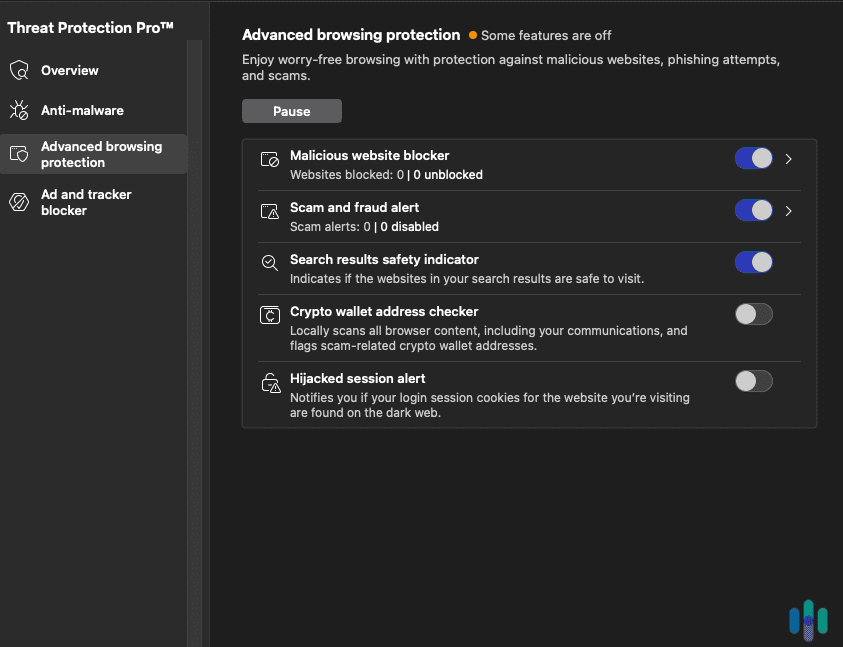
If you want more information, there are tabs for anti-malware, advanced browsing protection, and ad and tracker blocker. It’s also easy to turn features on and off. For example, we turned off the crypto wallet address checker since we only trade on our phone.
We think the settings menu strikes a good balance between simplicity and control. Entry-level users can stick with default settings that work well out of the box. Advanced users can customize the tools so they don’t interfere with their web experience. Our favorite page was the statistics page showing blocked threats over time. It’s satisfying seeing those numbers climb while knowing our system stays protected.
Did You Know: While we’re on the topic of statistics, did you know in the first quarter of 2025 there were over one million phishing attacks reported? This is the largest number since 2023.1 It’s a good reason to use security tools like Threat Protection Pro.
>> Learn More: Do You Still Need Antivirus Protection Software in 2026?
Performance Results
NordVPN’s next-generation antivirus is limited. For instance, it doesn’t scan devices for malware. It screens downloads, but if the malware has already entered your device, there’s nothing it can do. That said, next-generation antivirus focuses on online protections, including detecting phishing and malicious links.
We decided to test NordVPN’s next-generation antivirus across real-world scenarios where its protections apply. Here are the results from our Windows desktop and MacBook Pro.
System Impacts
We left the NordVPN app running in the background and it barely used any CPU resources. When we were running tests, the app rose to about one percent of usage, but it still didn’t affect the performance of our desktop or laptop.
Compared to Norton and McAfee, those apps peaked at 20 percent on average. That’s because we were running full scans of our devices, which next-generation antivirus doesn’t do. When Norton and McAfee were running in the background, we didn’t notice any device performance issues.
>> Compare: Norton Antivirus Vs McAfee
Detection and False Positive Rates
We threw our toughest malware samples at next-generation antivirus. The results impressed us. Detection rates were comparable to the best of the best like Norton Antivirus and Bitdefender. NordVPN blocked our malware test file download every single time.
Even false positives were low. During our testing period, next-generation antivirus flagged only two legitimate files incorrectly. Both were portable apps we tried to download from a trusted source. For context, we typically see five to 10 false positives with other antivirus products using similar testing methods.
Real-Time Protection
Unlike resource-heavy alternatives that slow down your system, NordVPN runs quietly in the background. While browsing, next-generation antivirus blocked 92 percent of our test phishing sites, including sophisticated ones that bypassed Chrome’s built-in protection. The app uses machine learning to detect threats, similar to Norton’s Genie Scam Protection feature.
We should note that while we’re calling it real-time protection, it doesn’t work the same as real-time protection in traditional antivirus software. Real-time protection typically scans every file and program you access. NordVPN doesn’t scan what’s already on your device, but rather, the files you’re downloading, links you’re clicking, and websites you’re visiting.
FYI: When we tested Norton Antivirus, it also detected all our malware test files and blocked almost every phishing site we tested it against.
Privacy-Focused Extras
Within our month of testing, the tracker blocker prevented 3,847 tracking attempts, which is roughly 128 per day. These weren’t just ad trackers. We saw blocks on analytics scripts, social media pixels, and fingerprinting attempts. Next-generation antivirus didn’t block anything it shouldn’t have, but it was nice to know we could unblock anything if needed.
Can Nord Replace Windows Defender?
Windows Defender has improved dramatically, achieving almost perfect detection rates in recent AV-TEST evaluations.2 NordVPN’s next-generation antivirus was still slightly better in our testing, but the difference isn’t dramatic.
Where next-generation antivirus justifies its cost over free Windows Defender is the additional features: ad blocking, tracker prevention, and VPN integration. We recommend Nord as a Defender replacement only if you’ll use these extra features. For basic malware protection alone, Windows Defender remains perfectly adequate for most people.
>> Learn More: Does Windows 10 Need or Come With Antivirus?
How Does Nord Compare to Traditional Antivirus?
Traditional antivirus apps like Norton, McAfee, and Bitdefender offer more comprehensive features than NordVPN’s next-generation antivirus. The most prominent is device scanning. You can run quick or intensive scans to find threats that might not come from the internet.
Next-generation antivirus takes a different approach, focusing on web protection and privacy features that complement its VPN service. Where the app stands out is in its integration and simplicity. Having VPN and antivirus in one application reduces complexity and subscription fatigue. Traditional antivirus software suits people needing advanced features, while we recommend NordVPN’s next-generation antivirus to those who spend most of their time online.
Is Nord’s Next-Generation Antivirus Worth It?
For current NordVPN subscribers, adding next-generation antivirus for an extra dollar a month makes absolute sense. We can’t think of any standalone antivirus offering comparable protection at that price point. You’re essentially getting antivirus, ad blocking, and tracker protection for less than the cost of a cup of coffee.
We do have a few issues with next-generation antivirus besides the lack of device scanning. First, the lack of advanced features is limiting. There’s no webcam protection, no smartphone apps, and no parental controls. Competitors like Bitdefender and Norton include these features in their basic antivirus packages. We understand Nord’s minimalist approach, but if you want comprehensive security you might feel shortchanged.
The bundling requirement can also be a turnoff. Nord forces you into its ecosystem, which feels restrictive compared to standalone alternatives.
FYI: Another flaw of next-generation antivirus is that it can’t protect you from smishing attempts because it doesn’t work on smartphones. SMS phishing attempts are up 2,534 percent in 2025 and are one of the most common spam attack methods.3
Final Verdict
Next-generation antivirus isn’t the best antivirus software or the most feature-rich security suite we’ve tested. Even so, we think it offers solid protection. We think it’s a worthy addition to NordVPN’s online protection. Next-generation antivirus does a good job blocking malware, phishing attempts, ads, and trackers.
However, we can’t recommend NordVPN’s next-generation antivirus for everyone. It’s missing advanced security features and it’s only available for desktops and laptops. It also doesn’t scan these devices, so if a malware file slips through the cracks, next-generation antivirus can’t do anything for you. That means you should hold onto your antivirus subscription with TotalAV or Norton Antivirus for more comprehensive protection.
Frequently Asked Questions
-
Does NordVPN's next-generation antivirus work without an active VPN connection?
Yes, the antivirus and web protection features function independently of the VPN connection. You can have full malware protection even when not connected to Nord’s VPN servers.
-
Can I use NordVPN's next-generation antivirus on multiple devices?
Your NordVPN subscription covers up to ten devices simultaneously. This includes any combination of computers and mobile devices running the NordVPN app. Keep in mind that next-generation antivirus is only available for Windows and macOS devices.
-
How does NordVPN's next-generation antivirus malware detection compare to free antivirus options?
Next-generation antivirus achieves higher detection rates than most free options except Windows Defender. The real advantage comes from additional features like ad blocking and tracker prevention.
-
Will NordVPN's next-generation antivirus slow down my computer?
We measured minimal performance impact during testing. Most people won’t notice any slowdown during normal use.
-
Does NordVPN's next-generation antivirus offer ransomware protection?
Nord includes behavioral detection for ransomware but lacks dedicated anti-ransomware features like protected folders. It caught 94 percent of ransomware samples in our tests.

-
APWG. (2025). Phishing Activity Trends Reports.
https://apwg.org/trendsreports -
AV-TEST. (2025). AV-TEST Product Review and Certification Report – May-Jun/2025.
https://www.av-test.org/en/antivirus/home-windows/windows-10/june-2025/microsoft-defender-antivirus-consumer-4.18-251313/ -
SQ Magazine. (2025). Email Spam Statistics 2025: Shocking Insights and Real Risks.
https://sqmagazine.co.uk/spam-statistics/