

the security.brief
Quishing uses QR codes to hide malicious URLs and steal your data. Learn how QR code phishing works, where it appears, and how to protect yourself.
Quishing (QR + phishing) is a cyberattack in which criminals embed malicious URLs inside QR codes to redirect victims to fake websites designed to steal credentials, financial information, or install malware. Unlike a standard phishing link, which a careful user can inspect before clicking, a QR code conceals its destination entirely until after it’s scanned. That single design characteristic makes quishing one of the fastest-growing and hardest-to-detect scam vectors of 2026. It’s simple yet effective.
So how do you protect yourself from quishing? We put this Quishing 101 guide to tell you everything you need to know – from how it works and where it’s often used to practical protection measures. We’ll also discuss what you can and should do if you believe you’ve been hit by a quishing attack.
How Quishing Works
A quishing attack follows the same psychological playbook as any other phishing scam. The difference is the delivery mechanism. Instead of sending you a suspicious link to click or an SMS such as in smishing, the attacker encodes a malicious URL inside a QR code and finds a plausible reason for you to scan it.
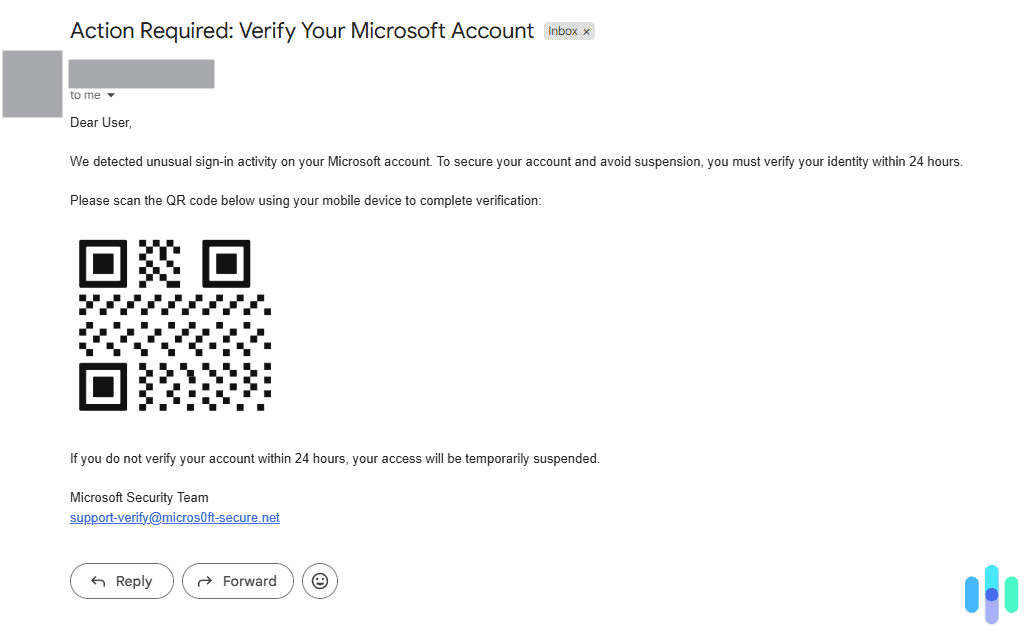
The typical attack sequence looks like this:
- The attacker creates a fraudulent website that closely mimics a legitimate service. It could be a bank login page, a Microsoft or Google sign-in portal, a payment platform, a package tracking site, or a company’s internal system. These spoofed pages are often visually indistinguishable from the real thing.
- A QR code is generated pointing to that fraudulent page. Creating a QR code requires no technical skill and takes about 30 seconds using any free online generator.
- The code is delivered to the target, embedded in an email, printed on a physical sticker and placed over a legitimate QR code, included in a document or PDF, or displayed on signage in a public space.
- The victim scans the code on their smartphone. The phone’s camera briefly shows a preview URL, but most people tap through without reading it. The mobile browser opens the spoofed page.
- Credentials or payment information are entered on the fake site. The attacker captures this data in real time. The victim typically receives no indication that anything went wrong until fraudulent charges appear, or until an account takeover is discovered.
Some advanced attacks add additional layers. For example, since a preview of the site URL appears when you scan the QR code using your smartphone, some attackers might use URL shorteners or legitimate redirect services to further obscure the final destination. In one documented technique, QR codes are assembled from components hidden inside macro-enabled Excel spreadsheets, with the malicious URL constructed dynamically when the file is opened.1
>> Stay Safe: FREE URL Safety Checker
Why QR Code Phishing Is So Effective
Quishing has grown rapidly because it exploits several specific gaps in both human behavior and technical security infrastructure. That’s exactly what makes it dangerous, despite the simplicity of the attack.
QR Codes are Opaque by Design
With a standard phishing email, a trained user can hover over a link and read the actual destination URL before clicking. That check is impossible with a QR code. The encoded URL is invisible until the code is scanned, and even after scanning, most smartphone cameras display only a brief, often truncated URL preview before the browser opens. By that point, many users have already tapped through.
Email Security Filters Treat QR Codes as Images
Traditional email security systems have come a long way and can reliably detect suspicious links within the text. However, QR codes are treated as image attachments, not links. Most filtering tools have no mechanism to extract and evaluate the URL encoded inside it. This allows quishing emails to bypass security gateways that would instantly flag the same URL if it appeared as a standard hyperlink.
Did You Know: Microsoft reportedly blocked 1.5 million quishing attempts per day in 2024 through systems specifically designed for QR code analysis. This figure illustrates both the scale of the problem and the inadequacy of older security tools against it.2
Scans Happen on Mobile Devices
There are plenty of PC antivirus software that can detect malicious links. However, scanning a QR code moves the attack to the victims’ personal smartphones, which are typically left more vulnerable.This lateral shift from a secured device to an unprotected one is a core reason QR code attacks succeed even in environments with strong email defenses and antivirus software.3
>> Stay Protected: Antivirus Software for Android
QR Codes Carry an Assumption of Legitimacy
Years of normalized use — restaurant menus, contactless payments, event check-ins, product packaging — have conditioned most people to scan QR codes without skepticism. A code on a parking meter, a poster in a lobby, or a company email does not trigger the same instinctive caution that a suspicious link might. Attackers rely on this habituation. According to NordVPN, 73% of Americans scan QR codes without verification of any kind.4
Where Quishing Attacks Appear
Quishing is not limited to email. Because a QR code can be printed, displayed, or embedded anywhere, attacks appear across a surprisingly wide range of contexts. Here are a few examples.
Email and Corporate Communications
Just like regular phishing, the majority of quishing attacks arrive via email, often impersonating Microsoft, Google, or a company’s own IT department. Common lures include fake multi-factor authentication (MFA) reset requests, security alerts, document sharing notifications, and invoice or payment confirmations.
PDF Attachments in Phishing Emails
To further evade detection, attackers embed QR codes inside PDF attachments rather than in the email body. The email itself contains minimal text and no visible links, which means it passes through most filters cleanly. The PDF appears to be a legitimate document — an invoice, a contract, a benefits form — with a QR code that the recipient is instructed to scan for “secure access.” By mid-2024, researchers had detected over half a million phishing emails using this technique.
Physical QR Code Stickers in Public Spaces
Attackers print malicious QR code stickers and physically place them over legitimate codes on parking meters, restaurant menus, event signage, and payment kiosks. The victim sees what appears to be the venue’s official QR code and scans it. Documented incidents have been reported at parking stations in Austin, Houston, and Fort Lauderdale, where fake codes replaced legitimate payment QR codes. The New York City Department of Transportation also issued warnings after similar incidents on parking meters in New York.5
Package Delivery and Unsolicited Mail
A newer variant involves sending an unsolicited package to a victim’s address. The package contains a QR code with instructions to scan it to identify the sender. Scanning redirects to a spoofed Amazon or USPS page that prompts the victim for personal information. The FTC issued a specific consumer warning about this tactic, describing it as a variant of the “brushing scam.”
Event Signage, Posters, and Flyers
Conferences, concerts, and large public events frequently display QR codes for check-in, Wi-Fi access, surveys, and promotional offers. Attackers often overlay fake codes on legitimate event signage or distribute counterfeit flyers with malicious codes embedded. Victims then scan in the expectation of accessing event content and instead land on credential-harvesting pages.
How to Spot and Stop a Quishing Attempt
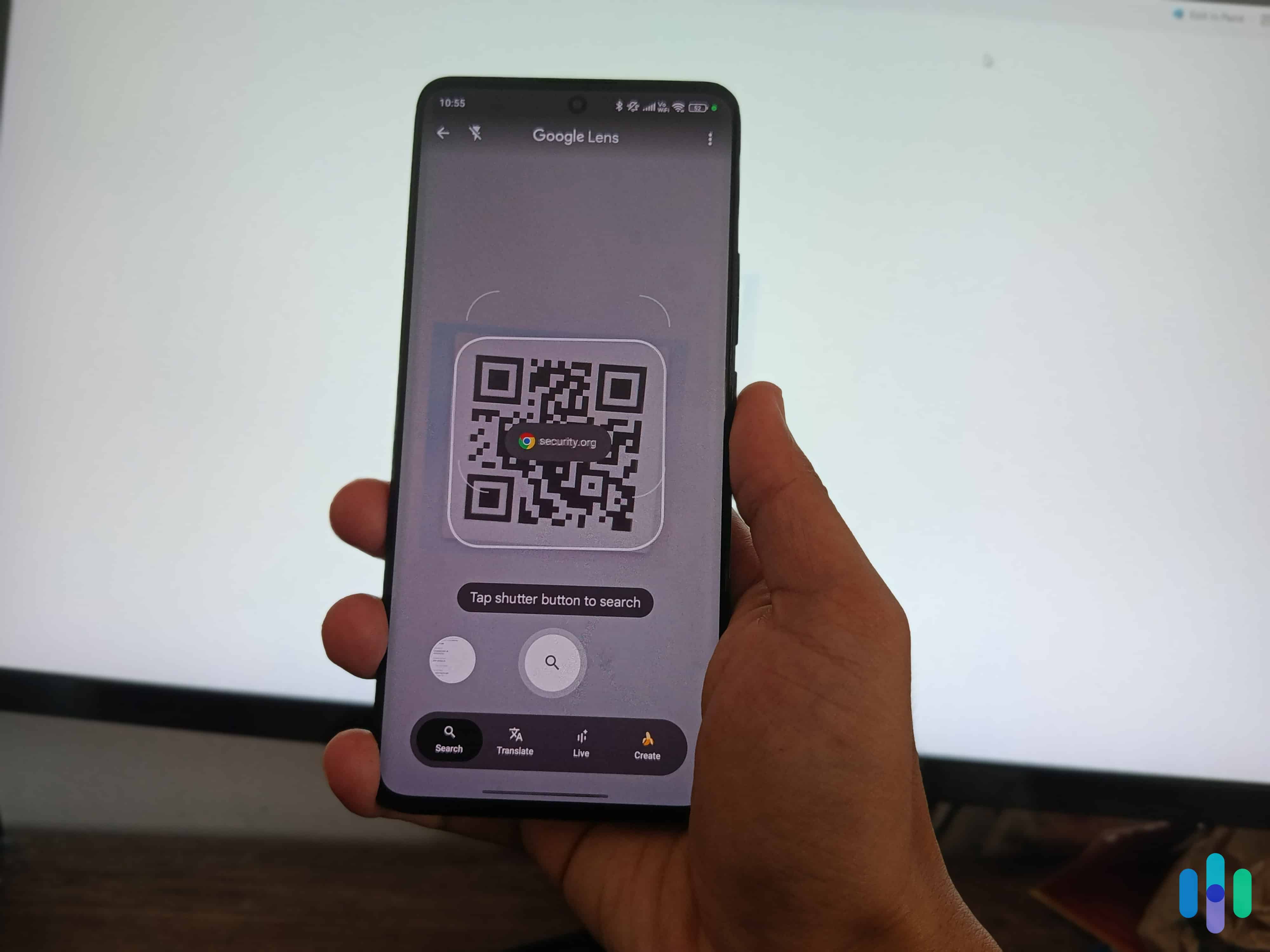
Quishing is a very hard scam to detect, and obviously, there are no definitive warning sign on its own. However, there are patterns that should prompt extra caution before you scan any QR code:
- You were not expecting it. Any QR code that arrives unsolicited — in an email, a text, a piece of mail, or a package — deserves skepticism. If you did not expect to receive a QR code, if the context doesn’t quite make sense, or if the accompanying message creates urgency, treat it as suspicious. Legitimate organizations rarely require you to scan a QR code to complete an urgent action.
- It creates urgency. Language like “your access will expire today,” “scan immediately,” or “action required” is a classic manipulation tactic. Urgency is designed to prevent you from pausing to think. What you should do instead is open your browser and navigate directly to that organization’s official website, or open the official mobile app. If there is genuinely an action required on your account, it will be visible there.
- The physical code looks like a sticker. On a parking meter, restaurant menu, or payment kiosk, look closely at the QR code. If it appears to be a sticker placed over another surface rather than printed directly on the signage, do not scan it.
- The email sender doesn’t match the claimed organization. An email purporting to be from Microsoft, your bank, or your company’s IT department should come from an official domain. A QR code in an email from a free webmail address is a significant red flag.
- After scanning, the URL looks suspicious. Before tapping through after scanning, read the URL that appears in your camera or browser preview. Look for misspellings (“rn” instead of “m”), unusual subdomains, URL shorteners, or domains that don’t match the organization they claim to represent. If anything looks off, do not proceed.
- The page asks for credentials immediately. Legitimate sites reached via QR code generally do not demand you log in before presenting any content. If the first thing you see after scanning is a login prompt for your Microsoft, Google, or banking account, close the browser immediately. In the event an attacker captures your username and password through a quishing attack, a strong second factor — particularly a hardware security key or an authenticator app — can prevent account takeover.
- The QR code is embedded in a PDF attachment. Email attachments containing QR codes — particularly those framed as invoices, contracts, or HR documents — are a recognized attack vector. Treat them with the same caution you would apply to a suspicious attachment link.
Additionally, give our comprehensive scam prevention guide to learn other tips that can help you spot and avoid quishing attempts, as well as other internet scams.
What to Do If You Scanned a Malicious QR Code
Some quishing attempts are so obvious that you can spot them from a mile away, but others are more convincing. If, after scanning a QR code, you suspect that it’s suspicious, speed of response matters. The faster you act, the more limited the damage is likely to be.
Step 1: Do Not Enter Any Information
If you have not yet entered any credentials, payment details, or personal information on the page you were directed to, close the browser immediately. Do not interact with the page further. If you were prompted to download anything, or if a download automatically started, do not open it. Delete the file immediately.
Step 2: Disconnect From the Network
If your device is connected to a public Wi-Fi network at the same time, disconnect immediately. Turn off your phone’s Wi-Fi temporarily. This limits the ability of any malicious code to communicate with an attacker’s server. Malicious code, such as Remote Access Trojans (RATs) can “report back” to the attacker and give them access to your device.
Step 3: Change Your Passwords
If you entered your username and password on the fraudulent site, assume that account is compromised. Change the password immediately. If possibly, do it from a different, trusted device. You should also consider changing passwords of other important online accounts, such as your email, banking accounts, and any account that uses the same password. Enable two-factor authentication if it is not already active.
Pro Tip: Use a password manager. The best password managers offer secure password generation, and then store your passwords for you. Alternatively, you can use our free password generator if you’re changing passwords of only a few accounts.
Step 4: Contact Your Bank if Financial Information was Entered
If you entered a credit card number, debit card number, or banking credentials, call your bank immediately. Request that the affected card be frozen or cancelled and reissued. Ask the bank to flag your account for monitoring. You should also check and monitor your transaction history for any unauthorized charges.
Step 5: Scan Your Device for Malware
If your device downloaded a file or application, or if the site you visited prompted you to install something, run a full antivirus scan. On both Android and iOS, malicious apps or profiles can sometimes be installed through browser-based prompts. Check your installed apps for anything you did not knowingly add.
Step 6: Report It
File a report with the FTC at ReportFraud.ftc.gov. If you suspect identity theft or a financial crime, also file a report with the FBI’s Internet Crime Complaint Center at IC3.gov. If the fake QR code was on physical signage in a public location, notify the venue, the local parking authority, or the relevant business so the code can be removed and others can be warned.
>> Take The Next Step: How to Report a Scam
Step 7: Monitor Your Accounts
Even if you acted quickly, monitor your bank statements, credit card activity, and credit report closely over the next several weeks. You are entitled to a free credit report from each of the three major bureaus every week at AnnualCreditReport.com. Consider placing a fraud alert or credit freeze if you entered sensitive personal information such as your Social Security number.
Additional Tip: If the attack is severe, consider getting identity protection with strong credit monitoring features. This will help you detect fraudulent transactions and loan applications quickly and get help resolving them.
Quishing vs. Phishing, Smishing, and Vishing
Quishing belongs to a family of social engineering attacks that share the same goal — stealing credentials, money, or personal information — but differ in how the malicious content is delivered. Understanding where quishing fits helps clarify why it requires specific awareness.
| Attack Type | Delivery Method | Why It’s Dangerous | Key Warning Sign |
|---|---|---|---|
| Phishing | Email with malicious link or attachment | High volume; can be highly personalized; impersonates trusted brands | Suspicious sender address; hover reveals mismatched URL |
| Smishing | SMS text message with malicious link | People trust texts more than emails; links are often shortened and hard to preview | Unknown sender; urgent tone; URL doesn’t match claimed organization |
| Vishing | Phone call impersonating a trusted party | Real-time social pressure; difficult to verify caller identity | Unsolicited call requesting account access or payment |
| Quishing | QR code in email, print, or physical location | URL is hidden until after scan; bypasses email filters; moves attack to unprotected mobile device | Unsolicited code; physical sticker over existing code; urgency framing |
Quishing is increasingly used in combination with other attack types. An attacker may send a smishing text that contains a QR code, or a vishing call that instructs the target to scan a code “for security verification.” These hybrid attacks layer multiple vectors to increase the probability of success and create additional confusion for victims trying to determine what happened.
Recap
Quishing is effective precisely because it turns a familiar, low-suspicion habit — scanning a QR code — into an attack vector. The URL is hidden until it’s too late to easily back out, the attack jumps from your secured work device to your personal phone, and most email filters never see a link to flag in the first place. That combination of concealment, familiarity, and technical blind spots is what separates quishing from a standard phishing email.
The good news is that the same basic instincts that protect you from other scams apply here. Unsolicited codes, urgency, and anything asking for credentials right after a scan are all reasons to stop and verify through official channels instead. Staying skeptical of QR codes in the wild — especially on physical signage — goes a long way.
Frequently Asked Questions
-
What does quishing mean?
Quishing is a portmanteau of “QR” and “phishing.” It refers specifically to phishing attacks in which the malicious link is delivered via a QR code rather than as a standard hyperlink in text. The term follows the same naming convention as smishing (SMS phishing) and vishing (voice phishing).
-
Can scanning a QR code install malware on my phone?
A QR code itself cannot execute code or directly install malware. The code simply encodes a URL. However, opening that URL can lead to a page that attempts to exploit browser vulnerabilities or tricks you into downloading a malicious app. The risk is not the scan itself but what the scan opens. Keeping your browser and operating system updated protects against many drive-by download attempts. Never follow prompts to install apps or profiles from pages you reached through an unexpected QR code scan.
-
Are QR codes on restaurant menus safe?
Most are. Restaurant QR codes are overwhelmingly legitimate. But the same physical vulnerability exists: a malicious sticker can be placed over a printed restaurant QR code quickly and without notice. Before scanning a restaurant menu QR code, check that the code appears to be printed directly on the material rather than applied as a sticker. If a restaurant’s code asks you to log in or enter payment details to view the menu, that is unusual and warrants skepticism.
-
Can my company's email security catch quishing?
Traditional email security gateways often cannot. They are designed to detect suspicious links in text and known malware signatures in attachments. A QR code embedded as an image in an email body or in a PDF attachment typically passes through without analysis. Security vendors have developed QR-specific detection capabilities in response to the surge in attacks, but deployment varies by organization. Awareness training remains the most consistently effective defense.
-
What should I do if I find a fake QR code on a parking meter or public sign?
Do not scan it. If possible, photograph it as evidence and report it to the local parking authority, transportation department, or business responsible for the signage. Also report it to the FTC at ReportFraud.ftc.gov. If you have already scanned and entered payment information, contact your bank immediately and file a report with the FTC and IC3.