
Unlike TorGuard, which still lacks split tunneling, NordVPN lets you route only select apps through the VPN while the rest use your normal connection.
TorGuard VPN Review and Pricing Guide: Understanding Your Subscription Options
TorGuard is one of the most advanced VPNs we’ve tested, but is it a good value?
- Free dedicated IP address
- Personal and business VPN options
- Over 3,000 servers in 50 countries
All of our content is written by humans, not robots.
Learn More
By

&

Last Updated Sep 10, 2026
the security.brief
TorGuard offers advanced torrenting features like port forwarding but lacks split tunneling. It's good for flexible payments and torrenting, but app bugs persist.
First things first: The name TorGuard might make others think it’s somehow connected to the Tor anonymity network. That’s not the case though. The ‘Tor’ in TorGuard is short for ‘torrent,’ which brings us to our next point. TorGuard isn’t your average VPN. It offers advanced features such as port forwarding, stealth mode, and internal encrypted DNS. And all those features can come in handy if you want to download or seed torrents anonymously.
With TorGuard’s advanced features comes a complex pricing structure, though, that we had to go through when we bought our subscription to test it out. In this review, we’ll look at TorGuard as a whole, and discuss its pricing options and features and our experience using it. There’s so much to talk about, so let’s get started.
TorGuard VPN Cost
TorGuard offers a dizzying array of digital security products and services, including personal VPNs, business VPNs, and VPN routers. Some products also come in bundles, so you need a bit of patience to understand TorGuard’s offerings.
We’ll focus on TorGuard’s personal VPNs, so let’s start with the pricing for each personal plan.
| Billing cycle | Anonymous VPN Standard | Anonymous VPN Pro | Anonymous VPN Premium |
|---|---|---|---|
| Monthly | $10.99 | $14.29 | $16.49 |
| Every 3 months | $21.99 | $38.49 | $44.99 |
| Every 6 months | $32.99 | $76.99 | $77.99 |
| Annually | $65.99 | $130.99 | $142.99 |
| Every 2 years | $109.99 | $197.98 | $208.99 |
| Every 3 years | $153.99 | $274.99 | Not available |
Like most VPN providers, TorGuard rewards longer commitments with better value. Opting for a quarterly billing cycle on the Standard plan saves you nearly $11 compared to paying monthly. The three-year option delivers even more dramatic savings—you’ll pay under $5 per month. That puts TorGuard in competitive territory with other premium VPN services.
We recommend a longer billing period if – and only if – you’re sure that TorGuard is right for you. That way, you can enjoy substantial savings. However, if you’re only testing the waters, TorGuard’s monthly plans provide flexible and affordable options.
FYI: TorGuard’s three-year Pro plan comes out to approximately $10 per month, which places it in the mid-range pricing tier alongside services like NordVPN and Surfshark, both offering similar advanced features.
Split Tunneling TorGuard Doesn't Have

Get NordVPN
Links to NordVPN
TorGuard Standard vs. Pro vs. Premium
Among TorGuard’s three plans, Premium has the best and most advanced features. Not everyone needs those features, though, so the best plan for you depends on what you’re looking for in a VPN.
Here’s how the three TorGuard plans stack up against each other.
| Features | Standard | Pro | Premium |
|---|---|---|---|
| Unlimited speeds | Yes | Yes | Yes |
| Unlimited data | Yes | Yes | Yes |
| Simultaneous connections | 8 devices | 12 devices | 30 devices |
| Port forwarding | Yes | Yes | Yes |
| Stealth mode | Yes | Yes | Yes |
| Dedicated IP address | +$7.99 per month | 1 free dedicated IP address | 1 free dedicated IP address |
| Malware and ad blocking | Yes | Yes | Yes |
| Streaming (Netflix, Hulu, Prime Video, etc.) | No | Yes | Yes |
To whom do we recommend each plan?
- Standard: The Standard plan is best for average users who want extra privacy and security while browsing or torrenting, but its lack of a streaming option makes it a hard sell for anyone who wants to access geo-restricted content.
- Pro: We recommend the Pro plan to people who need a VPN for streaming and torrenting. Since it comes with one free dedicated IP address, it’s also best for people who need a VPN IP address that only they can use to avoid blacklisting by websites.
- Premium: The Premium plan serves as an excellent bridge between personal and business use. With support for 16 simultaneous connections and a dedicated IP address, it’s ideal for power users, small home offices, or families with extensive device ecosystems.
Pro Tip: The main advantage of a dedicated IP address is that you’re less likely to be banned by websites or streaming platforms since you’re the only one using the IP address. TorGuard offers two types of dedicated IP addresses: residential (for general use) and streaming (exclusively for streaming).
TorGuard Standard vs. Pro vs. Premium
Among TorGuard’s three plans, Premium has the best and most advanced features. Not everyone needs those features, though, so the best plan for you depends on what you’re looking for in a VPN.
Here’s how the three TorGuard plans stack up against each other.
| Features | Standard | Pro | Premium |
|---|---|---|---|
| Unlimited speeds | Yes | Yes | Yes |
| Unlimited data | Yes | Yes | Yes |
| Simultaneous connections | 8 devices | 12 devices | 30 devices |
| Port forwarding | Yes | Yes | Yes |
| Stealth mode | Yes | Yes | Yes |
| Dedicated IP address | +$7.99 per month | 1 free dedicated IP address | 1 free dedicated IP address |
| Malware and ad blocking | Yes | Yes | Yes |
| Streaming (Netflix, Hulu, Prime Video, etc.) | No | Yes | Yes |
To whom do we recommend each plan?
- Standard: The Standard plan is best for average users who want extra privacy and security while browsing or torrenting, but its lack of a streaming option makes it a hard sell for anyone who wants to access geo-restricted content.
- Pro: We recommend the Pro plan to people who need a VPN for streaming and torrenting. Since it comes with one free dedicated IP address, it’s also best for people who need a VPN IP address that only they can use to avoid blacklisting by websites.
- Premium: The Premium plan serves as an excellent bridge between personal and business use. With support for 16 simultaneous connections and a dedicated IP address, it’s ideal for power users, small home offices, or families with extensive device ecosystems.
Pro Tip: The main advantage of a dedicated IP address is that you’re less likely to be banned by websites or streaming platforms since you’re the only one using the IP address. TorGuard offers two types of dedicated IP addresses: residential (for general use) and streaming (exclusively for streaming).
Does TorGuard Have a Free Trial?
We have good and bad news if you’re considering TorGuard. The good news is that TorGuard has a free trial (sort of). The bad news is that it comes in the form of a money-back guarantee, which means you’ll have to pay for the service first and you’ll get your money back if you don’t like it. You have only seven days after your purchase, though, so use TorGuard as much as possible during that time.
TorGuard Cancellation Process
We have first-hand experience with TorGuard’s cancellation and refund process. We selected the Standard plan for our tests, but we canceled it and bought a subscription to the Pro plan after discovering the Standard plan has no streaming options. The cancellation request took 24 hours since we put in our request on the weekend. After getting our request approved, we received the refund in four business days.
Here’s how we canceled our subscription and got a refund:
- We logged in to our account on TorGuard’s website.
- We clicked Services, then My Services.
- After selecting Manage, we clicked Request Cancellation.
- We submitted a support ticket requesting a refund.
- To be safe, we removed our credit card details from our account to stop recurring payments.
TorGuard VPN Features: Do They Work?
Now that we have somewhat of a handle on TorGuard’s pricing, let’s talk about its features.
Kill Switch
TorGuard offers two types of kill switches. The first is the real deal: if the VPN unexpectedly disconnects, it shuts down all internet traffic on your device. Total lockdown – nothing gets in or out. This shields your real IP address and current activities from prying eyes. You can toggle this in the settings under Network, and from our testing, it’s reliable. TorGuard once disconnected abruptly, and the kill switch kicked in almost instantly.
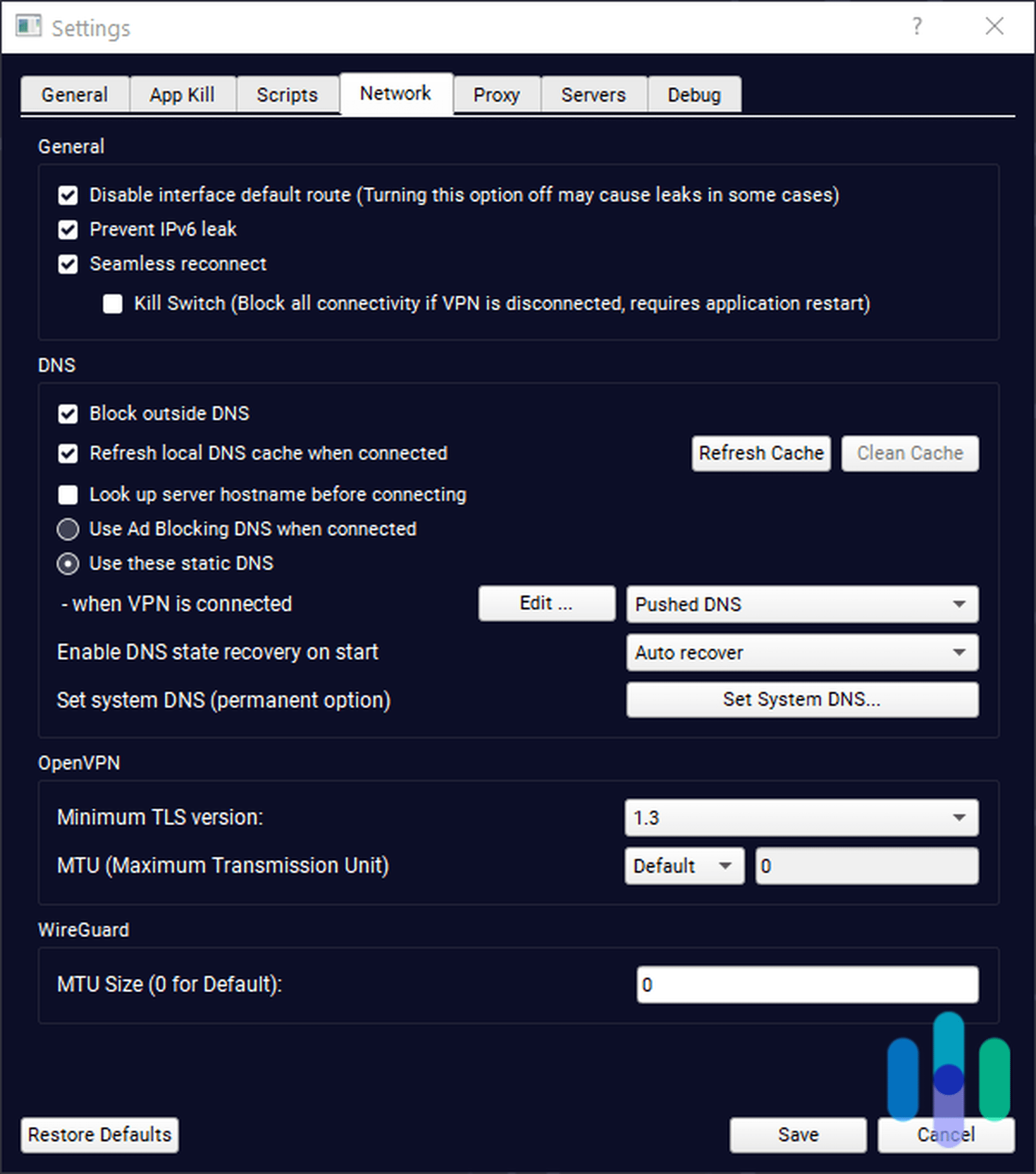
The second type, known as App Kill, is a bit more selective. Instead of cutting off all traffic, it targets specific apps and processes of your choosing. This is handy if you don’t want the kill switch interrupting crucial tasks like torrent downloads – another reason to use TorGuard for torrenting. You’ll find the App Kill feature in the settings.
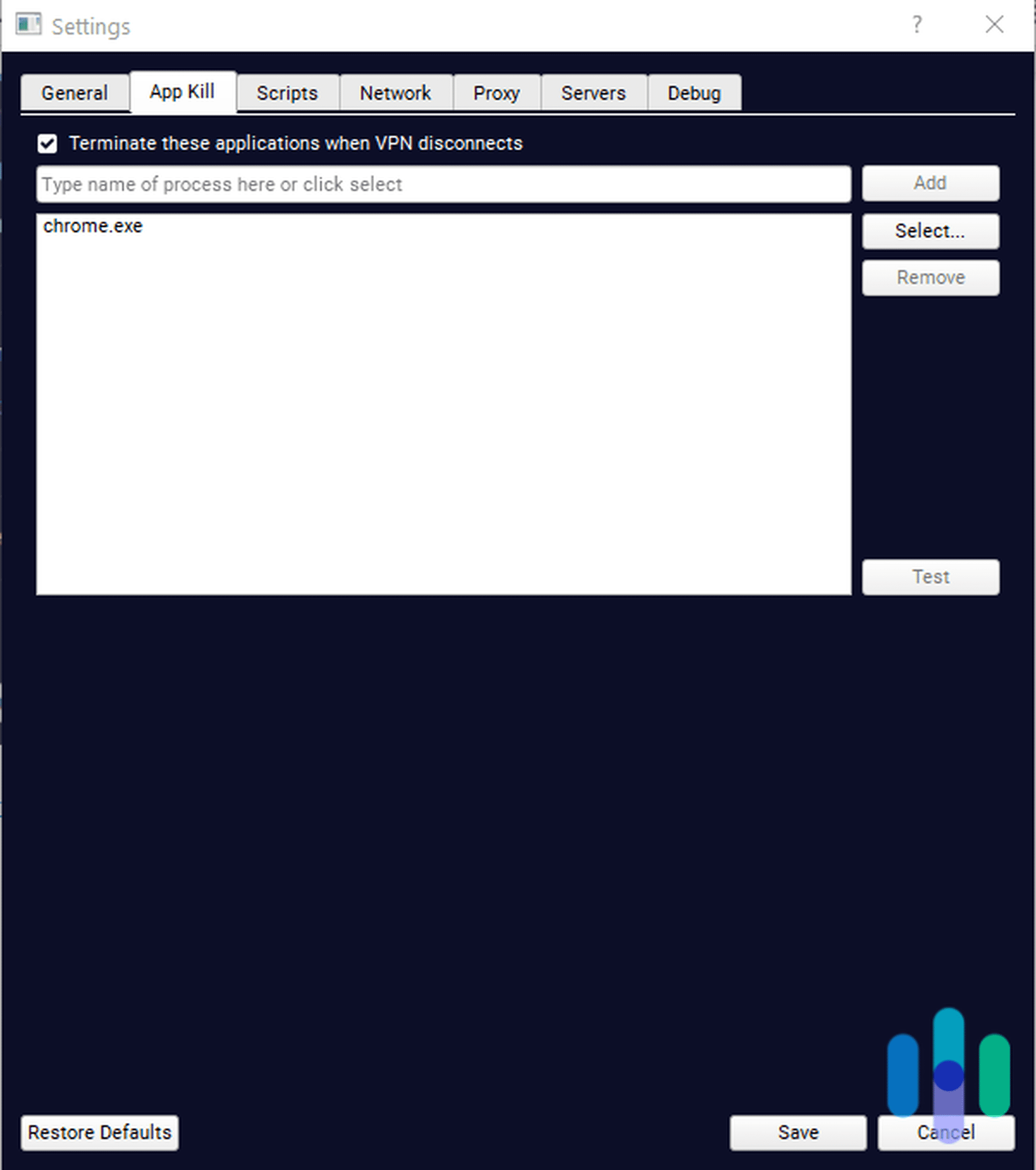
FYI: The App Kill feature triggers not only when TorGuard disconnects unexpectedly, but also when you manually disconnect from the VPN.
Split Tunneling
Split tunneling is a multitasking feature that allows you to connect to the VPN while keeping some traffic outside the encrypted tunnel. We consider it a necessary VPN feature, because let’s face it – not all online activities need encryption.
Unfortunately, TorGuard doesn’t have a split tunneling feature. We were able to confirm it after contacting support, but on the bright side, we were told it’s on the roadmap. Hopefully, it becomes available soon.
Multi-Hop
Multi-hop is another missing feature from TorGuard, but it has a nifty alternative: Stealth Mode. Instead of routing your traffic through two VPN servers for extra security, Stealth Mode obfuscates your VPN connection. TorGuard’s implementation uses OpenVPN Scramble and Shadowsocks protocols to disguise VPN traffic as regular HTTPS traffic. This sophisticated approach ensures only you and TorGuard know that you’re using a VPN. Stealth Mode is not quite as effective as multi-hop in securing your traffic, but it makes your traffic less conspicuous.
Streaming
TorGuard’s ability to stream depends on which plan you choose. When we tested the Standard plan, every server we connected to didn’t let us stream Netflix or Prime Video.
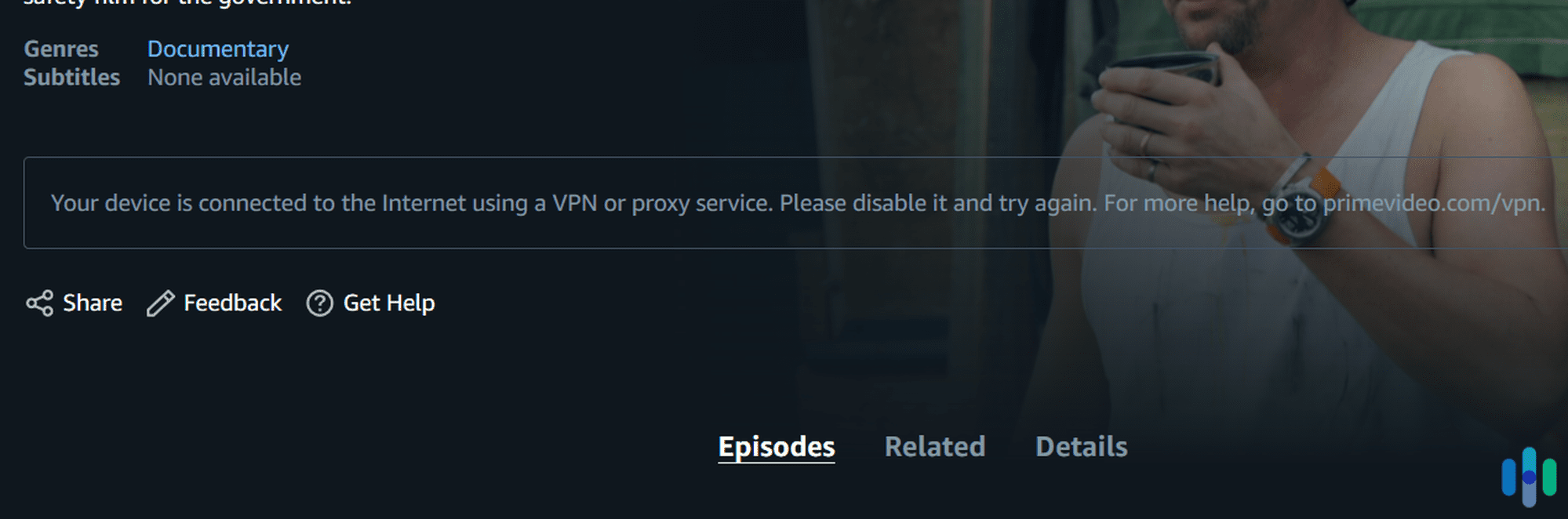
With the Pro plan, we successfully accessed Netflix libraries in 15+ countries, Disney+ in multiple regions, and BBC iPlayer, all from our New York office. TorGuard maintains dedicated streaming servers that are regularly updated to bypass the latest VPN blockers. The dedicated streaming IP addresses included with Pro and Premium plans provide reliable access to region-locked content.
Torrenting
TorGuard actually stands for torrent guard; it has nothing to do with the Tor anonymity project. TorGuard positions itself as a VPN ideal for torrenting, and, from what we’ve seen, it’s right. All three plans support torrenting, and all the servers we tried during our tests worked with uTorrent and BitTorrent.
We also liked that TorGuard included features useful for torrenting — particularly port forwarding. TorGuard’s port forwarding lets users request to create and use a port in the particular server they’re using to torrent. This makes peers more reachable, enhancing your download and upload speeds.1
Pro Tip: You can request to open a new port by going to your account dashboard on TorGuard’s website and clicking Services, then My Services. Click the menu next to your VPN subscription, then select Port Forward Request.
VPN Protocols
Another great thing about TorGuard is that it offers multiple VPN protocols: OpenVPN, WireGuard, and IKEv2/IPSec.
- OpenVPN: OpenVPN is an open-source protocol that has been around for quite some time. It balances speed and security well, which is why many of the good VPNs we’ve tested use this protocol.
- WireGuard: WireGuard has become the go-to protocol for speed-conscious users. Our tests show it consistently delivers faster speeds than OpenVPN while maintaining excellent security. These results stem from its streamlined codebase of just 4,000 lines compared to OpenVPN’s 400,000+.2
- IKEv2/IPSec: Reliability is IKEv2/IPSec’s main selling point. It connects quickly and it’s one of the few VPNs that can handle network changes well, but it’s not as secure as OpenVPN or WireGuard.
We used OpenVPN and WireGuard for the majority of our tests, and both protocols worked well with TorGuard’s VPN servers.
TorGuard VPN Privacy
Privacy remains a cornerstone of TorGuard’s service. The company maintains a strict no-logs policy. In the policy, they explicitly state: “TorGuard does not collect or log any data from its Virtual Private Network (VPN) or Proxy services.” They accept anonymous payment methods including cryptocurrency and even cash by mail, demonstrating their commitment to user privacy.
TorGuard’s Performance
Features aside, we tested TorGuard’s performance on our Windows desktop computer running Windows 10. Our performance test focused on two things: speed and security.
Speed Test
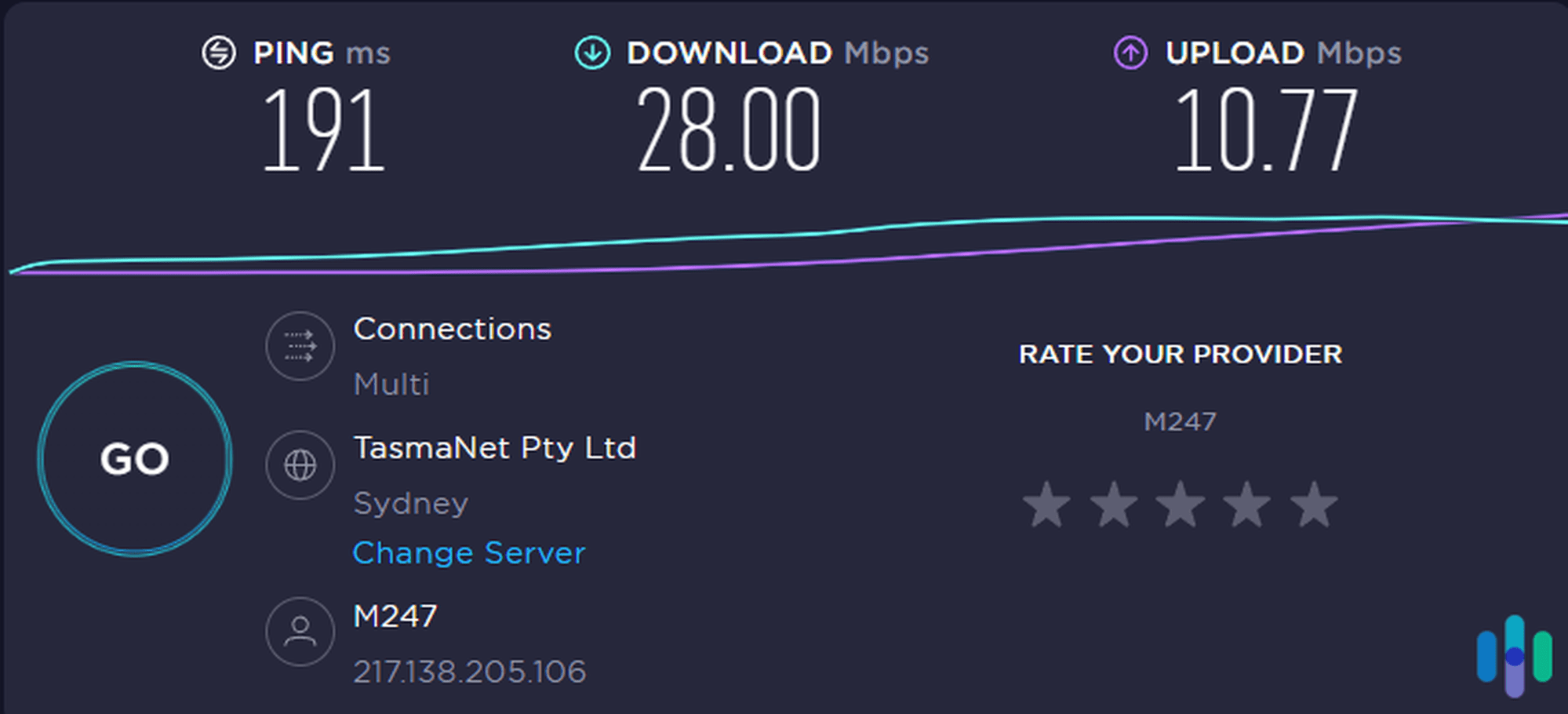
All VPNs we’ve ever tested affected our internet speed to some degree. That’s forgivable, since adding encryption and routing data through servers hundreds of miles away will surely cause some slowdown. For a VPN to be considered fast, however, the drop in download and upload speeds shouldn’t exceed 40 percent. How did TorGuard do? We measured its speed at three different times and compared it to our current internet speed. These were the results:
| Latency (in ms) | Download (in Mbps) | Upload (in Mbps) | |
|---|---|---|---|
| First test | 193 | 40.69 | 18.11 |
| Current speed | 4 | 47.68 | 36.98 |
| Second test | 190 | 20.98 | 8.92 |
| Current speed | 3 | 47.92 | 36.90 |
| Third test | 191 | 28.00 | 10.77 |
| Current speed | 4 | 47.96 | 37.05 |
The results were mixed. On our first try, TorGuard’s download speed was blazing fast, but the upload speed was marginal. On our second and third tries, the download speed dropped by over 40 percent, while the upload speed results went even lower than the first try. Based on those results and our observations throughout our testing period, TorGuard’s speed is average. It is by no means slow, but it’s also not the fastest VPN we’ve tested.
Security Tests
For our security tests, we performed leak tests to see if TorGuard was leaking our IP address via WebRTC and DNS vulnerabilities. What are those? Let us explain briefly.
- WebRTC leak: Chrome, Firefox, Edge, and many other browsers use WebRTC to speed up some functions, such as video streaming. When WebRTC is on, however, third parties can exploit a vulnerability that could show them your real IP address even if you’re using a VPN. A good VPN should be able to block WebRTC leakage.
- DNS leak: We all use DNS (domain name system) when browsing. When you connect to a VPN, the VPN should route all DNS requests through secure tunnels. In certain cases, however, your computer could continue to use your ISP-assigned DNS server, which would cause your real IP address to become visible.
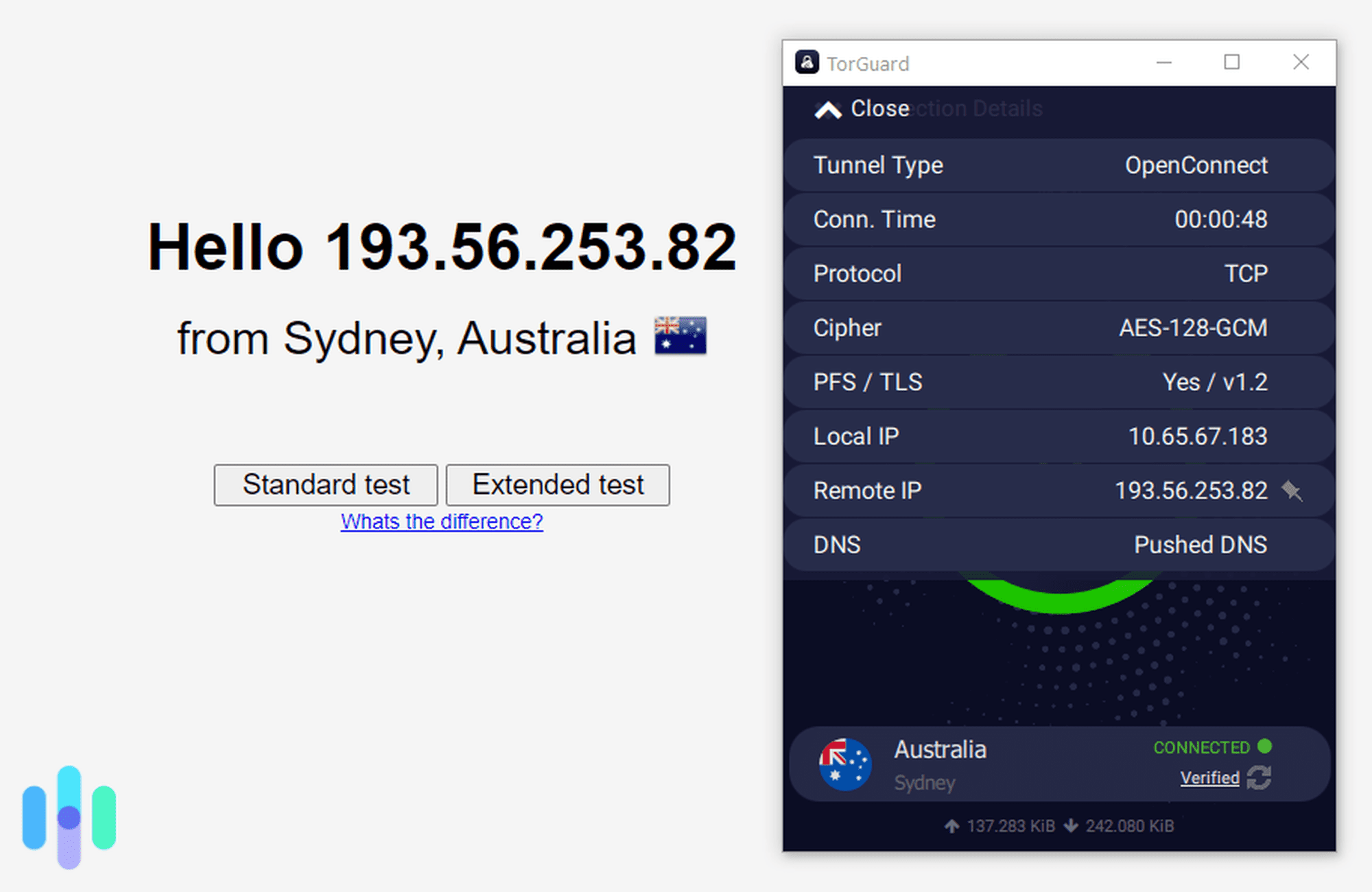
We tested TorGuard using multiple leak detection tools including IPLeak.net and DNSLeakTest.com. In all cases, only our VPN-assigned IP address was detected, confirming TorGuard’s robust leak protection. The service also passed IPv6 leak tests, which have become increasingly important as more ISPs adopt IPv6 addressing.
TorGuard VPN User Experience
The final part of our TorGuard test involves the overall user experience, and, boy, do we have a lot to share.
Signing Up for TorGuard
Confusing subscription options aside, the sign-up process was pretty straightforward. We created an account, selected the product we wanted to buy (in this case, Anonymous VPN), and chose a plan and billing cycle. Once we were in our online dashboard, we downloaded the Windows installer and launched the app. Easy, right? Well, not so fast.
TorGuard has streamlined their onboarding process since our initial testing. New accounts now activate within 60 seconds, and the app automatically configures your login credentials during installation. The dashboard also provides helpful quick-start guides and video tutorials for first-time users.
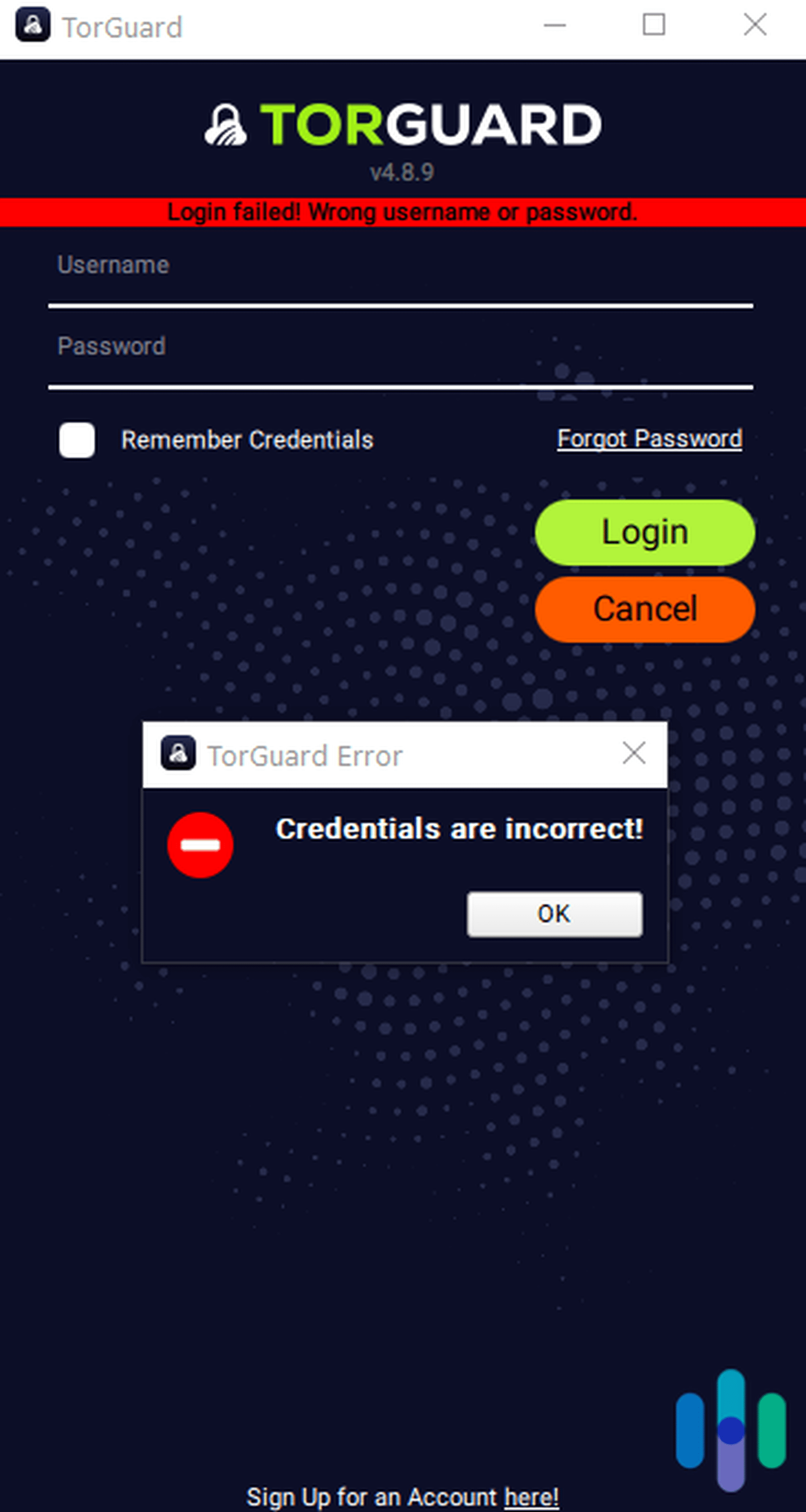
We looked around and found that we could set the username in our online dashboard, so we tried that. Unfortunately, the option wasn’t there on our first try. We were getting ready to contact support, but we decided to give it a few minutes. Good thing we did, because about five minutes later we tried logging in again using our email and it worked. It’s odd that it took that long for our account to be created, but no harm, no foul!
The App Experience
TorGuard recently released a major app update that addressed some login issues we previously encountered. In our recent tests, we were able to log in right away and connect to a server. They also redesigned the interface, making it cleaner and more intuitive. Still, they maintain the advanced customization options power users like us appreciate.
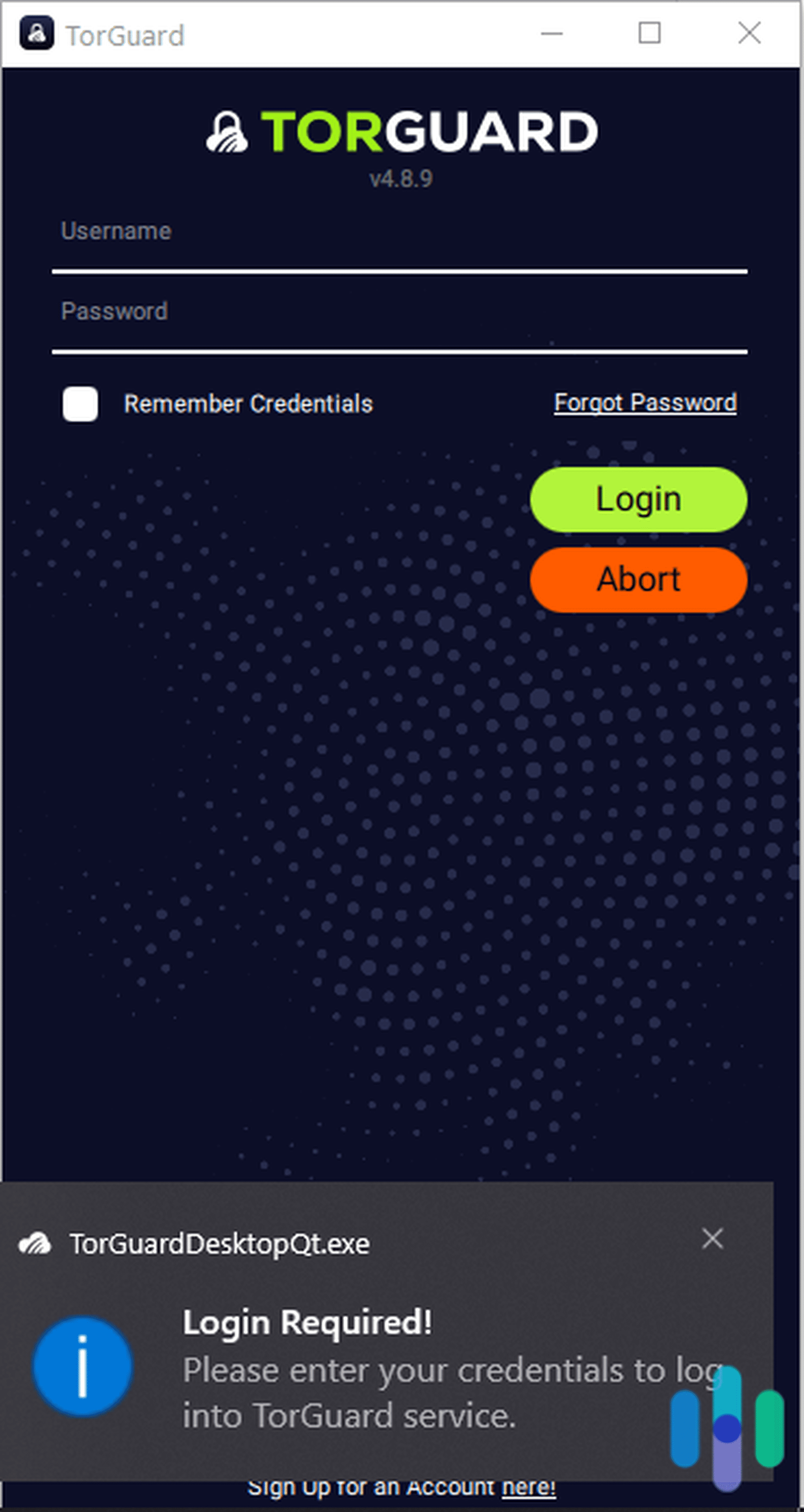
The settings menu remains impressively comprehensive. You can configure everything from custom DNS servers to SOCKS5 proxy settings. There’s also options to set up automatic connection rules based on network detection. The Network section includes granular kill switch controls and the ability to allowlist specific applications or IP ranges.
The bottom line is that the TorGuard app can be very simple and straightforward if that’s what you want, but you can also use its many customizations to enjoy a fuller VPN experience.
FAQ
Here are some of the frequently asked questions about TorGuard.
-
How many servers does TorGuard have?
TorGuard operates over 3,000 servers across 50+ countries, with recent expansions in Asia and South America to improve global coverage.
-
Does TorGuard work with Netflix?
Yes, TorGuard works with Netflix, but you need to be on the Pro or Premium plan. The Standard plan doesn’t work well with Netflix or other streaming platforms.
-
Where is TorGuard located?
TorGuard is headquartered in Florida, USA. While the U.S. is part of the Five Eyes intelligence alliance, TorGuard’s verified no-logs policy means they have no user activity data to surrender even if legally compelled. They’ve also never received a National Security Letter or FISA court order.
-
What kind of IP addresses does TorGuard use?
TorGuard uses dynamic, shared IP addresses. Pro and Premium users get one free dedicated IP address, and Standard users can rent a dedicated IP address for $7.99 a month.
Citations
-
Codecademy. (2025). Here’s What You Need to Know About Port Forwarding. https://www.codecademy.com/resources/blog/port-forwarding
-
Wireguard. (2020). WireGuard: Next Generation Kernel Network Tunnel. https://www.wireguard.com/papers/wireguard.pdf