Ring Doorbell Camera Review
Ring was the first company to popularize video doorbells, and the company continues to add new features while keeping costs budget-friendly
 &
&
 Last Updated on Oct 21, 2026
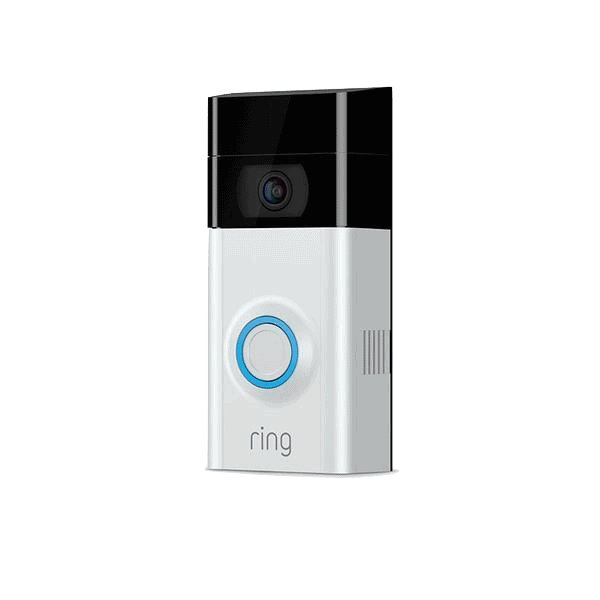
What We Like
- Eight doorbell models: Multiple wired and battery models available to suit different homes, various setups, and video quality preferences.
- Budget-friendly starting price: Two doorbell models are under $100, with more expensive options offering higher resolution, improved night vision, and 3D motion detection.
- 180 days of cloud storage: For as little as $5 a month, you can get up to 180 days of video history with a Ring Protect plan.
What We Don't Like
- Premium models are expensive: Prices jump by $100 for the Doorbell Plus models, and then another $50 for the Pro models.
- Local storage isn’t straightforward: You can store videos locally with Ring Edge, but only if you have an Alarm Pro base station, microSD card, and a Ring Pro subscription. Local storage isn’t available for 2K or 4K devices either.
- Smart features also need a subscription: Intruder deterrence features and facial recognition also require the Ring Pro plan.
Bottom Line
the security.brief
Ring offers a wide range of video doorbells with great picture quality, smart notifications, and low-priced monitoring.
Ring is the leading name in doorbell cameras, offering an extensive lineup that ranges from budget-friendly options to premium models with advanced features. Beyond doorbells, the company provides a wide selection of other security equipment including indoor and outdoor security cameras, entryway sensors, environmental sensors, and other items like panic buttons and super-loud alarms. If you’re looking for total home security, they’re pretty much a one-stop shop.
We think the doorbell cameras are the standout of the entire range. You can get a Wired Doorbell camera for just $79.99 and a 2K battery version for under $100. Ring also has doorbell cameras featuring 4K resolution, color night vision, and other advanced security features. Which one is the best? Let’s go through each model to find out.
>> Keep Reading: The Best Doorbell Cameras of 2026
Your Doorbell Camera Options From Ring
Ring offers more doorbell cameras than most other brands. There are eight models to choose from. Four are battery-powered, three are wired, and there is a Power over Ethernet option as well. Thankfully, Ring has given them logical names so you know which one is the base model and which one is best of the bunch.
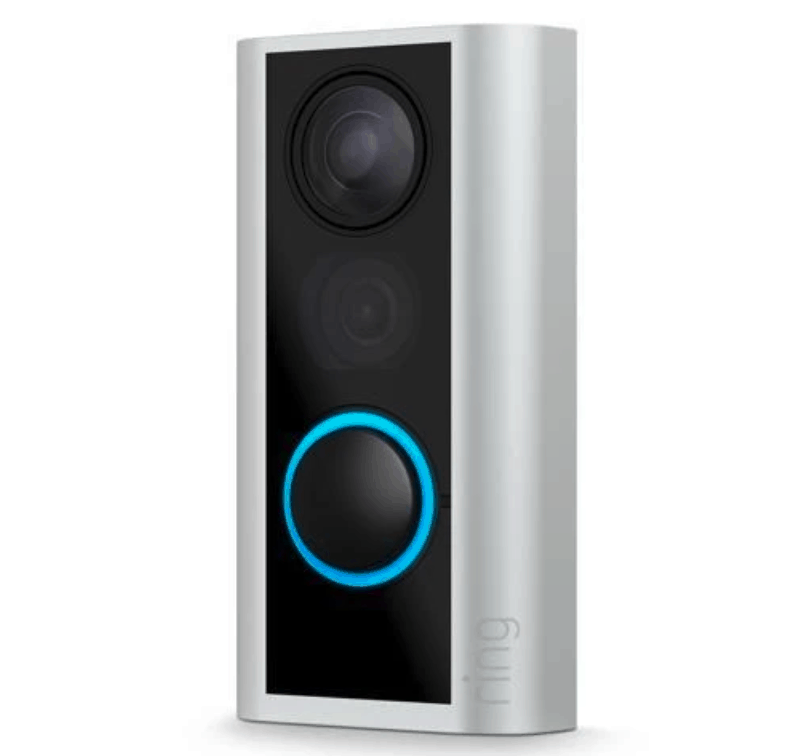
- Ring Peephole Cam 2K: The Peephole Cam is designed for apartment and condo doors with peepholes. The device includes 2K resolution, motion detection, and live view, so you can chat with guests even if you’re not home.
- Ring Doorbell: The Battery Doorbell and Wired Doorbell are the base models. Despite being the cheapest options, they both offer 2K head-to-toe video, night vision, and two-way audio.
- Ring Doorbell Plus: The battery and wired Doorbell Plus models are priced identically. The specs are almost identical too, except the Wired Doorbell Plus option offers color night vision.
- Ring Doorbell Pro: Like Doorbell Plus, the Doorbell Pro models also cost the same. Both also offer 4K video resolution. The wired model includes color night vision and a quick replies feature, which lets guests record a message if you’re not at home.
- Ring Doorbell Elite: The Elite model uses Power over Ethernet to stay online. It costs $500 and includes 4K resolution, color night vision, and remote gate access. This lets you use the device as an intercom system to control front gates using the Ring app.
Other features like field of view are mostly identical across all Ring doorbell cameras. There are some subtle differences, like motion detection. Some offer basic motion detection, which sends you a notification when the camera detects movement. Other models include 3D motion detection, which tells you exactly how close a person is to your property.
>> Learn More: How do Motion Detectors Work?
A Look at the Ring Doorbell Camera (Base Model)
| Feature | Ring Battery Doorbell | Ring Wired Doorbell |
|---|---|---|
| Price | $99.99 | $79.99 |
| Resolution | 2K | 2K |
| Field of View | 140-degrees | 140-degrees |
| Night Vision | Standard | Standard |
| Two-Way Audio | Yes | Yes |
| Motion Detection | Yes | Yes |
The battery and wired doorbell cameras are in their second generation. The most obvious upgrade compared to the previous generation is 2K head-to-toe video. In our testing, we could make out who was standing at the front door far more clearly than we could with older models. That said, we noticed that the Wired Doorbell doesn’t activate your home’s internal doorbell chime. You’ll have to upgrade to Ring Chime or Chime Plus, or rely on the app for notifications when someone is at the door.
Aside from that difference, we found the Ring Battery Doorbell and Ring Wired Doorbell to be almost identical in our hands-on testing. The question comes down to whether you prefer the cheaper hardwired option or the flexible battery model. Based on our testing, we recommend the Ring Wired Doorbell. It’s one of the most affordable doorbell cameras we’ve tested, and you’ll never have to worry about the battery going flat at the worst possible time. But if you live in an apartment or your house doesn’t have doorbell wiring, the Battery Doorbell is the obvious pick.
>> Check Out: How to Secure Your Home
A Look at the Ring Doorbell Plus
Comparing the thickness of the Ring Battery Doorbell to the Ring Battery Doorbell Plus.
| Features | Ring Battery Doorbell Plus | Ring Wired Doorbell Plus |
|---|---|---|
| Price | $179.99 | $179.99 |
| Resolution | 2K | 2K |
| Field of View | 140-degrees | 140-degrees |
| Night Vision | Low-Light and Adaptive | Color |
| Two-Way Audio | Yes | Yes |
| Motion Detection | Yes | Yes |
There are not a lot of differences between the battery and wired Doorbell Plus cameras. The wired model is slightly better, with color night vision and the quick replies feature. The rest of the specs are similar to the cheaper Ring doorbell cameras, including the field of view and video resolution.
Is it worth an extra $100 compared to the base model? Based on our testing, we think the color night vision is worth the price. While low-light, infrared night vision does the job, it doesn’t compare to color in practice. When we tested both side by side after dark, those extra details made a noticeably bigger difference in identifying porch pirates or intruders hanging around the property compared to seeing them in black and white.
Pro Tip: Doorbell cameras offer excellent protection for your front porch, but for total security, we recommend installing a few security cameras. You can even integrate your Ring doorbell camera with Ring security cameras to make it easier to manage.
A Look at the Ring Doorbell Pro
| Features | Ring Battery Doorbell Pro | Ring Wired Doorbell Pro |
|---|---|---|
| Price | $249.99 | $249.99 |
| Resolution | 4K | 4K |
| Field of View | 140-degrees | 140-degrees |
| Night Vision | Low-Light and Adaptive | Color |
| Two-Way Audio | Yes | Yes |
| Motion Detection | 3D | 3D |
The Doorbell Pro devices double the resolution from the Plus range while adding more advanced features. One of the standouts in our testing was 3D motion detection. We simulated intrusions during testing, and the doorbell alerted us to how close someone was to the house. This information is useful if you want to know whether to ignore someone passing by or be concerned about a bad actor.
Quick replies are available with the Ring Wired Doorbell Pro. We used this feature to let visitors know we weren’t home and gave them the option to leave a recorded message. It’s handy if you’re driving, in a meeting, or just don’t feel like answering the door.
A Look at the Ring Doorbell Elite
| Features | Ring Wired Doorbell Elite |
|---|---|
| Price | $499.99 |
| Resolution | 4K |
| Field of View | 140-degrees |
| Night Vision | Color |
| Two-Way Audio | Yes |
| Motion Detection | 3D |
At $500, the Ring Wired Doorbell Elite might seem a bit much for most people. It does have some features that make it worthwhile for some properties, though. For starters, the power source is Power over Ethernet, meaning it’s immune to internet outages. The remote gate access feature is also useful for gated homes. You can use the Ring Doorbell Elite as an intercom service to let people in.
For the average home or apartment, the Ring Wired Doorbell Elite isn’t worth the extra money compared to the other models. The video resolution is capped at 4K, the field of view is identical to the base model, and 3D motion detection is no different from the Pro range.
FYI: The Ring Peephole Cam 2K is also available but it isn’t your typical doorbell camera, as it requires a door to have a peephole for it to be set up. It’s designed to enhance your existing peephole with 2K resolution and motion detection. You’ll just need to decide if that’s worth the $100 price tag.
The Ring App
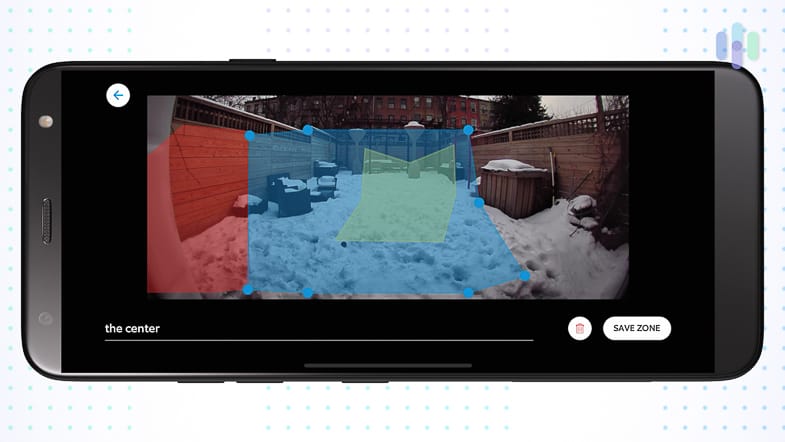
The Ring – Always Home app is what you’ll use to manage your Ring doorbells. If you’re a Ring Alarm customer or have Ring security cameras, you’ll be familiar with it. We used it to access live feeds, adjust privacy settings, and set up motion zones. Creating motion zones meant we weren’t getting notifications every time someone walked their dog past the house. All we had to do was adjust how far we wanted the camera to detect motion and hit save.
We found the app intuitive to navigate, even when we were testing the Ring Alarm system. The app makes you feel like a security expert with the number of customization options. We could even use it to talk to people at the front door when we weren’t home.
On that note, the sound quality was great, but during our testing we noticed a lag of roughly one to two seconds between when we spoke and when the person at the door actually heard us. This showed up most on the two-way talk feature rather than on the recorded video playback, and it meant we sometimes talked over the visitor or paused waiting for a reply that was already on its way. It wasn’t a dealbreaker since most of these conversations were short anyway, but it’s worth knowing about if you plan to use the doorbell for longer exchanges, like walking a delivery driver through where to leave a package.
Ring Protect Plans: Is It Worth It?
You don’t need a Ring Protect plan, since Ring doorbell cameras can work without one. But we think it’s worth signing up for. The free tier will only give you access to live view and motion alerts. That means you can’t save, review, or access recorded footage. At a minimum, we recommend Ring Protect Solo, which is $4.99 a month. Keep in mind that this plan only covers one doorbell camera or security camera. If you have multiple Ring devices, you’ll need the Multi plan. Here’s a quick overview of all Ring Protect options.
| Features | Ring Protect Solo | Ring Protect Multi | Ring Pro |
|---|---|---|---|
| Monthly Price | $4.99 | $9.99 | $19.99 |
| Devices Covered | One doorbell | All Ring devices at one location | All Ring devices at one location |
| Video History | 180 Days | 180 Days | 180 Days |
| Doorbell Calls | Yes | Yes | Yes |
| Smart Notifications | Yes | Yes | Yes |
| Extended Warranty | No | Yes | Yes |
| Familiar Faces | No | No | Yes |
| Professional Monitoring | No | No | Yes |
We like that Ring offers up to 180 days of video event history. That’s more than most competitors. The Nest Doorbell cameras we tested only offer up to 60 days on a Google Home Premium Advanced subscription that costs $20 a month. Even SimpliSafe security systems cap cloud storage at 30 days. If you only need a doorbell camera, you can get 180 days of video storage with Ring for $5 a month.
FYI: You can save even more on Ring Protect subscriptions by paying annually. A Ring Protect Solo plan is just $49.99 a year, which saves you $10 a year.
Ring vs. The Competition
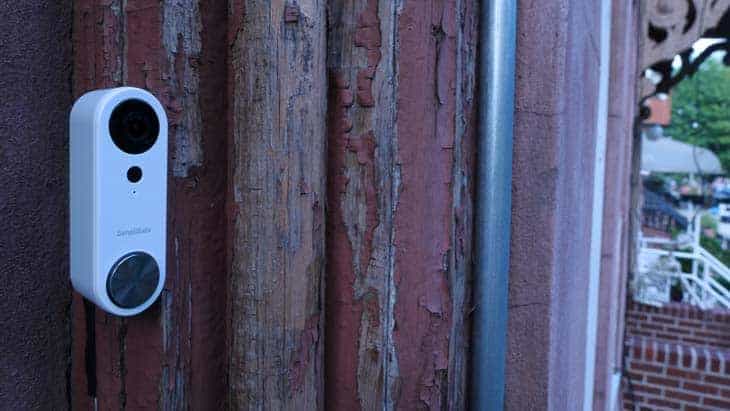
Ring offers the best range of doorbell cameras, but there are better devices on the market. For example, SimpliSafe’s Video Doorbell Series 2 offers smart alerts, with people, package and familiar face detection, and it records in 2K. It also supports active intruder deterrence when paired with a Pro or Pro Plus plan starting at $49.99 per month. Comparable protection from Ring costs $99 per month. However, it does not work as a standalone device.
ADT’s Nest Doorbell cameras are also a strong competitor to Ring’s crown. Nest Doorbell cameras offer facial recognition, motion zones, and security features like Trusted Neighbor. It’s similar to the Ring Doorbell Elite’s gate access feature, except it’s for your front door. With an ADT professional monitoring plan and a smart lock, you can let registered guests into your house when you’re not home or available. While the devices are similarly priced to the Ring Doorbell Plus range, ADT subscriptions are significantly more expensive than Ring Protect plans.
>> Learn More: Our Hands-On ADT Doorbell Camera Review
Wrap Up
Ring has a video doorbell to suit every type of home, though the right pick depends on your budget and how much you value the extra features.
The battery and wired base models are suitable for most properties and offer 2K resolution, which is higher than most competitors who charge more for doorbell cameras. In our testing, they covered the essentials well without the premium price tag.
The Plus and Pro models offer a few more advanced features, like color night vision and 3D motion detection, that are worth the upgrade if you’ve had trouble identifying visitors after dark or want more precise motion alerts. The Elite model is the best pick if you live in a large home with a front gate, but for most households, we found the extra cost hard to justify given how similar the specs are to the cheaper models.
One thing to weigh before buying into any Ring doorbell is the subscription. Most of the standout features we tested, like video recording and person alerts, require a Ring Protect plan to unlock fully. No matter what model you choose, we recommend signing up for one. But if ongoing subscription costs are a dealbreaker for you, it’s worth comparing Ring against competitors that offer more functionality without a required plan.
FAQs
-
Is there a monthly fee for Ring doorbell cameras?
Ring doorbell cameras don’t require a monthly fee. If you want access to video events, smart notifications, and security features, you’ll need to sign up for Ring Protect. Pricing starts at $4.99 a month for one doorbell camera.
-
What are the downsides of a Ring doorbell?
Ring doorbell cameras offer a lot of great features, but the best ones are locked behind a paid subscription. There is also not a significant difference in specs across the doorbell cameras, but the price jumps quite a bit.
-
How long do Ring doorbells last?
Ring battery doorbell cameras tend to last up to five years. Wired models last up to seven years. The average lifespan can vary depending on usage, weather conditions, and the number of features you’re using.
-
Do Ring doorbell cameras work without the internet?
Ring doorbell cameras require an internet connection to function. Cellular backup options are only available for Ring Alarm systems, not Ring video doorbells or cameras.
-
Can Ring call the police?
Ring can call the police if you’re subscribed to Ring Protect Pro. If you’re on a Ring Solo or Ring Multi plan, you’ll need to call the police if you need assistance.