iTop VPN Review 2026: Is This VPN Safe?
Find out if iTop VPN is worth your time and money in 2026.
 &
&
 Last Updated on Feb 24, 2026
What We Like
- Affordable: iTop VPN costs as little as $1.66 per month if you buy a three-year subscription, making it one of the most budget-friendly VPN options available.
- Dynamic and static IP addresses: You can choose a dynamic or static IP address. Dynamic IP is harder to track, while static IP is more user-friendly, especially for sites that block VPN IP addresses.
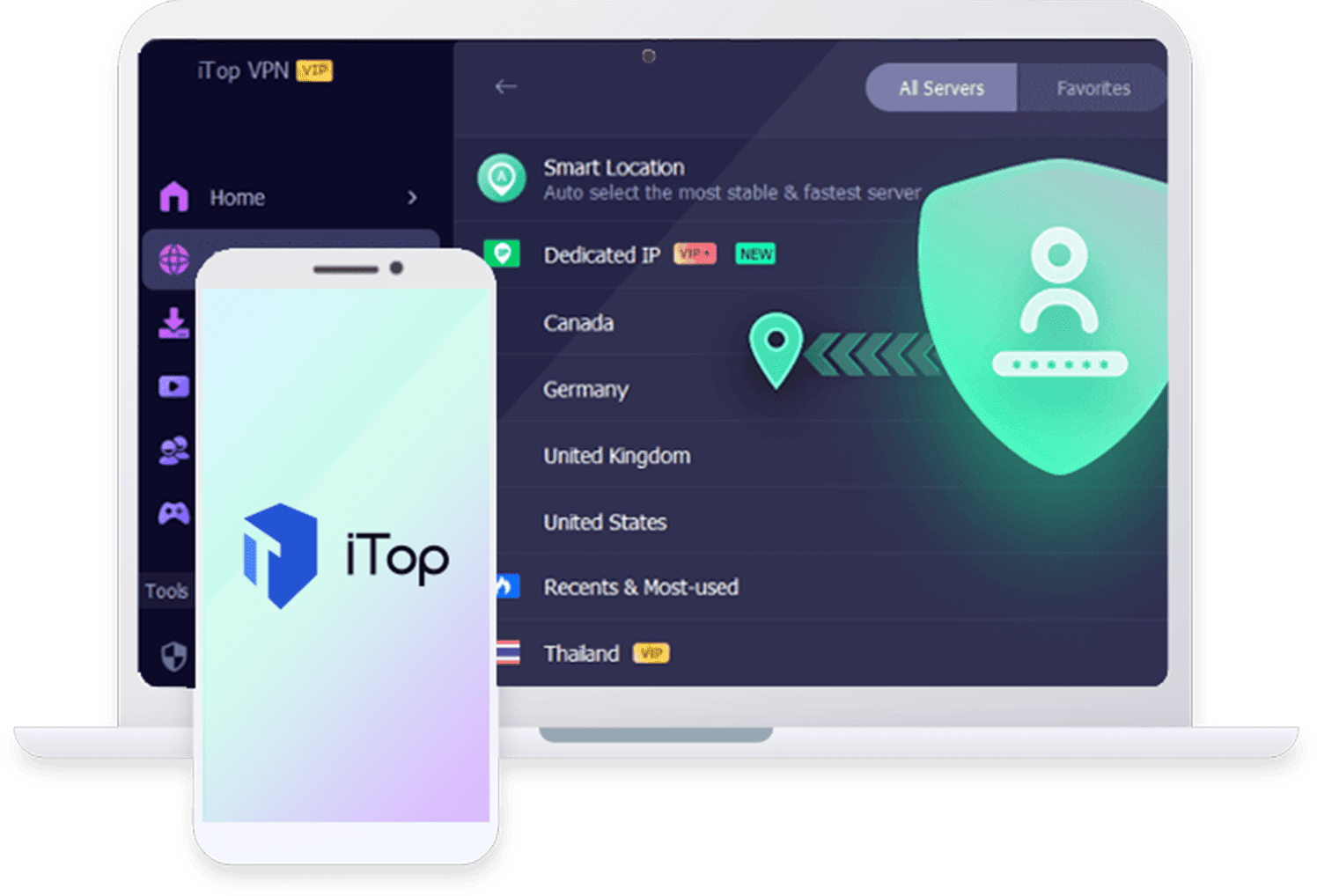
- Streaming-optimized servers: If there’s one thing iTop VPN is good at, it’s unblocking content with its streaming-optimized VPN servers.
What We Don't Like
- Speed: Despite promising better speeds with a premium account, iTop only delivered about 20 percent of our raw network speed.
- Vague encryption and VPN protocol standards: We wouldn’t recommend iTop to advanced VPN users who want full control over their encryption and VPN protocols, as iTop is vague about the standards and protocols it uses.
- Poor app experience: The desktop and smartphone apps are hard to use and laggy. Moreover, if you have a free account, expect to see lots of ads and ad banners.
Bottom Line
VPNs have become essential tools for digital privacy and security. They protect us from online snoopers and give us open access to content from anywhere in the world. To take this a step further, VPNs encrypt our online traffic too. Over the past several years, a few VPNs have emerged as the best at meeting a growing consumer demand. Could iTop become one of them?
If you’ve ever read a guide to VPNs, they’ll all tell you that the best VPNs have a few things in common: They offer fast speeds, use top-notch encryption standards, deliver useful extra features, and have a “no logs” privacy policy. These days, however, a lot of VPNs claim and promise to offer those, so the only way to truly find out if a VPN is top shelf is by testing it. That’s what we did with iTop VPN, and here are our findings.
In this review, we will tackle iTop VPN’s privacy, features, and security, as well as all the extras it delivers. We’ll also take a closer look at the available free option and the user experience with its desktop and smartphone apps. Without further ado, let’s start.
About iTop VPN
iTop is a software company based in Hong Kong that offers more than just VPN services. The company provides various utility tools including a screen recorder, data recovery application, desktop organizer, and password manager. However, the VPN service remains its flagship product and what launched the company into the market.

When talking about a VPN company, location matters a lot. After all, the privacy legislation of the region under which the company operates has a significant effect on the company’s privacy practices.
iTop operates from Hong Kong. While Hong Kong is part of China — a country known for restrictive data privacy laws — it maintains its own data protection ordinance. This legislation, the Personal Data (Privacy) Ordinance, is actually one of Asia’s longest-standing comprehensive data protection laws. It took effect in December 1996.1
However, the Hong Kong national security law passed in June 2020 raised concerns among VPN providers about maintaining servers in the region.2 This law gave Beijing authority to establish security operations in Hong Kong with the aim to address perceived national security threats to both Hong Kong and mainland China. While not as extensive as China’s Great Firewall, the legislation has significant implications for digital privacy and surveillance.
Has the new law affected iTop VPN’s privacy policy?
FYI: After the national security law was enacted, several VPN companies announced the removal of their physical servers from Hong Kong. Others, however, decided to keep their servers there. In our latest NordVPN review, the company still had Hong Kong servers, citing the physical security and encryption of its servers make them safe from both physical and digital breaches.
Is iTop VPN as Trustworthy as the Competition?
Regardless of whether the new laws have affected iTop VPN’s privacy policy, one thing we always look at is whether a VPN’s privacy policy has undergone security audits. As users, we can’t really look into a VPN’s server infrastructure to verify their privacy policies. That’s why some VPNs submit their networks to security audits by well-renowned security firms. Unfortunately, iTop hasn’t gone through such audits, so take what its privacy policy says with a grain of salt. If you’d rather go with a verified and audited VPN, take a look at these top providers:


Is iTop in a Five Eyes, Nine Eyes, or 13 Eyes Country?
iTop VPN operates from Hong Kong, China. China is not part of the Five Eyes, Nine Eyes, or 14 Eyes surveillance alliances. These international intelligence-sharing agreements require member countries to cooperate on surveillance activities and share information about civilians when requested by allied nations.
That said, Hong Kong’s status as part of China — which has a concerning track record on data privacy — remains a factor to consider. If you’re concerned about government surveillance, you may want to consider a provider based in a VPN with a more privacy-friendly jurisdiction. It’s worth noting that using a VPN is completely legal in the United States, regardless of where the provider is headquartered, so iTop’s Hong Kong headquarters won’t cause you legal issues.
iTop’s Privacy Policy
iTop markets itself as a “no-logs” VPN, meaning your online activities while connected to its servers should remain private. According to the company’s policy, it doesn’t store identifying information that could link you to your browsing activity, such as your IP address, DNS queries, or browsing history.
This no-logs commitment is particularly important for two reasons. First, iTop’s privacy policy permits third-party data sharing, meaning any information the company does collect could potentially be shared with service providers or law enforcement. Second, iTop explicitly states it will comply with legal requests including warrants and subpoenas. If the company logged your usage data, that information could be accessed by authorities. The no-logs policy means iTop won’t have any of your data to hand over.
iTop Features
Now that we’ve established that iTop is safe to use, let’s talk about its features. We tested the VPN extensively, spending time using its apps for everyday browsing while connected to its network. We also evaluated both the free and premium versions to understand their differences.
iTop Free vs. iTop Premium
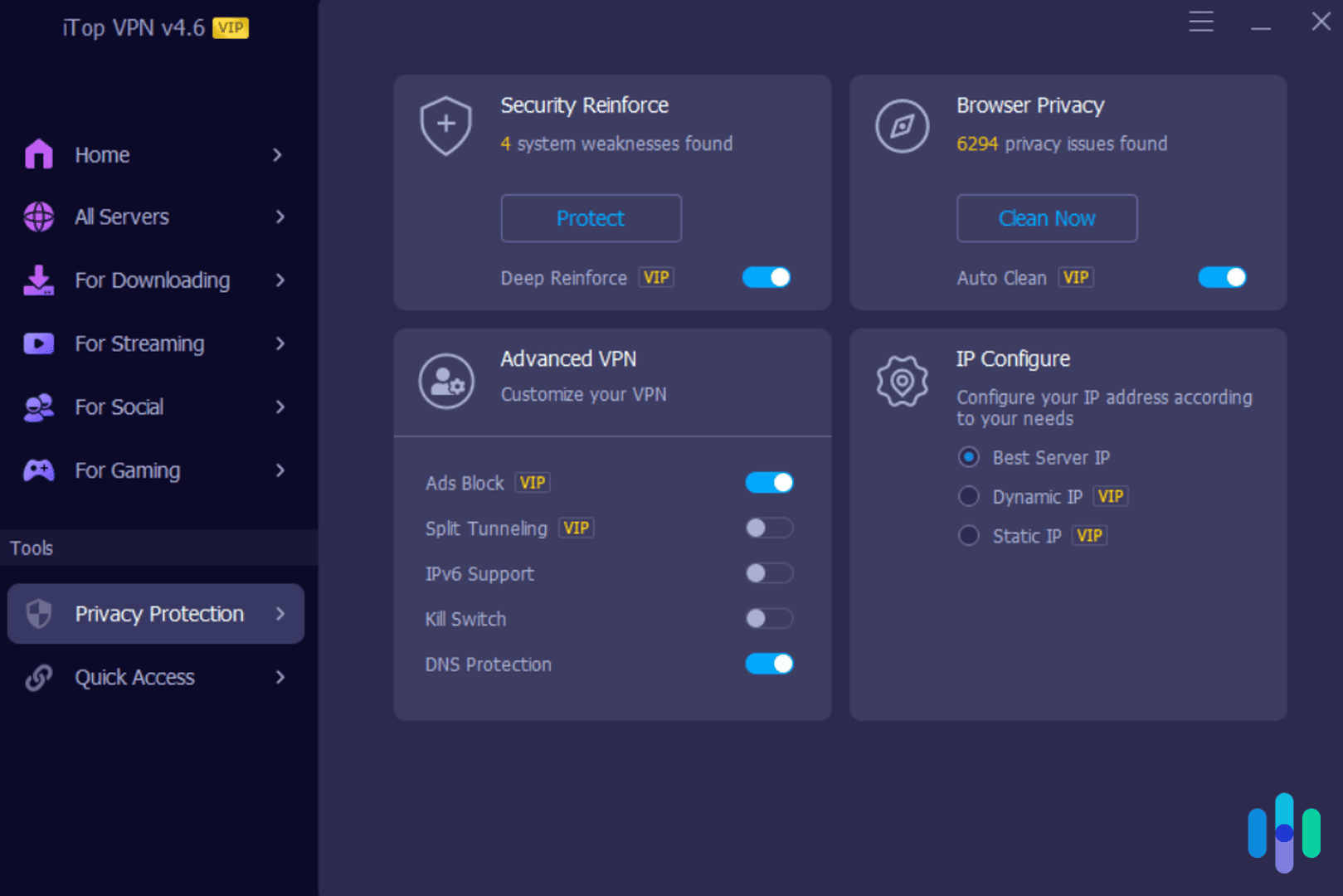
The free and premium versions use the same apps, but some features are locked for the free version. Advanced features like split tunneling are inaccessible, and so are the options to use either a dynamic or static IP address.
The most significant differences between the two versions are the number of servers available and the speed of VPN connections. The free version provides access to only a handful of server locations compared to the 3,200+ servers in over 100 locations available to premium users. Moreover, these limited servers provide slower speeds, partly because users with free accounts concentrate on these servers, creating traffic congestion.
Another thing to note is that there’s a 700 MB daily data usage limit for free users. That’s enough for basic browsing, but not for streaming or downloading large files, which means only the premium version is suitable if you’re looking for a VPN for watching Netflix.
Pro Tip: Want a better streaming experience on not just Netflix but other streaming platforms as well? Check out the best VPNs for streaming, which offer the fastest speeds and least amount of buffering.
Here’s a quick comparison between the free and premium versions of iTop VPN.
| iTop VPN Free | iTop VPN Premium |
|---|---|
| Limited servers and locations | 3,200+ servers in 100+ locations |
| Limited speed | Unlimited speed |
| Offers kill switch | Offers kill switch |
| No split tunneling | Offers split tunneling |
| Automatic IP address selection | Choose between static or dynamic IP |
| Manual browser tracker remover | Auto browser tracker remover |
| No ad blocker | Ad blocker |
| Free | Starting at $1.66 per month |
iTop VPN Network Kill Switch
Both the premium and the free versions offer a kill switch, which is a built-in backup measure that stops all internet communications in case the VPN disconnects unexpectedly.
We like having a kill switch feature because no VPN is 100 percent reliable all the time. Even the best VPNs slip up. At least with a kill switch, we wouldn’t inadvertently use an unsecure connection if the VPN cuts out in the middle of our browsing session.
We commend iTop for including a kill switch in both free and premium accounts.
iTop Split Tunneling
Unlike the kill switch, which is necessary for your security, split tunneling is more of a miscellaneous feature that can improve your overall user experience. We use it to multitask whenever we have to use services that require a connection but don’t want the other apps we are running to use the VPN.
Split tunneling creates two tunnels – one for the VPN and another for your unencrypted network – and then lets you choose which tunnel to route traffic from which apps. For example, if you’re streaming music while researching, you may want to use the unencrypted tunnel to access local top hits from Spotify and use the VPN tunnel for your Chrome browser to keep your browsing private.
Split tunneling is exclusive to premium accounts.
iTop VPN for Streaming and Gaming
Perhaps iTop VPN’s greatest ability is to unblock websites and services, a feature almost every other VPN can do. What sets iTop VPN apart is that it has servers optimized for streaming and gaming. These servers are built with additional security to be able to bypass geographic restrictions, plus they offer great speeds.
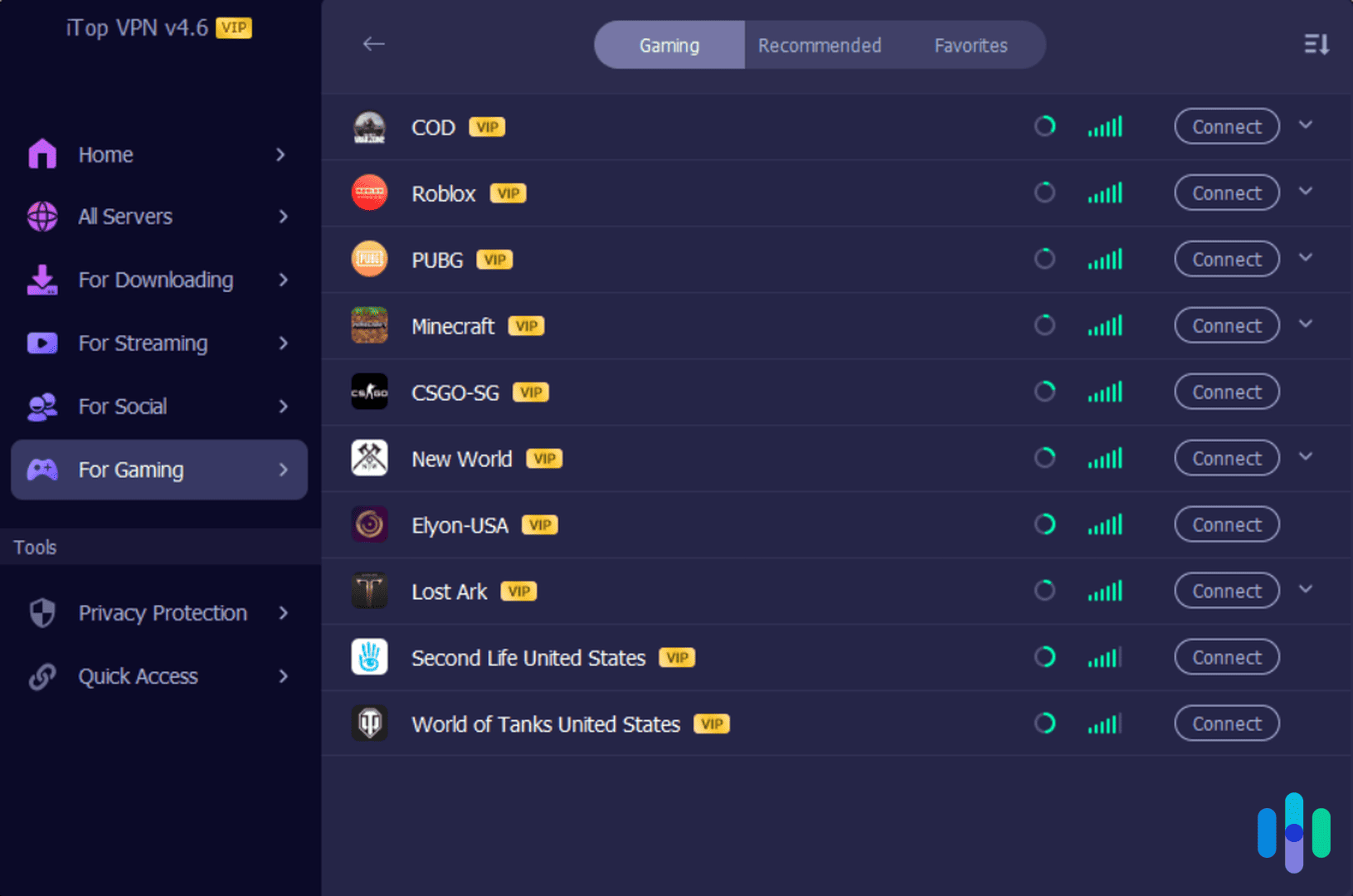
That being said, the majority of streaming- and gaming-optimized servers are in the United States and United Kingdom. So, if you’re living in the U.S. and looking to stream Netflix Australia content, for instance, none of the optimized servers will work for you. You’re better off connecting to a regular server in Australia. If you’re traveling abroad, however, the optimized servers may come in handy.
As mentioned earlier, free accounts get access to six optimized servers, whereas premium users have dozens to choose from.
Encryption and VPN Protocols
iTop VPN doesn’t provide much customizations or even information about encryption and VPN protocols. Those two are important; VPNs use encryption to keep your browsing data private, while they use VPN protocols to create the secure tunnel through which all your VPN traffic will pass.
iTop VPN keeps information about its encryption and VPN protocols somewhat vague. For instance, rather than specify which encryption standard it uses, it simply mentions that it utilizes “military-grade” encryption. However, in our test it successfully evaded IP address detection when we performed DNS and WebRTC leak tests. That confirms it offers solid security and privacy protection.
iTop VPN Speed: Free vs. Premium
Beyond the server selection, a key difference between iTop VPN’s free and premium tiers is speed. According to promotional materials within the app, free servers deliver roughly one-third the maximum speed of premium servers. We decided to test this claim.
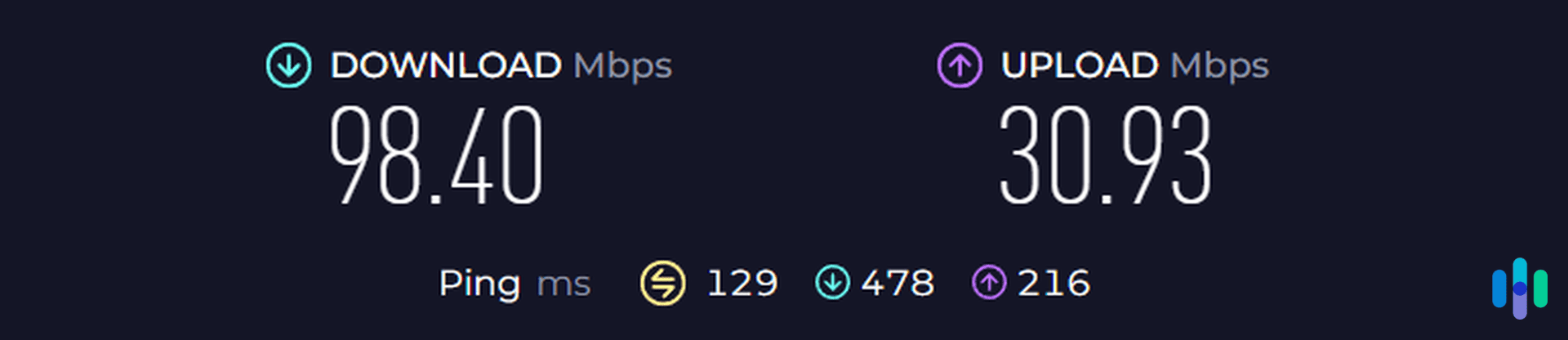
We tested our internet speed while connected to a free Australia server. The results are shown above. Speeds appeared reasonable at first glance, but context matters — we were testing on a 500 Mbps fiber-optic connection. Below are the baseline speeds we recorded without the VPN just moments earlier.
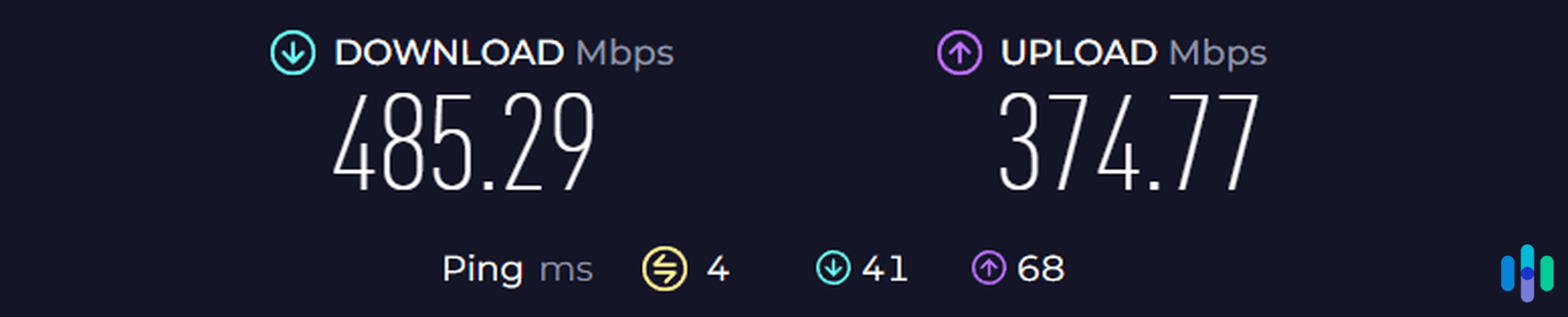
We lost approximately 80 percent of our download speed and over 90 percent of our upload speed. By our standards, that’s a significant performance hit, though not entirely unexpected from a free VPN. Aside from the best free VPNs, it’s typical to experience substantial speed reductions with free services. The real question was whether upgrading to premium would deliver the promised improvements.
We purchased a monthly subscription and reconnected to an Australia server — this time one labeled VIP (reserved for premium users). As shown below, only upload speeds improved meaningfully. Download speeds remained under 100 Mbps, falling far short of the advertised three-times speed boost.
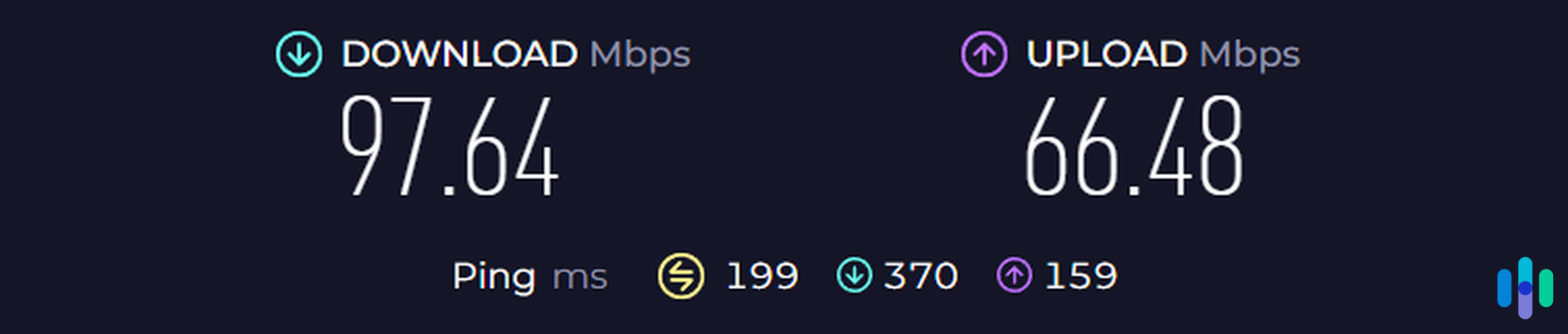
To confirm our findings, we tested multiple additional servers. The pattern held consistent — speeds remained capped below 100 Mbps across the board.
Is Paying for a VPN Worth It?
With numerous free VPNs available, you might question whether paying for VPN service makes sense. The reality is that free VPNs typically impose significant limitations.
The better free options provide comparable security to paid services but drastically restrict usage. Many cap you at 500 MB to 10 GB of data monthly — often barely enough for a few hours of regular browsing. Even worse, the weaker ones offer minimal protection, relying on outdated encryption that leaves you vulnerable.
So is paying for a VPN like iTop worthwhile? If your needs are minimal — say, uploading a document or two each month — a free VPN could suffice. However, most users want to stream Hulu with their VPN or protect their anonymity online. For those purposes, a paid VPN is essential.
>> Another Free VPN: VPN Gate Review
Our Final Thoughts on iTop VPN
While it was certainly a good VPN to try out, iTop VPN didn’t really deliver top-caliber performance. The speed was suboptimal, the security and privacy measures were vague, and frankly the desktop and smartphone software seemed half-baked.
There were a number of things we liked about iTop VPN, such as the servers optimized for streaming and gaming and the ad blocker feature, but there are VPNs that deliver those alongside high speeds, clear encryption and VPN protocol standards, and good software. One that comes to mind is Surfshark. You can read about it in our Surfshark review.
Overall, iTop is safe to use, but as far as its performance goes, we wouldn’t consider anywhere near the best VPNs in 2026.
iTop VPN FAQ
Learn more about iTop VPN in this section of frequently asked questions.
-
Is iTop VPN controlled by China?
We found no evidence that iTop VPN is under China’s control, but since it’s headquartered in Hong Kong, there’s a possibility that its networks could be monitored by China. That being said, iTop promises not to log users’ browsing information.
-
Does iTop VPN have a refund policy?
All iTop VPN subscriptions are covered by a 30-day money-back guarantee, but you’ll have to contact support to cancel your subscription and request a refund.
-
Does iTop VPN have smartphone apps?
iTop VPN offers smartphone apps for iPhones and Android devices. The iPhone app works similarly to the desktop app, though the Android app felt less polished during our tests.
-
Does iTop VPN support P2P file sharing and torrenting?
Yes, iTop VPN supports P2P file sharing and torrenting, but only on five of its servers. And since there are only five servers, expect even slower download speeds, as the servers can get crowded at certain hours of the day.
-
Is iTop VPN safe to use?
As far as our tests go, iTop VPN is safe to use. It’s a legitimate VPN with a “no logs” policy and added security features like an ad blocker.
-
Office of the Privacy Commissioner for Personal Data, Hong Kong. (2026). The Personal Data (Privacy) Ordinance.
pcpd.org.hk/english/data_privacy_law/ordinance_at_a_Glance/ordinance.html -
BBC. (2022, Jun 28). Hong Kong national security law: What is it and is it worrying?
bbc.com/news/world-asia-china-52765838