
Speedify VPN Review 2026: Can It Speed Up Your Internet?
With channel bonding technology, Speedify VPN promises to improve your internet connection while delivering conventional VPN security features.
 &
&
 Last Updated on Feb 24, 2026

What We Like
- Highest level of encryption: Speedify uses industry-standard 256-bit AES encryption to protect your incoming and outgoing data packets.
- Free version: The free plan provides up to 2 GB of data monthly and includes access to Speedify's network optimization features.
- Channel bonding: Speedify's channel bonding technology combines two or more internet connections to boost your VPN connection's speed and reliability.
What We Don't Like
- Pricey: At $14.99 per month for the monthly plan, Speedify costs more than many top-rated VPNs on the market.
- No kill switch on free plan: The free version lacks a kill switch feature, despite this being essential VPN security functionality.
- Small server network: With servers in only 50+ countries, Speedify's network is smaller than some competitors.
Bottom Line
the security.brief
Speedify VPN uses channel bonding for improved internet speed but lacks a kill switch on its free plan. It's pricier at $14.99/month and has a small server network.
Faster internet speeds aren’t typically what people expect from VPNs. In most cases, unless your ISP is throttling your connection, using a VPN actually slows down your internet. That’s because they use a VPN protocol to encrypt your data, route it through remote servers, and sometimes send it through multiple intermediary servers before it reaches your destination.
However, Speedify VPN claims to do the opposite — it promises to enhance your internet speed and reliability when connected to its virtual private network. Naturally, this raises some questions. Will it actually speed up your baseline internet connection? Or is it simply faster than other VPNs in direct comparisons?
In this review, we’re examining Speedify VPN to determine if its speed claims hold up and whether it’s a secure, reliable VPN option. We’ll analyze its features, pricing, and subscription plans — including both free and premium options — to see how they stack up against the competition.
What Exactly Is Speedify VPN?
First and foremost, Speedify is a virtual private network that offers conventional VPN features and functionalities. It encrypts data packets to keep your browsing activity private, and it hides your traffic by creating a private tunnel just between you and the internet. By doing so, it also hides your real IP address from websites and apps you use as well as from your internet provider and others that might be tracking you.
Pro Tip: Serious about hiding your browsing activity? Check out our complete guide to private browsers. And we’re not talking about incognito mode here. Chrome Incognito mode is not the same as a VPN and it doesn’t give you much privacy.
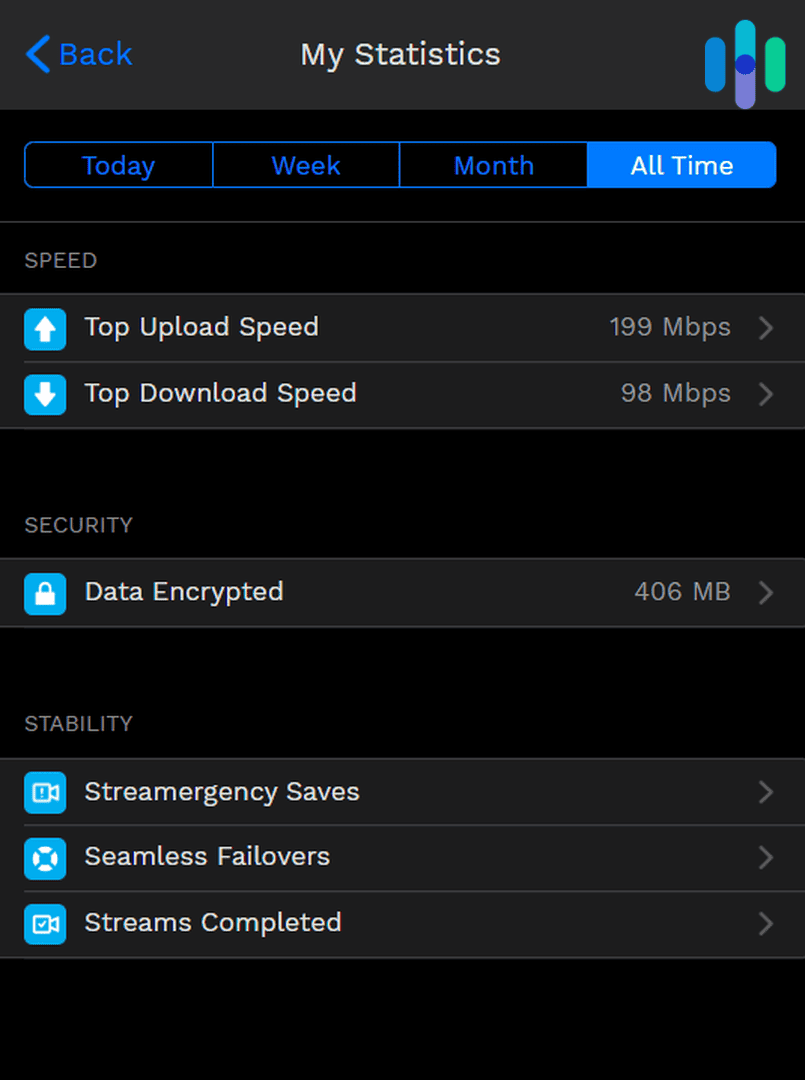
Secondarily, though, Speedify VPN is a piece of software that aims to improve your internet connection’s speed and reliability. For one, it offers channel bonding, which lets you use two internet connections (e.g., Wi-Fi and cellular data) simultaneously to improve your bandwidth, potentially resulting in better speeds. It also uses channel bonding to improve stability. If one internet connection drops, like if you step outside your Wi-Fi range, for instance, it seamlessly switches over to an active connection without dropping whatever you’re doing online at the time.
Speedify VPN has to be one of the most interesting VPN concepts we’ve seen, so we got a subscription to see if it performs as well as it claims. Does it?
Conventional VPN Features
Before we dive into Speedify's unique capabilities, let's briefly examine what a standard VPN typically offers and what you can expect to pay. Most VPNs cost between $4 and $8 per month when you opt for an annual subscription. They include encryption and tunneling, but they also come with VPN features like a kill switch and multihop. Some of the best options can also protect you from digital threats like intrusive ads and malicious websites. If you want to see what a good conventional VPN looks like before checking out Speedify, here are our three favorite VPN picks:


Testing Speedify VPN’s Features
Being a VPN primarily, we tested Speedify’s VPN features first, namely, whether it has a kill switch and split tunneling, what encryption standards it uses, and how it routes traffic through its encrypted tunnels, also known as its VPN protocol.
Does Speedify Have a Kill Switch?
A kill switch, in VPN terms, is a fail-safe feature that kills your internet connection if the VPN connection drops unexpectedly. This prevents your device from sending anything over the internet without protection from a VPN. Not sure if you need a kill switch or not? Check out our guide to VPN kill switches and why you need one. It even made our list of the top three stealth-mode VPN features.
Speedify does have a kill switch, but it’s turned off by default. Moreover, it is reserved for premium users only. So, if you plan on using the free version, you will not have access to this feature.
Pro Tip: The VPN kill switch is a critical feature that every VPN user should use. If you’re looking for a free VPN with a kill switch, check out our list of the best free VPNs.
Does Speedify Offer Split Tunneling?
Usually, split tunneling lets you select apps or websites that can bypass the VPN tunnel. That means even if you’re connected to a VPN, traffic from selected apps and sites will not go through encryption and private network tunneling. Split tunneling is useful for apps that block VPN traffic, such as banking apps and some streaming services. We know that if you try to understand VPN split tunneling and how it works from a technical standpoint, things can get a bit confusing. But using the feature is simple.
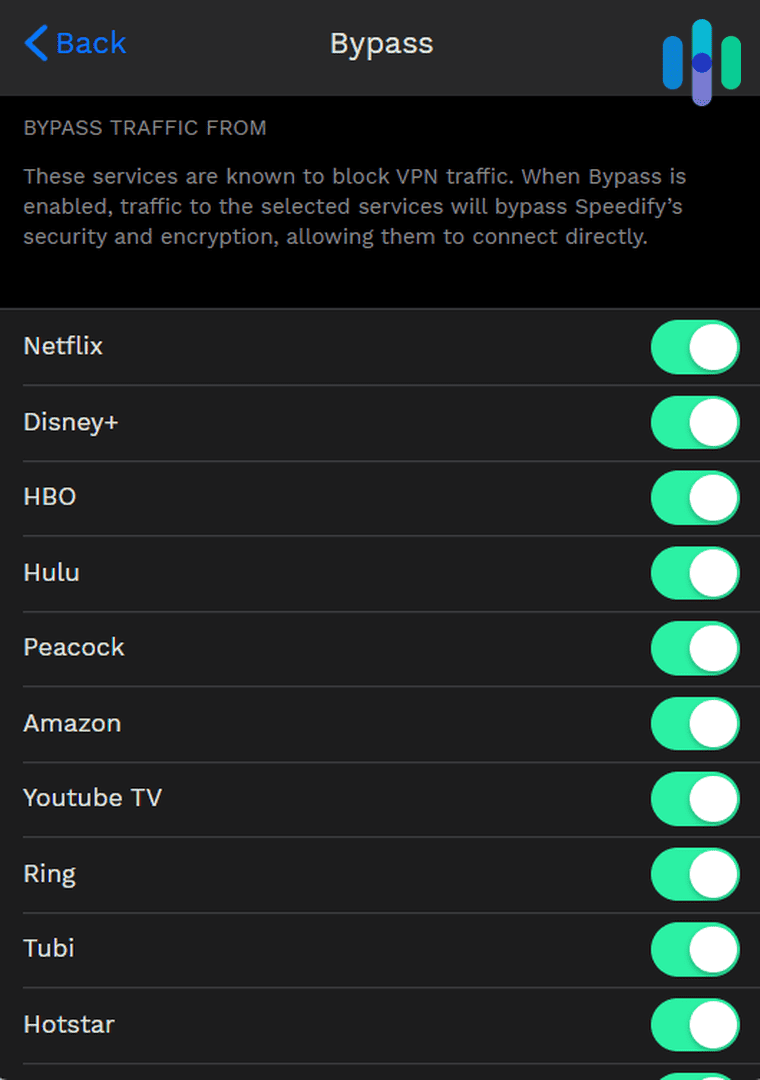
On desktop, Speedify has a list of apps that block VPN traffic. You can use the toggle next to them to set whether they bypass or use the VPN tunnel. On Android and iOS, in addition to the list of preselected apps, you can create a custom bypass list from the apps installed on your phone.
What Encryption Standards Does Speedify Use?
The privacy that VPNs provide come from their encryption. They encrypt your data packets, so that even if they fall into the wrong hands, what they contain will always remain hidden behind the encryption.
Speedify uses the highest encryption standard available to VPNs today: 256-bit AES. It’s the same encryption standard the U.S. government uses to secure classified documents.1 and what all of the best VPNs use.
What VPN Protocols Does Speedify Offer?
OpenVPN, WireGuard, and IKEv2 are some of the most common VPN protocols available from commercial VPNs, but Speedify doesn’t use any of those. Instead, it uses a custom proprietary protocol.
The reason that it uses a custom-built protocol is that Speedify needs it for its network acceleration features, which we will discuss below. However, according to Speedify, its VPN protocol is also just as secure as WireGuard, one of the most trusted protocols.
Speedify’s Network Acceleration Features
As you’ve seen, Speedify offers customary VPN features, making it a secure and reliable VPN option overall. On top of those features, though, Speedify promises to improve your internet connection using its unique network acceleration technology.
Channel Bonding
Using its proprietary VPN protocol, Speedify allows one device to use up to two different internet connections. This can be Wi-Fi and cellular data for smartphones, broadband and Wi-Fi, or even Ethernet and Wi-Fi. By doing so, Speedify increases your device’s bandwidth, which can result in faster speeds if you’re doing bandwidth-heavy tasks like streaming or downloading.
To help you picture how it works, imagine the queue at your local coffee shop. If there’s only one barista taking orders, the line will move much slower than if there are two. In the same manner, bonding two internet connections allows your device to process and transmit more data packets at the same time.
Speedify’s channel bonding has two modes. Speed mode offers maximum speed output by distributing your online traffic among all available networks. Redundancy mode, on the other hand, sends your online traffic through all available networks; whichever responds the fastest will be utilized. The other network will remain on standby as backup.
Does Channel Bonding Work?
We tested the Speed mode to see if it really makes a difference, and while it didn’t make our internet faster, we saw better speeds from Speedify when we used both Wi-Fi and cellular data than when we used just Wi-Fi.
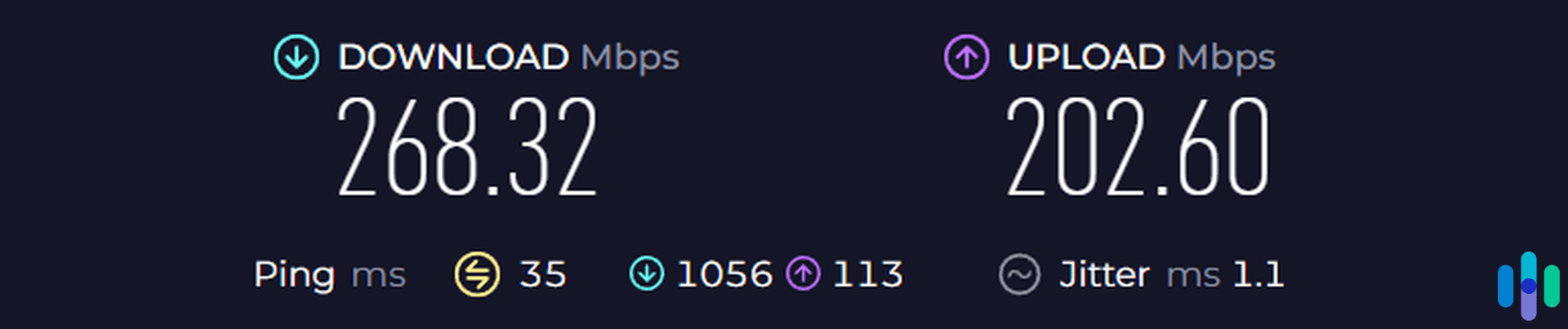
We used the Speedtest by Ookla app on Android.2 With both Wi-Fi and 4G cellular data, we notched a download speed of 268 Mbps. With just Wi-Fi, the speed went down to 259 Mbps. That’s not a big difference, and this change could have been affected by other network factors, but if you notice your internet speed goes down drastically whenever you connect to a VPN, Speedify is worth a shot.
Tip: Another VPN worth trying if you want better speeds is Hotspot Shield. In our VPN speed test, Hotspot Shield recorded the lowest download speed loss among the 12 we tested. Learn more from our Hotspot Shield review.
TCP Multiple Through the Speedify Protocol
If you don’t have access to multiple internet connections, Speedify has another way to improve your VPN experience using the Speedify protocol. In the Settings page of the app under Transport Mode, you’ll see a setting called TCP Multiple.
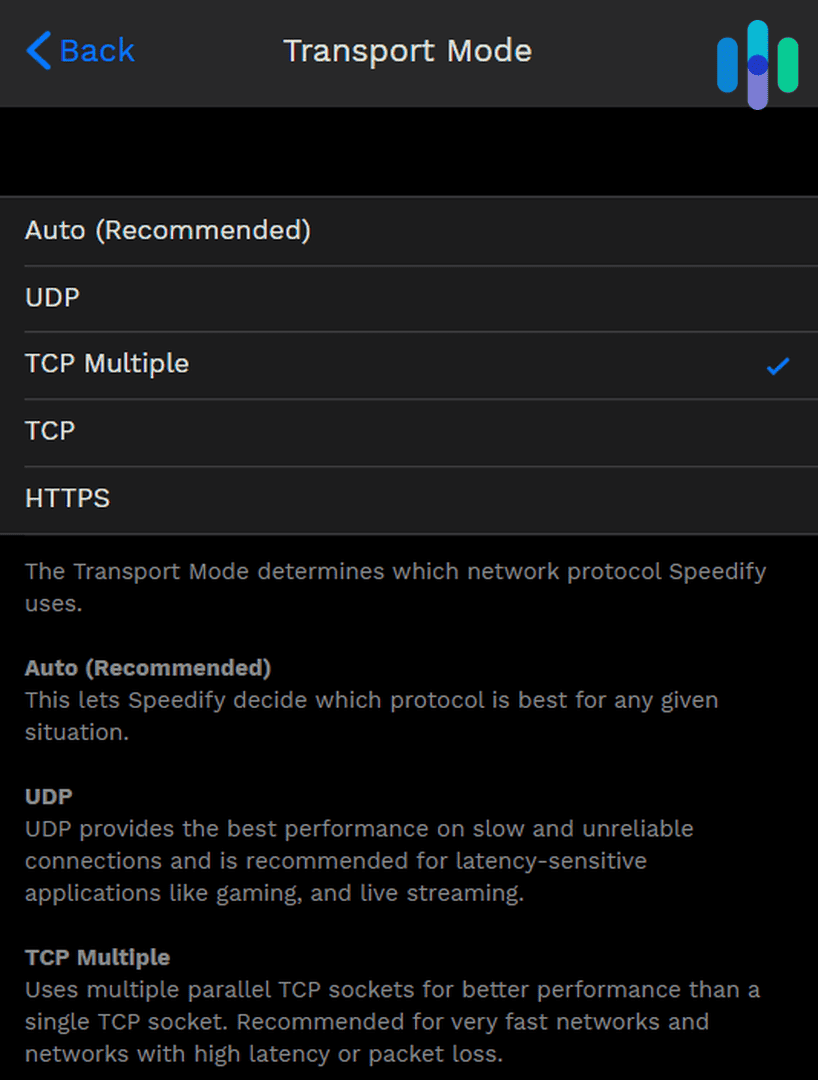
In TCP Multiple mode, Speedify opens multiple network sockets through which your traffic can pass. If you’re experiencing high packet data loss, which can result in video buffering, the multiple open sockets will send and receive data redundantly to ensure reliable data transfer. If you’re experiencing high latency, which can result in lagging when playing online games, they will send and receive data in parallel to deliver data packets faster to your device. Speedify decides the best course of action, depending on your network.
As our network is pretty reliable (with low latency and low packet loss), we weren’t able to test TCP Multiple. But in theory, TCP Multiple can potentially deliver a good VPN experience for gaming and streaming. For recommendations of VPNs that we were able to test, though, head over to our pages on the best VPNs for gamers and the best VPNs for streaming.
How Much Does Speedify Cost?
It’s clear that Speedify isn’t your average VPN. It offers the traditional security features of a VPN, plus a lot of speed-focused features designed for heavy users like gamers and streaming fans. Unfortunately, those extra features make Speedify pricier than some alternatives.
A single subscription, which can cover up to five devices and offers unlimited data, costs $14.99 per month. You can offset the monthly cost of Speedify by paying yearly, in which case you’d pay $89.99 or about $7.50 per month. To bring that cost down even more, you can pay for the 3-year plan at $179.99, which comes out to about $5.00 per month. Each of those plans costs notably more than a NordVPN subscription, the VPN we recommend most for privacy- and security-focused VPN users.
Also, keep in mind the device limit. A single subscription covers only five devices. If you have more than five, you might want to consider alternatives like Surfshark, which protects unlimited devices. For another point of comparison, NordVPN covers up to 10 devices.
If your heart is set on Speedify, however, you can use it on more than five devices by getting a family plan. A family plan covers up to five users, each with a five-device limit. That’s a total maximum of 25 devices. A family plan costs $22.50 per month, or if you pay yearly, $135 ($11.25 monthly).
FYI: Speedify offers a Teams plan to buy a single plan for multiple users. But, the plan doesn’t cost any less than buying a single subscription through their plans for individuals. So, we couldn’t see much benefit for this option unless you run a business and want a dedicated server. That dedicated server will cost you a pretty penny though at $120 per month or $75 per month if you pay for a year upfront
| Speedify subscriptions | Individual | Family |
|---|---|---|
| Monthly plan | $14.99 | $22.50 |
| Yearly plan | $89.99 ($7.49 monthly average) | $135 ($11.25 monthly average) |
Another good thing about Speedify is that you can use it for free, but with limited features and limited data. The free version offers up to 2 GB of data per month, and it lacks features like the kill switch and custom DNS. It’s good for some light browsing, but considering that Speedify’s spotlight features are speed-focused, you’re better off with a paid plan to fully enjoy them.
>> Another Option: iTop VPN Review
Final Thoughts: Do We Recommend Speedify VPN?
Based on our testing, Speedify VPN is, at best, an average VPN made exponentially better by its network accelerating features. After all, it comes from a company that specializes in software for network and speed improvement.
As a VPN, it only provides basic privacy features, but it covers everything we consider necessary. It also delivers on its promise of a better VPN experience in terms of speed and reliability. While it won’t make your internet connection faster and more dependable on its own, it performs better than many competing VPNs when tested under real-world conditions.
The biggest drawback is the cost. Speedify is on the pricier side of VPNs. Especially since we’ve tested plenty of less expensive options that are just as reliable and provide adequate speeds. So, are you willing to pay the higher cost for premium network optimization features? If you answer yes, then Speedify may be for you. If not, check out the fastest (but less expensive) VPNs of 2026.
Speedify FAQs
Let’s answer some frequently asked questions about Speedify to cap off this review.
-
Where is Speedify located?
Speedify comes from the same company that made Connectify, a piece of software that can turn computers into a mobile hotspot or Wi-Fi extender. The company, Connectify, Inc., is based in Philadelphia, Pennsylvania.
-
How many locations and servers does Speedify offer?
Speedify offers hundreds of servers spread across over 50 countries. Just to name a few, it has servers in the United States, United Kingdom, Australia, Singapore, New Zealand, Switzerland, and Canada.
-
Does Speedify work on all device operating systems?
Speedify has native apps for Windows, macOS, iOS, and Android. It also works on Linux.
-
Can Speedify access Netflix and other streaming platforms?
Speedify isn’t particularly great with Netflix and streaming platforms. In fact, streaming platforms are set to bypass Speedify by default. As we’ve seen, however, some servers can access streaming services without being detected.
-
Does Speedify have a “no-logs” policy?
Yes, Speedify’s no-logs policy indicates that it does not collect or log IP addresses, website information, or any type of identifiable usage data from its users.
-
Cybersecurity and Infrastructure Security Agency. (2024). Transition to Advanced Encryption Standard (AES). https://www.cisa.gov/sites/default/files/2024-05/23_0918_fpic_AES-Transition-WhitePaper_Final_508C_24_0513.pdf
-
Google Play. (2023). Speedtest by Ookla.
play.google.com/store/apps/details?id=org.zwanoo.android.speedtest&hl=en&gl=US